Station 7 · Lesson 1
Scalp maps (topoplot)
eeglab_data.set (D1) · Already applied: High-pass & low-pass filtering, Removing line noise (50/60 Hz), Bad channels, Channel interpolation, Re-referencing, Running ICA, 1-Hz filtering for ICA & copying weights, ICLabel & removing components, Extracting epochs, Baseline correction, Rejecting bad epochsDownload the data (opens in a new tab)Script to reach this state
% Shortcut: if you saved D1_epochs_clean.set in the epoch rejection lesson, keep
% the first line and the last two lines (pop_newset, eeglab redraw), and replace
% every line between them with:
% EEG = pop_loadset('D1_epochs_clean.set', pwd);
[ALLEEG, EEG, CURRENTSET, ALLCOM] = eeglab;
eeglabRoot = fileparts(which('eeglab'));
EEG = pop_loadset('eeglab_data.set', fullfile(eeglabRoot, 'sample_data'));
fullLocs = EEG.chanlocs;

% Main dataset: high-pass at 0.1 Hz, then 60 Hz line-noise removal
EEG = pop_eegfiltnew(EEG, 'locutoff', 0.1);
EEG = pop_eegfiltnew(EEG, 'locutoff', 58, 'hicutoff', 62, 'revfilt', 1);

% Bad channels you removed earlier, e.g. {'T7'}; leave empty if none
badChans = {};
if ~isempty(badChans)
    EEG = pop_select(EEG, 'rmchannel', badChans);
    EEG = pop_interp(EEG, fullLocs, 'spherical');
end

% Average reference, EOG channels excluded
eogIdx = find(ismember({EEG.chanlocs.labels}, {'EOG1', 'EOG2'}));
EEG = pop_reref(EEG, [], 'exclude', eogIdx);

% ICA on a 1-Hz copy, then copy the weights back
EEG_ica = pop_eegfiltnew(EEG, 'locutoff', 1);
EEG_ica = pop_runica(EEG_ica, 'icatype', 'runica', 'extended', 1);
EEG.icaweights  = EEG_ica.icaweights;
EEG.icasphere   = EEG_ica.icasphere;
EEG.icachansind = EEG_ica.icachansind;
EEG.icawinv     = [];
EEG.icaact      = [];
EEG = eeg_checkset(EEG);

% Remove eye and muscle components, then low-pass at 30 Hz
EEG = pop_iclabel(EEG, 'default');
EEG = pop_icflag(EEG, [NaN NaN; 0.9 1; 0.9 1; NaN NaN; NaN NaN; NaN NaN; NaN NaN]);
artifactComps = find(EEG.reject.gcompreject);
if ~isempty(artifactComps)
    EEG = pop_subcomp(EEG, artifactComps, 0);
end
EEG = pop_eegfiltnew(EEG, 'hicutoff', 30);

% Epochs around 'square', baseline, and +/-100 uV rejection
EEG = pop_epoch(EEG, {'square'}, [-1 2], 'newname', 'D1 epochs', 'epochinfo', 'yes');
EEG = pop_rmbase(EEG, [-200 0]);
EEG = pop_eegthresh(EEG, 1, 1:EEG.nbchan, -100, 100, EEG.xmin, EEG.xmax, 0, 0);
badEpochs = find(EEG.reject.rejthresh);
if ~isempty(badEpochs)
    EEG = pop_rejepoch(EEG, EEG.reject.rejthresh, 0);
end
EEG.setname = 'D1 epochs clean';
EEG = eeg_checkset(EEG);
EEG = pop_saveset(EEG, 'filename', 'D1_epochs_clean.set', 'filepath', pwd);
EEG.filename = ''; EEG.filepath = ''; EEG.datfile = ''; EEG.saved = 'no';
[ALLEEG, EEG, CURRENTSET] = pop_newset(ALLEEG, EEG, 0, 'setname', 'D1 epochs clean', 'gui', 'off');
eeglab redraw;
Your browser's back button takes you to the exact place you were, so open anything you like.
The idea in brief
An ERPThe brain's average response to a given event across many trials. waveform answers “when”: at what time the signalValues that change over time, such as the voltage recorded on a channel. rises or falls. A scalp mapA top-down picture showing how a value is spread over the head. answers “where”: how the voltage is spread over the scalp at one moment.
Before and after
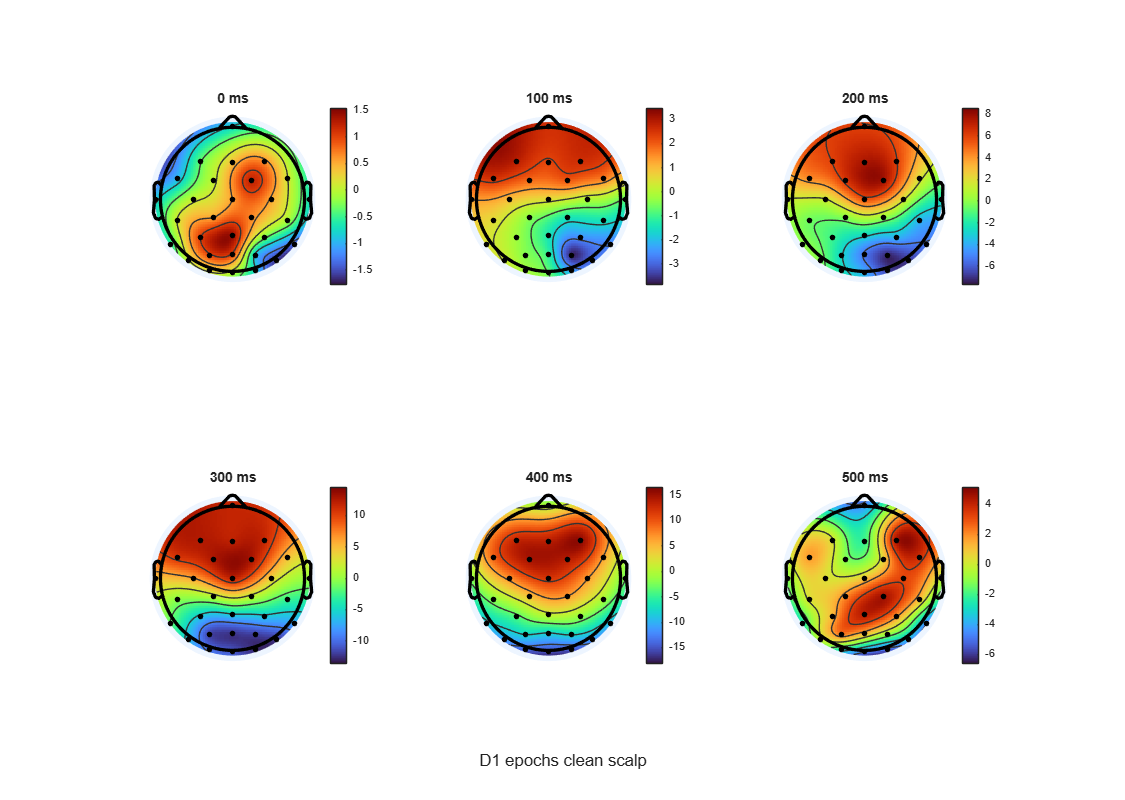
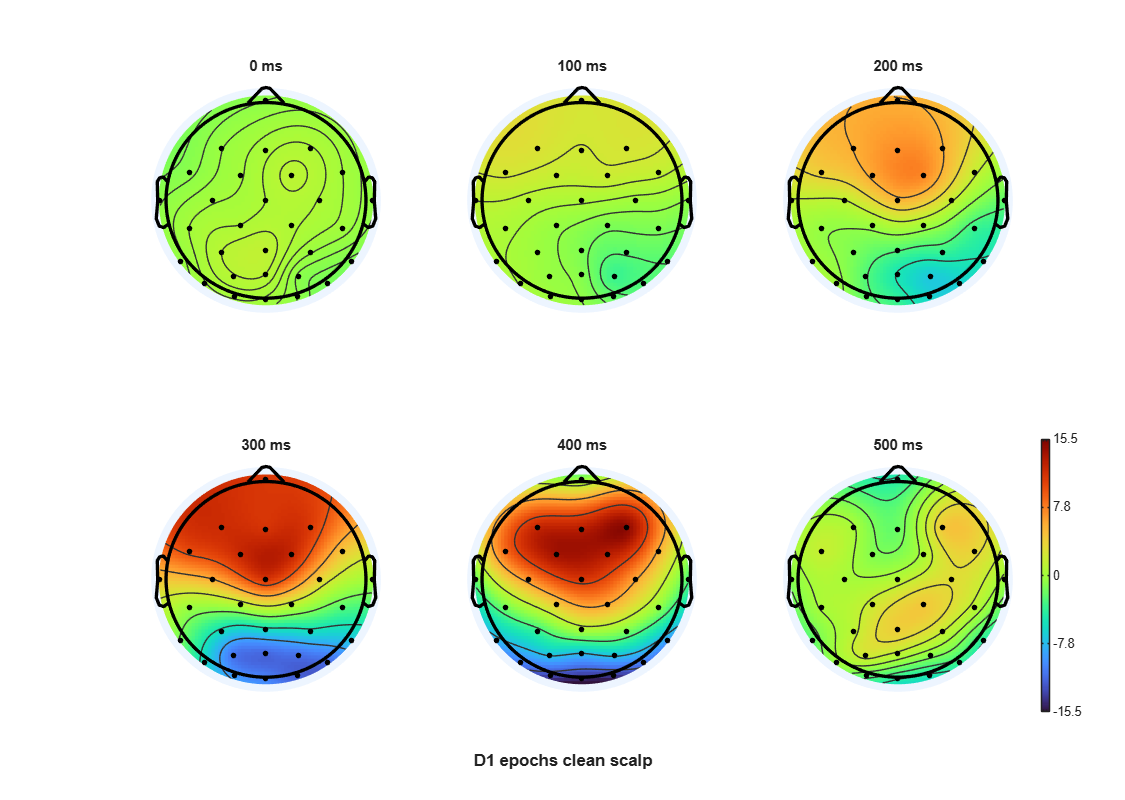
Drag the line to compare.
Your next questions, each answered in its own section:
Why do I need this step?
The reasons in detail, and the terms you need
Each ERP componentA specific wave in the ERP with a typical timing and meaning, such as P3 or N400. has a roughly known distribution. So a map helps you tell apart two components that occur at the same time, and spot a bad channelA channel that is flat or noisy for most of the recording. that shows up as a lone, odd-looking spot.
Maps are also easy to misread: a different color scale on two maps can create a difference that does not exist. This lesson teaches plotting and reading together.
Why do I need this step?
Each ERP component has a roughly known distribution. So a map helps you tell apart two components that occur at the same time, and spot a bad channel that shows up as a lone, odd-looking spot.
Maps are also easy to misread: a different color scale on two maps can create a difference that does not exist. This lesson teaches plotting and reading together.
How do I do it in EEGLAB?
15 steps in the menus
Start with the datasetOne EEG data file loaded in EEGLAB together with its information. D1 epochs clean open, as in “Starting point”. It has 32 channels with locations, epoched around the square eventA marker in the recording that flags a moment of interest, such as a stimulus..
0. Keep the scalp channels only
EOG1 and EOG2 were left out of the average referenceA reference equal to the mean of all scalp channels. in the rereferencing lesson, so they are still on the original referenceThe point against which each channel's voltage is measured.. They also have locations in D1, so EEGLAB would draw them on the map and could take its color limits from them. Make a copy without them first.
- Open Edit then Select data.
- In the Channel(s) row, type
EOG1 EOG2, and tick the box in the on->remove these column of that row. Press Ok. - In the window that follows, name the new dataset
D1 epochs clean scalpand do not save it to disk. It has 30 channels, and all of them use the average reference.
Use this dataset for every map in this lesson.
1. The waveforms and their maps together
- Open Plot then Channel ERPs then With scalp maps.
- In Plotting time range (ms): type
-200 800. - Leave Scalp map latencies (ms, NaN -> max-RMS) at
NaN. EEGLAB then picks the time at which the ERP is strongest across channels. - Leave Window size at latencies in ms at
0. Press Ok. - The waveforms of all 30 channels appear on top of each other, with a map above them at the chosen time and a line linking it to the time axis. Click any point on the waveforms to draw the map at that time.
- Repeat the steps, this time typing
100 200 400in the latency box to see three maps above the waveforms.
2. A map series on one scale
- Open Plot then ERP map series then In 2-D.
- In Plotting ERP scalp maps at these latencies type
0:100:500. The box accepts any MATLAB expression, so this means 0, 100, 200, 300, 400 and 500 ms. - In Plot title keep the dataset name.
- In Plot geometry (rows,col.); [] -> near square type
[2 3]. - Leave the extra options box at
'electrodes', 'on'so the electrodeThe physical sensor placed on the scalp to pick up the signal. dots are shown. Press Ok. - Six maps appear on one color scale with one color bar. Click any map to enlarge it in its own window.
3. Read the map
| What you see | What it means |
|---|---|
| The small triangle at the top | The nose. The map is seen from above the head, with the ears at the sides. |
| The left side of the map | The left half of the head. Scientific plots are never mirrored. |
| The black dots | Electrode positions. Values between them are interpolated, not measured. |
| The color bar | amplitudeThe size of a signal, measured in microvolts (µV) in EEG. in microvolts (µV). In a map series the upper and lower limits have the same size and opposite signs, so the middle color is zero. |
| Warm and cool colors | With turbo, red is positive and blue is negative. |
| A small sharp spot around one electrode | Usually a bad channelThe signal recorded from one electrode, as shown in EEGLAB., not brain activity. |
Why step 0?
Why step 0? A map mixes channels by interpolation, so every channel on it must use the same reference. EOG1 and EOG2 do not, and in a map series their values can also set the shared color scale for all six maps. Removing them gives a map of 30 average-referenced scalp channels.
Why step 0?
Why step 0? A map mixes channels by interpolation, so every channel on it must use the same reference. EOG1 and EOG2 do not, and in a map series their values can also set the shared color scale for all six maps. Removing them gives a map of 30 average-referenced scalp channels.
How do I do it in EEGLAB?
Start with the dataset D1 epochs clean open, as in “Starting point”. It has 32 channels with locations, epoched around the square event.
0. Keep the scalp channels only
EOG1 and EOG2 were left out of the average reference in the rereferencing lesson, so they are still on the original reference. They also have locations in D1, so EEGLAB would draw them on the map and could take its color limits from them. Make a copy without them first.
- Open Edit then Select data.
- In the Channel(s) row, type
EOG1 EOG2, and tick the box in the on->remove these column of that row. Press Ok. - In the window that follows, name the new dataset
D1 epochs clean scalpand do not save it to disk. It has 30 channels, and all of them use the average reference.
Use this dataset for every map in this lesson.
1. The waveforms and their maps together
- Open Plot then Channel ERPs then With scalp maps.
- In Plotting time range (ms): type
-200 800. - Leave Scalp map latencies (ms, NaN -> max-RMS) at
NaN. EEGLAB then picks the time at which the ERP is strongest across channels. - Leave Window size at latencies in ms at
0. Press Ok. - The waveforms of all 30 channels appear on top of each other, with a map above them at the chosen time and a line linking it to the time axis. Click any point on the waveforms to draw the map at that time.
- Repeat the steps, this time typing
100 200 400in the latency box to see three maps above the waveforms.
2. A map series on one scale
- Open Plot then ERP map series then In 2-D.
- In Plotting ERP scalp maps at these latencies type
0:100:500. The box accepts any MATLAB expression, so this means 0, 100, 200, 300, 400 and 500 ms. - In Plot title keep the dataset name.
- In Plot geometry (rows,col.); [] -> near square type
[2 3]. - Leave the extra options box at
'electrodes', 'on'so the electrode dots are shown. Press Ok. - Six maps appear on one color scale with one color bar. Click any map to enlarge it in its own window.
3. Read the map
| What you see | What it means |
|---|---|
| The small triangle at the top | The nose. The map is seen from above the head, with the ears at the sides. |
| The left side of the map | The left half of the head. Scientific plots are never mirrored. |
| The black dots | Electrode positions. Values between them are interpolated, not measured. |
| The color bar | Amplitude in microvolts (µV). In a map series the upper and lower limits have the same size and opposite signs, so the middle color is zero. |
| Warm and cool colors | With turbo, red is positive and blue is negative. |
| A small sharp spot around one electrode | Usually a bad channel, not brain activity. |
Why step 0?
Why step 0? A map mixes channels by interpolation, so every channel on it must use the same reference. EOG1 and EOG2 do not, and in a map series their values can also set the shared color scale for all six maps. Removing them gives a map of 30 average-referenced scalp channels.
Why step 0?
Why step 0? A map mixes channels by interpolation, so every channel on it must use the same reference. EOG1 and EOG2 do not, and in a map series their values can also set the shared color scale for all six maps. Removing them gives a map of 30 average-referenced scalp channels.
How do I write it as code?
The same steps in 19 lines of MATLAB
EEG = pop_loadset('D1_epochs_clean.set', pwd);

% Scalp channels only: the EOG channels are not on the average reference
EEG = pop_select(EEG, 'rmchannel', {'EOG1', 'EOG2'});
EEG.setname = 'D1 epochs clean scalp';

% All-channel ERP with a scalp map at the latency of maximum power
figure; pop_timtopo(EEG, [-200 800], NaN, 'D1 epochs clean scalp');

% ERP with scalp maps at chosen latencies
figure; pop_timtopo(EEG, [-200 800], [100 200 400], 'D1 epochs clean scalp');

% Map series every 100 ms, one shared color scale, 2 x 3 grid
pop_topoplot(EEG, 1, 0:100:500, 'D1 epochs clean scalp', [2 3], 0, 'electrodes', 'on');

% Mean map over a 300 to 500 ms window
erp = mean(EEG.data, 3);
win = EEG.times >= 300 & EEG.times <= 500;
winMap = mean(erp(:, win), 2);
lim = max(abs(winMap));
figure;
topoplot(winMap, EEG.chanlocs, 'maplimits', [-lim lim], 'electrodes', 'on');
cb = colorbar; ylabel(cb, '\muV');
title('300 to 500 ms');
How do I write it as code?
EEG = pop_loadset('D1_epochs_clean.set', pwd);

% Scalp channels only: the EOG channels are not on the average reference
EEG = pop_select(EEG, 'rmchannel', {'EOG1', 'EOG2'});
EEG.setname = 'D1 epochs clean scalp';

% All-channel ERP with a scalp map at the latency of maximum power
figure; pop_timtopo(EEG, [-200 800], NaN, 'D1 epochs clean scalp');

% ERP with scalp maps at chosen latencies
figure; pop_timtopo(EEG, [-200 800], [100 200 400], 'D1 epochs clean scalp');

% Map series every 100 ms, one shared color scale, 2 x 3 grid
pop_topoplot(EEG, 1, 0:100:500, 'D1 epochs clean scalp', [2 3], 0, 'electrodes', 'on');

% Mean map over a 300 to 500 ms window
erp = mean(EEG.data, 3);
win = EEG.times >= 300 & EEG.times <= 500;
winMap = mean(erp(:, win), 2);
lim = max(abs(winMap));
figure;
topoplot(winMap, EEG.chanlocs, 'maplimits', [-lim lim], 'electrodes', 'on');
cb = colorbar; ylabel(cb, '\muV');
title('300 to 500 ms');
Which value should I choose?
Suitable values for your analysis goal
| Setting | Value | Why |
|---|---|---|
| One latency or a window? | A window for a sustained component (e.g. 300 to 500 ms); a single latency for exploring | A window mean is more stable than one point, because the noise in a single sample is larger. It is the same logic as “mean amplitude” in the ERPLAB lesson. |
| Color scale | One scale shared by all maps you compare | A different scale for each map makes a weak map look strong. Plot then ERP map series then In 2-D does this for you. |
| Scale limits | Symmetric around zero ([-lim lim]) | The middle color stays at zero, so you can compare positive and negative by eye. This is the topoplot default ('absmax'). |
'electrodes' | 'on' up to 64 channels | Shows where the real measurements are. Above 64 channels the dots crowd the map, and EEGLAB suggests 'off' automatically. |
| Colormap | The EEGLAB default | EEGLAB 2026.1 uses turbo on MATLAB R2023b and later, and jet before that (icadefs.m). Do not switch to colors that hide where zero is. |
| 2-D or 3-D map | 2-D (Plot then ERP map series then In 2-D) | Plot then ERP map series then In 3-D needs a spline file made for your montage and a match between your electrodes and a head mesh, and each view shows only part of the head. A 2-D map shows the whole scalp at once and is what papers use, so this path uses 2-D maps only. |
Which value should I choose?
| Setting | Value | Why |
|---|---|---|
| One latency or a window? | A window for a sustained component (e.g. 300 to 500 ms); a single latency for exploring | A window mean is more stable than one point, because the noise in a single sample is larger. It is the same logic as “mean amplitude” in the ERPLAB lesson. |
| Color scale | One scale shared by all maps you compare | A different scale for each map makes a weak map look strong. Plot then ERP map series then In 2-D does this for you. |
| Scale limits | Symmetric around zero ([-lim lim]) | The middle color stays at zero, so you can compare positive and negative by eye. This is the topoplot default ('absmax'). |
'electrodes' | 'on' up to 64 channels | Shows where the real measurements are. Above 64 channels the dots crowd the map, and EEGLAB suggests 'off' automatically. |
| Colormap | The EEGLAB default | EEGLAB 2026.1 uses turbo on MATLAB R2023b and later, and jet before that (icadefs.m). Do not switch to colors that hide where zero is. |
| 2-D or 3-D map | 2-D (Plot then ERP map series then In 2-D) | Plot then ERP map series then In 3-D needs a spline file made for your montage and a match between your electrodes and a head mesh, and each view shows only part of the head. A 2-D map shows the whole scalp at once and is what papers use, so this path uses 2-D maps only. |
How do I check it worked?
5 quick checks
- Nose up, with Fz at the front and Oz at the back when you use
'electrodes', 'labels'. - One color bar for the series of six maps, with limits of equal size.
- No electrode dots below the eyes: the map has 30 dots, and
EEG.nbchanis 30. - The 0 ms map has calm colors, usually close to the zero color, because the -200 to 0 ms mean was set to zero by baseline correction and the visual response has not started yet.
- The window map changes when you move the window from 300–500 ms to 100–200 ms, and its limits change only when the amplitude changes.
How do I check it worked?
- Nose up, with Fz at the front and Oz at the back when you use
'electrodes', 'labels'. - One color bar for the series of six maps, with limits of equal size.
- No electrode dots below the eyes: the map has 30 dots, and
EEG.nbchanis 30. - The 0 ms map has calm colors, usually close to the zero color, because the -200 to 0 ms mean was set to zero by baseline correction and the visual response has not started yet.
- The window map changes when you move the window from 300–500 ms to 100–200 ms, and its limits change only when the amplitude changes.
What mistakes do people make?
5 mistakes and how to avoid them
- Comparing maps on different scales. Read the numbers on the color bar before the colors. Two maps with similar colors can differ tenfold in amplitude.
- Trusting the Window size at latencies in ms box. The value is half the window width, so 50 at 100 ms means 50 to 150 ms. In EEGLAB 2026.1 the first maps carry that “50 to 150 ms” label, but they are drawn from a single sample. The real window average only happens when you click the waveforms. For a reliable window map, use the script above.
- Reading the map as the source location. A red spot over Pz does not mean the source is under Pz. Conduction through the skull spreads the voltage, and the source orientation moves the peak. Source localization is the topic of the DIPFIT lesson.
- A map without correct electrode locations. If locations are missing or wrong, the whole map is wrong. Check them as in the channel locations lesson.
- Forgetting the reference. The map changes completely with the reference. Our maps use the average reference of 30 scalp channels, so say so under every figure.
What mistakes do people make?
- Comparing maps on different scales. Read the numbers on the color bar before the colors. Two maps with similar colors can differ tenfold in amplitude.
- Trusting the Window size at latencies in ms box. The value is half the window width, so 50 at 100 ms means 50 to 150 ms. In EEGLAB 2026.1 the first maps carry that “50 to 150 ms” label, but they are drawn from a single sample. The real window average only happens when you click the waveforms. For a reliable window map, use the script above.
- Reading the map as the source location. A red spot over Pz does not mean the source is under Pz. Conduction through the skull spreads the voltage, and the source orientation moves the peak. Source localization is the topic of the DIPFIT lesson.
- A map without correct electrode locations. If locations are missing or wrong, the whole map is wrong. Check them as in the channel locations lesson.
- Forgetting the reference. The map changes completely with the reference. Our maps use the average reference of 30 scalp channels, so say so under every figure.
Your browser doesn't allow saving progress. All lessons are open, but completion marks won't be saved.
Done. Your progress is saved in this browser.UndoHow do I write it in my paper?
A Methods template: edit the data, settings and versions to match what you ran
A template: edit the data, settings and versions to match what you ran.
Scalp topographies of the ERP at 30 average-referenced scalp channels (EOG channels excluded) were plotted at 0 to 500 ms in 100-ms steps and as the mean amplitude from 300 to 500 ms, using a symmetric color scale (pop_topoplot, topoplot, EEGLAB 2026.1).How do I write it in my paper?
A template: edit the data, settings and versions to match what you ran.
Scalp topographies of the ERP at 30 average-referenced scalp channels (EOG channels excluded) were plotted at 0 to 500 ms in 100-ms steps and as the mean amplitude from 300 to 500 ms, using a symmetric color scale (pop_topoplot, topoplot, EEGLAB 2026.1).Where can I read more?
2 sources, official docs first
- EEGLAB TutorialDocumentation8. Plot data > a. ERPs: Plotting all-channel ERPs; Plotting a series of 2-D ERP scalp maps
- EEGLAB TutorialDocumentation11. Write scripts > d. Advanced plots
Written for EEGLAB 2026.1 · 2026-10-28
Going further
- EEGLAB Tutorial: https://eeglab.org/tutorials/08_Plot_data/Data_Averaging.html (8. Plot data > a. ERPs: Plotting all-channel ERPs; Plotting a series of 2-D ERP scalp maps)
- EEGLAB Tutorial: https://eeglab.org/tutorials/11_Scripting/EEG_scalp_measures.html (11. Write scripts > d. Advanced plots)
Need help?
Ask, share feedback, or report an error
- Report a scientific error · Needs a GitHub account. Don't have one? Use "Share your thoughts".