Station 2 · Lesson 2
Channel locations
S001R03.set (D2) · Already applied: Importing raw files: EDF, BDF & BrainVisionDownload the data (opens in a new tab)Script to reach this state
[ALLEEG, EEG, CURRENTSET, ALLCOM] = eeglab;
% Folder where you keep the course data (change it)
dataFolder = 'C:\Users\me\Documents\eeg-course';
EEG = pop_loadset('filename', 'S001R03.set', 'filepath', dataFolder);
[ALLEEG, EEG, CURRENTSET] = pop_newset(ALLEEG, EEG, 0, 'setname', 'S001R03', 'gui', 'off');
eeglab redraw;
Your browser's back button takes you to the exact place you were, so open anything you like.
The idea in brief
Right now your datasetOne EEG data file loaded in EEGLAB together with its information. knows the channelThe signal recorded from one electrode, as shown in EEGLAB. names only. It does not know where each electrodeThe physical sensor placed on the scalp to pick up the signal. sits on the head. Any scalp mapA top-down picture showing how a value is spread over the head., any step that uses neighboring channels (such as interpolating a bad channelA channel that is flat or noisy for most of the recording.), and ICAA method that separates the recording into independent sources, some brain and some artifact. component maps all need these positions.
Before and after
Before / After
Image coming soon.
Before: the EEGLAB main window with S001R03 loaded, and the Channel locations line showing No (labels only). Same window size and frame as the “after” image exactly, so the slider lines up. Real screenshot from EEGLAB 2026.1 (source: eeglab-ui).
Image coming soon.
After: the same EEGLAB main window after the lookup, with the Channel locations line showing Yes. The other lines (64 channels, 160 Hz) have not changed. Same window size and frame as the “before” image exactly. Real screenshot from EEGLAB 2026.1 (source: eeglab-ui).
What does this show?
What does this show?
Your next questions, each answered in its own section:
Why do I need this step?
The reasons in detail, and the terms you need
EEGLAB finds the positions by matching each channel name with a template file of standard names, such as FC5 or Cz. The match works only if the names are written the standard way.
In S001R03.edf the names end with extra dots: Fc5., Cz.., T10.. The dots pad every name to four characters. A name such as Cz.. does not match Cz in the template, so EEGLAB finds no position for it. This is a real problem you will meet with files from other systems, so we fix it here first.
Why do I need this step?
EEGLAB finds the positions by matching each channel name with a template file of standard names, such as FC5 or Cz. The match works only if the names are written the standard way.
In S001R03.edf the names end with extra dots: Fc5., Cz.., T10.. The dots pad every name to four characters. A name such as Cz.. does not match Cz in the template, so EEGLAB finds no position for it. This is a real problem you will meet with files from other systems, so we fix it here first.
How do I do it in EEGLAB?
9 steps in the menus
1. See the problem
- Open the dataset
S001R03.setyou saved in the previous lesson. - In the main window, the Channel locations line shows
No (labels only). - In the Command Window, type
{EEG.chanlocs(1:3).labels}. The result is'Fc5.''Fc3.''Fc1.': each name ends with a dot.
2. Remove the dots from the names
You can change one name by hand in Edit then Channel locations, in the Channel label (“label”) field. But there are 64 names, so it is faster to remove the dots from all of them with four lines in the Command Window:
for iChan = 1:EEG.nbchan
    EEG.chanlocs(iChan).labels = strrep(EEG.chanlocs(iChan).labels, '.', '');
end
[ALLEEG, EEG, CURRENTSET] = eeg_store(ALLEEG, EEG, CURRENTSET); eeglab redraw;
Type {EEG.chanlocs(1:3).labels} again. The result is now 'Fc5' 'Fc3' 'Fc1'.
3. Look up the positions
- Open Edit then Channel locations.
- Because the channels have no positions yet, EEGLAB first opens a window titled Look up channel locations?.
- Keep the default choice in the list: use MNI coordinate file for BEM dipfit model. The file under it is
standard_1005.elc. - Leave Import file instead and erase all channels unticked.
- Click OK. The Command Window prints
64 channel with the same label found and imported. - The channel editing window opens, showing each channel with its coordinates. Click OK at the bottom to close it. The changes take effect only after you close this window.
4. Check the positions on the head
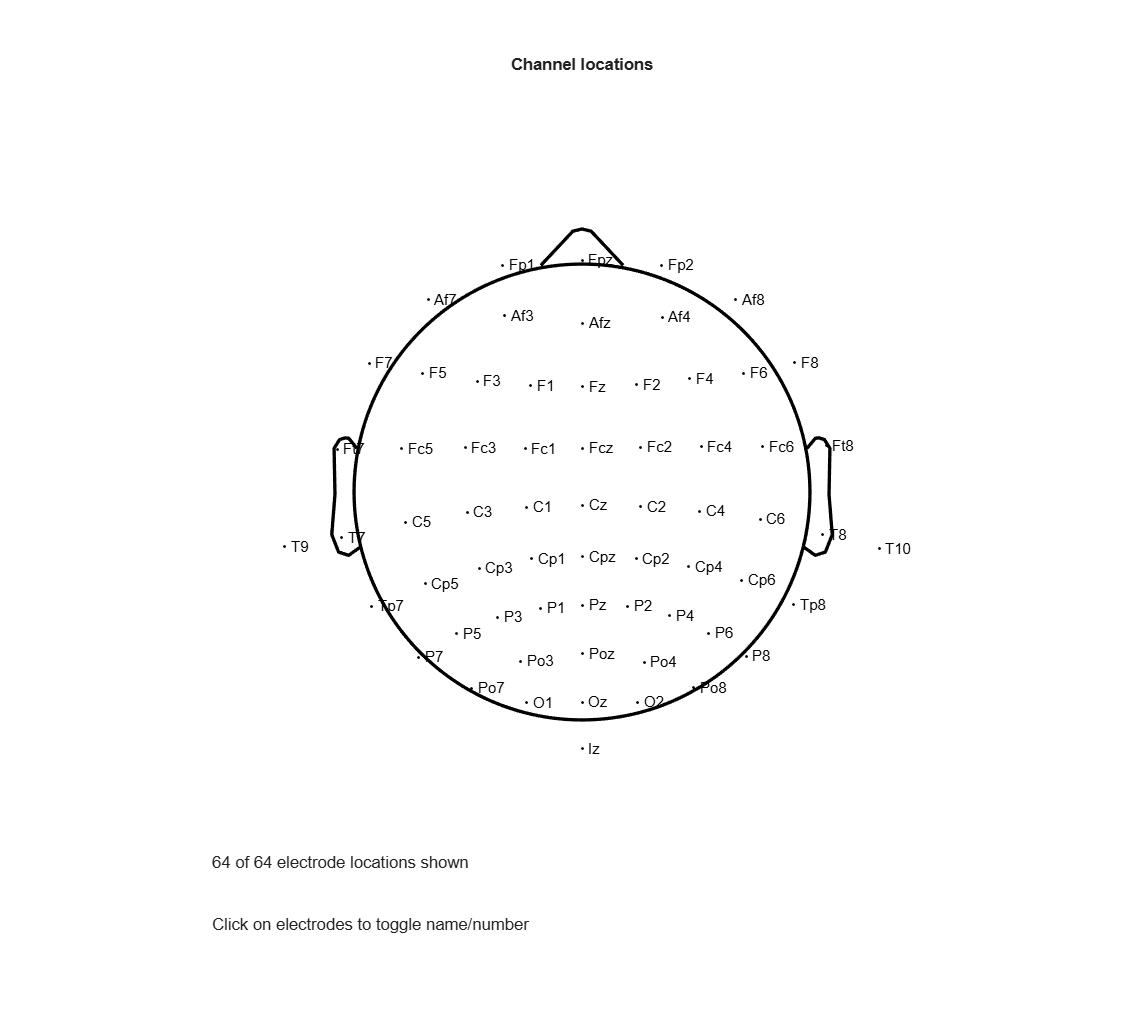
Open Plot then Channel locations then By name. A head seen from above appears, nose at the top, with each electrode’s name in its place.
5. Save
Open File then Resave current dataset(s). This writes the fixed names and the positions into the same file S001R03.set in your lessons folder.
How do I do it in EEGLAB?
1. See the problem
- Open the dataset
S001R03.setyou saved in the previous lesson. - In the main window, the Channel locations line shows
No (labels only). - In the Command Window, type
{EEG.chanlocs(1:3).labels}. The result is'Fc5.''Fc3.''Fc1.': each name ends with a dot.
2. Remove the dots from the names
You can change one name by hand in Edit then Channel locations, in the Channel label (“label”) field. But there are 64 names, so it is faster to remove the dots from all of them with four lines in the Command Window:
for iChan = 1:EEG.nbchan
    EEG.chanlocs(iChan).labels = strrep(EEG.chanlocs(iChan).labels, '.', '');
end
[ALLEEG, EEG, CURRENTSET] = eeg_store(ALLEEG, EEG, CURRENTSET); eeglab redraw;
Type {EEG.chanlocs(1:3).labels} again. The result is now 'Fc5' 'Fc3' 'Fc1'.
3. Look up the positions
- Open Edit then Channel locations.
- Because the channels have no positions yet, EEGLAB first opens a window titled Look up channel locations?.
- Keep the default choice in the list: use MNI coordinate file for BEM dipfit model. The file under it is
standard_1005.elc. - Leave Import file instead and erase all channels unticked.
- Click OK. The Command Window prints
64 channel with the same label found and imported. - The channel editing window opens, showing each channel with its coordinates. Click OK at the bottom to close it. The changes take effect only after you close this window.
4. Check the positions on the head
Open Plot then Channel locations then By name. A head seen from above appears, nose at the top, with each electrode’s name in its place.
5. Save
Open File then Resave current dataset(s). This writes the fixed names and the positions into the same file S001R03.set in your lessons folder.
How do I write it as code?
The same steps in 20 lines of MATLAB
% Start EEGLAB and load the file from the previous lesson
[ALLEEG, EEG, CURRENTSET, ALLCOM] = eeglab;
dataFolder = 'C:\Users\me\Documents\eeg-course';   % change it
EEG = pop_loadset('filename', 'S001R03.set', 'filepath', dataFolder);
[ALLEEG, EEG, CURRENTSET] = eeg_store(ALLEEG, EEG, 0);

% Remove the trailing dots from the names (Fc5. -> Fc5, Cz.. -> Cz)
for iChan = 1:EEG.nbchan
    EEG.chanlocs(iChan).labels = strrep(EEG.chanlocs(iChan).labels, '.', '');
end

% Look up the positions in the standard MNI template
% (case does not matter: Fc5 matches FC5)
EEG = pop_chanedit(EEG, 'lookup', 'standard_1005.elc');
EEG = eeg_checkset(EEG);

% Plot the electrodes by name (same as Plot > Channel locations > By name)
figure; topoplot([], EEG.chanlocs, 'style', 'blank', ...
    'electrodes', 'labelpoint', 'chaninfo', EEG.chaninfo);

% Save over the lesson file and show the result in the main window
EEG = pop_saveset(EEG, 'savemode', 'resave');
[ALLEEG, EEG, CURRENTSET] = eeg_store(ALLEEG, EEG, CURRENTSET);
eeglab redraw
strrep(text, '.', '')replaces every dot in the text with nothing.'lookup', 'standard_1005.elc'is the same choice as the default in the lookup window. EEGLAB finds this file inside the dipfit pluginA package that adds new functions or menus to EEGLAB., which ships with EEGLAB.
How do I write it as code?
% Start EEGLAB and load the file from the previous lesson
[ALLEEG, EEG, CURRENTSET, ALLCOM] = eeglab;
dataFolder = 'C:\Users\me\Documents\eeg-course';   % change it
EEG = pop_loadset('filename', 'S001R03.set', 'filepath', dataFolder);
[ALLEEG, EEG, CURRENTSET] = eeg_store(ALLEEG, EEG, 0);

% Remove the trailing dots from the names (Fc5. -> Fc5, Cz.. -> Cz)
for iChan = 1:EEG.nbchan
    EEG.chanlocs(iChan).labels = strrep(EEG.chanlocs(iChan).labels, '.', '');
end

% Look up the positions in the standard MNI template
% (case does not matter: Fc5 matches FC5)
EEG = pop_chanedit(EEG, 'lookup', 'standard_1005.elc');
EEG = eeg_checkset(EEG);

% Plot the electrodes by name (same as Plot > Channel locations > By name)
figure; topoplot([], EEG.chanlocs, 'style', 'blank', ...
    'electrodes', 'labelpoint', 'chaninfo', EEG.chaninfo);

% Save over the lesson file and show the result in the main window
EEG = pop_saveset(EEG, 'savemode', 'resave');
[ALLEEG, EEG, CURRENTSET] = eeg_store(ALLEEG, EEG, CURRENTSET);
eeglab redraw
strrep(text, '.', '')replaces every dot in the text with nothing.'lookup', 'standard_1005.elc'is the same choice as the default in the lookup window. EEGLAB finds this file inside the dipfit plugin, which ships with EEGLAB.
Which value should I choose?
Suitable values for your analysis goal
The main choice is where the positions come from:
| Source | When to use it | How |
|---|---|---|
Standard MNI template (standard_1005.elc) | Your cap uses standard 10-20 or 10-10 names, and you did not measure the positions. This is our case. | The default choice in Look up channel locations? |
| Your cap’s own location file (from the manufacturer) | Your system’s channel names are not standard, such as numbers E1, E2 | Read locations in the channel editing window |
| Positions measured on the participantThe person whose data were recorded in the study.’s head | You digitized the electrodes at the recording session | Read locations with the digitizer’s file |
Upper or lower case does not matter. EEGLAB compares names in lower case, so Fc5 finds FC5 in the template. Extra characters such as dots or spaces do matter.
Which value should I choose?
The main choice is where the positions come from:
| Source | When to use it | How |
|---|---|---|
Standard MNI template (standard_1005.elc) | Your cap uses standard 10-20 or 10-10 names, and you did not measure the positions. This is our case. | The default choice in Look up channel locations? |
| Your cap’s own location file (from the manufacturer) | Your system’s channel names are not standard, such as numbers E1, E2 | Read locations in the channel editing window |
| Positions measured on the participant’s head | You digitized the electrodes at the recording session | Read locations with the digitizer’s file |
Upper or lower case does not matter. EEGLAB compares names in lower case, so Fc5 finds FC5 in the template. Extra characters such as dots or spaces do matter.
How do I check it worked?
4 quick checks
- The Channel locations line in the main window shows
Yes. - The Command Window printed
64 channel with the same label found and imported. - Plot then Channel locations then By name shows 64 electrodes:
Czin the center,Fpzat the front,Ozat the back. all(~cellfun(@isempty, {EEG.chanlocs.X}))gives1: every channel has coordinates.
Keep S001R03.set. The next lesson (events) continues on it.
How do I check it worked?
- The Channel locations line in the main window shows
Yes. - The Command Window printed
64 channel with the same label found and imported. - Plot then Channel locations then By name shows 64 electrodes:
Czin the center,Fpzat the front,Ozat the back. all(~cellfun(@isempty, {EEG.chanlocs.X}))gives1: every channel has coordinates.
Keep S001R03.set. The next lesson (events) continues on it.
What mistakes do people make?
5 mistakes and how to avoid them
- Looking up before removing the dots. No name matches, and no warning appears. The Channel locations line stays
No (labels only). Remove the dots, then look up again. - Not closing the channel editing window with OK. The changes take effect only after you close it.
- Thinking the electrodes outside the circle are a mistake. The circle marks the horizontal plane through the center of the head. Electrodes below that plane, around the lower edge of the cap (such as
T7,T8,T9,T10andIz), are drawn on or outside it. This is expected. - Ticking Import file instead and erase all channels. This replaces your channels with all the template’s channels (hundreds of names). Leave it unticked.
- Assuming the file order follows the head. In
S001R03.edfthe first channel isFc5, notFp1. Always look a channel up by its name, not by its number.
What mistakes do people make?
- Looking up before removing the dots. No name matches, and no warning appears. The Channel locations line stays
No (labels only). Remove the dots, then look up again. - Not closing the channel editing window with OK. The changes take effect only after you close it.
- Thinking the electrodes outside the circle are a mistake. The circle marks the horizontal plane through the center of the head. Electrodes below that plane, around the lower edge of the cap (such as
T7,T8,T9,T10andIz), are drawn on or outside it. This is expected. - Ticking Import file instead and erase all channels. This replaces your channels with all the template’s channels (hundreds of names). Leave it unticked.
- Assuming the file order follows the head. In
S001R03.edfthe first channel isFc5, notFp1. Always look a channel up by its name, not by its number.
Your browser doesn't allow saving progress. All lessons are open, but completion marks won't be saved.
Done. Your progress is saved in this browser.UndoHow do I write it in my paper?
A Methods template: edit the data, settings and versions to match what you ran
A template: edit the data, settings and versions to match what you ran.
Channel labels were cleaned of trailing periods and matched to the standard 10-5 template in MNI space (standard_1005.elc) with pop_chanedit (EEGLAB 2026.1).How do I write it in my paper?
A template: edit the data, settings and versions to match what you ran.
Channel labels were cleaned of trailing periods and matched to the standard 10-5 template in MNI space (standard_1005.elc) with pop_chanedit (EEGLAB 2026.1).Where can I read more?
3 sources, official docs first
- EEGLAB TutorialDocumentationc. Channel Locations: Command-line channel location look up example; Why are electrodes plotted outside of the head limits?
- EEGLAB preprocessing #2: Events and channel locationsVideoFull video · 11:40
- EEG Motor Movement/Imagery Dataset (PhysioNet)Montage
Written for EEGLAB 2026.1 · 2026-10-28
Going further
- EEGLAB Tutorial: https://eeglab.org/tutorials/04_Import/Channel_Locations.html (c. Channel Locations: Command-line channel location look up example; Why are electrodes plotted outside of the head limits?)
- EEGLAB preprocessing #2: Events and channel locations: https://www.youtube.com/watch?v=2CPmmPG5Beo (Full video)
- EEG Motor Movement/Imagery Dataset (PhysioNet): https://physionet.org/content/eegmmidb/1.0.0/ (Montage)
Need help?
Ask, share feedback, or report an error
- Report a scientific error · Needs a GitHub account. Don't have one? Use "Share your thoughts".