Station 3 · Lesson 4
Bad channels
eeglab_data.set (D1) · Already applied: High-pass & low-pass filtering, Removing line noise (50/60 Hz)Download the data (opens in a new tab)Script to reach this state
[ALLEEG, EEG, CURRENTSET, ALLCOM] = eeglab;
eeglabRoot = fileparts(which('eeglab'));
EEG = pop_loadset('eeglab_data.set', fullfile(eeglabRoot, 'sample_data'));

% Main dataset: high-pass at 0.1 Hz, then 60 Hz line-noise removal
EEG = pop_eegfiltnew(EEG, 'locutoff', 0.1);
EEG = pop_eegfiltnew(EEG, 'locutoff', 58, 'hicutoff', 62, 'revfilt', 1);
EEG.filename = ''; EEG.filepath = ''; EEG.datfile = ''; EEG.saved = 'no';
[ALLEEG, EEG, CURRENTSET] = pop_newset(ALLEEG, EEG, 0, 'setname', 'D1 hp0.1 notch60', 'gui', 'off');
eeglab redraw;
Your browser's back button takes you to the exact place you were, so open anything you like.
The idea in brief
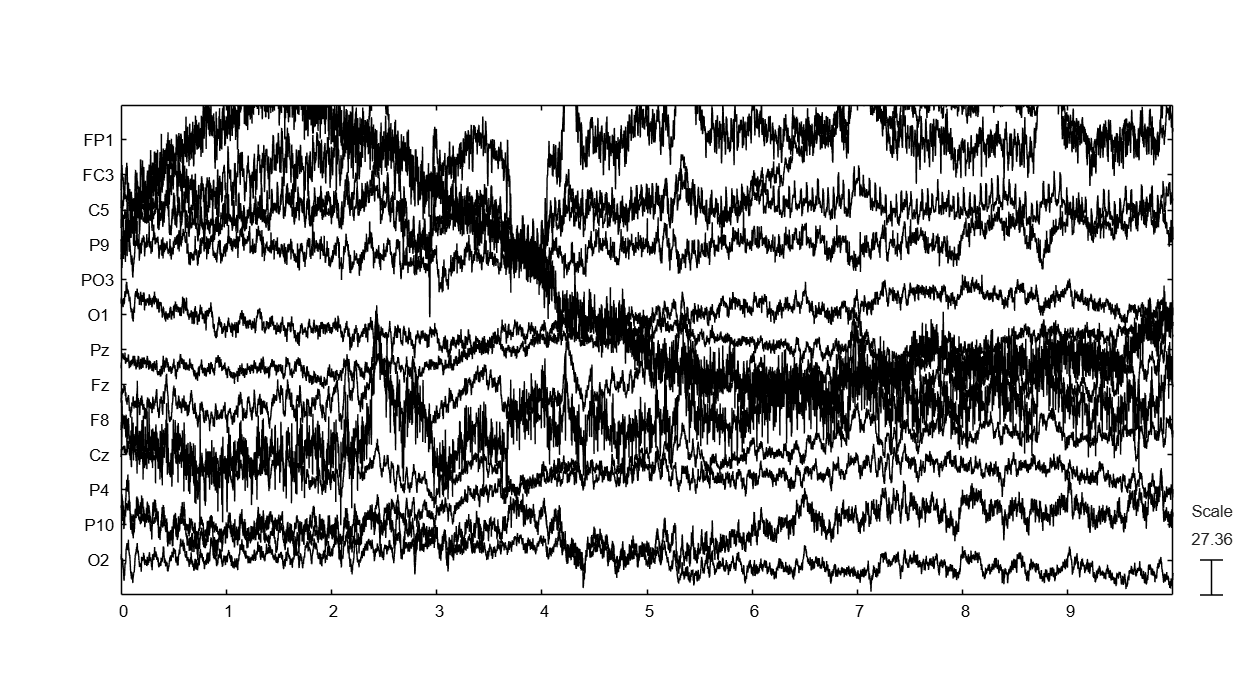
A bad channelA channel that is flat or noisy for most of the recording. is a channelThe signal recorded from one electrode, as shown in EEGLAB. that does not record brain activity properly. The cause is often an electrodeThe physical sensor placed on the scalp to pick up the signal. with poor skin contact, a damaged wire, or two electrodes bridged by gel.
It shows up in three ways: a flat line, much more noiseAny part of the recording that does not carry the information we want. than its neighbors, or a signalValues that change over time, such as the voltage recorded on a channel. unlike the channels next to it.
Before and after
Your next questions, each answered in its own section:
Why do I need this step?
The reasons in detail, and the terms you need
One bad channel harms all the data. In an average referenceA reference equal to the mean of all scalp channels. its noise enters every channel. In ICAA method that separates the recording into independent sources, some brain and some artifact. it takes components for itself instead of the real sources.
So you find bad channels now, record their names, and remove them. In the next lesson you rebuild them by interpolationEstimating a removed channel's signal from the channels around it..
About D1
the official tutorial says the tutorial data are relatively clean and do not contain channels you would normally reject. And the clean_rawdata check with the settings in this lesson does not remove any channel. This is a valid result: not all data have bad channels. We will not invent a fault. You learn the method on D1 and see what a bad channel looks like in a picture from other data.
About D1
the official tutorial says the tutorial data are relatively clean and do not contain channels you would normally reject. And the clean_rawdata check with the settings in this lesson does not remove any channel. This is a valid result: not all data have bad channels. We will not invent a fault. You learn the method on D1 and see what a bad channel looks like in a picture from other data.
Why do I need this step?
One bad channel harms all the data. In an average reference its noise enters every channel. In ICA it takes components for itself instead of the real sources.
So you find bad channels now, record their names, and remove them. In the next lesson you rebuild them by interpolation.
About D1
the official tutorial says the tutorial data are relatively clean and do not contain channels you would normally reject. And the clean_rawdata check with the settings in this lesson does not remove any channel. This is a valid result: not all data have bad channels. We will not invent a fault. You learn the method on D1 and see what a bad channel looks like in a picture from other data.
About D1
the official tutorial says the tutorial data are relatively clean and do not contain channels you would normally reject. And the clean_rawdata check with the settings in this lesson does not remove any channel. This is a valid result: not all data have bad channels. We will not invent a fault. You learn the method on D1 and see what a bad channel looks like in a picture from other data.
How do I do it in EEGLAB?
22 steps in the menus
Start with the main datasetOne EEG data file loaded in EEGLAB together with its information. D1 hp0.1 notch60 loaded, as in the Starting point.
First: look at the signal
- Open Plot then Channel data (scroll).
- Scroll through the whole recording, not just the first few seconds. Some channels go bad for a short time and then recover.
- Look for three signs: a flat line, an amplitudeThe size of a signal, measured in microvolts (µV) in EEG. much larger than the neighboring channels, or repeated jumps in a single channel.
- In D1 you will see large peaks in
EOG1,EOG2, and the frontal channels. These are eye blinks, a normal artifactA non-brain signal mixed into the recording, such as blinks or muscle activity. that ICA removes later. A channel is not bad because it records blinks.
Second: look at the spectrumHow a signal's strength is distributed across frequencies.
- Open Plot then Channel spectra and maps.
- Change Plotting frequency range [lo_Hz hi_Hz]: to
1 64, then press OK. - A bad channel shows up as a line far from the group: much higher, or much lower if it is flat.
- Click any line in the plot, and its channel number appears in the command window.
- In D1 the lines stay close together, and no line clearly stands apart.
- To look closely at one suspect channel, open Plot then Channel properties and type its number. The window shows the channel’s location on the head, its activity over time, and its spectrum together.
Third: check with the clean_rawdata channel criteria only
- Open Tools then Reject data using Clean Rawdata and ASR.
- Leave Remove channel drift (data not already high-pass filtered) unchecked, because the data are already filtered.
- Keep Process/remove channels checked.
- Check Ignore these channels (ECG, EMG, …) and type
EOG1 EOG2in the field next to it. - Leave the three criteria at their defaults: Remove channel if it is flat for more than (seconds) at 5, Max acceptable high-frequency noise std dev at 4, and Min acceptable correlation with nearby chans [0-1] at 0.8.
- Uncheck Perform Artifact Subspace Reconstruction bad burst correction/rejection, and uncheck Additional removal of bad data periods. These two remove time segments, which is the topic of another lesson.
- Press OK. The command window prints
Scanning for bad channels...and then its progress over 5-second blocks. - A window comparing the data before and after appears. A removed channel shows in red. In D1 no channel is red.
- Name the resulting dataset
D1 badchand leave Overwrite it in memory (set=yes; unset=create a new dataset) unchecked.
Fourth: record the names and remove what you found by eye
- Write down the names of all the bad channels you found, from all three methods. You will need them for interpolation and for the Methods section of your paper.
- clean_rawdata removes what it detects by itself. A channel you found only by eye, remove it with Edit then Select data: type its name in Channel(s), check the box under on->remove these on the same row, then press OK.
- In D1 the list is empty, so you remove nothing. Save
D1 badchwith File then Save current dataset as. The interpolation lesson starts from it.
How do I do it in EEGLAB?
Start with the main dataset D1 hp0.1 notch60 loaded, as in the Starting point.
First: look at the signal
- Open Plot then Channel data (scroll).
- Scroll through the whole recording, not just the first few seconds. Some channels go bad for a short time and then recover.
- Look for three signs: a flat line, an amplitude much larger than the neighboring channels, or repeated jumps in a single channel.
- In D1 you will see large peaks in
EOG1,EOG2, and the frontal channels. These are eye blinks, a normal artifact that ICA removes later. A channel is not bad because it records blinks.
Second: look at the spectrum
- Open Plot then Channel spectra and maps.
- Change Plotting frequency range [lo_Hz hi_Hz]: to
1 64, then press OK. - A bad channel shows up as a line far from the group: much higher, or much lower if it is flat.
- Click any line in the plot, and its channel number appears in the command window.
- In D1 the lines stay close together, and no line clearly stands apart.
- To look closely at one suspect channel, open Plot then Channel properties and type its number. The window shows the channel’s location on the head, its activity over time, and its spectrum together.
Third: check with the clean_rawdata channel criteria only
- Open Tools then Reject data using Clean Rawdata and ASR.
- Leave Remove channel drift (data not already high-pass filtered) unchecked, because the data are already filtered.
- Keep Process/remove channels checked.
- Check Ignore these channels (ECG, EMG, …) and type
EOG1 EOG2in the field next to it. - Leave the three criteria at their defaults: Remove channel if it is flat for more than (seconds) at 5, Max acceptable high-frequency noise std dev at 4, and Min acceptable correlation with nearby chans [0-1] at 0.8.
- Uncheck Perform Artifact Subspace Reconstruction bad burst correction/rejection, and uncheck Additional removal of bad data periods. These two remove time segments, which is the topic of another lesson.
- Press OK. The command window prints
Scanning for bad channels...and then its progress over 5-second blocks. - A window comparing the data before and after appears. A removed channel shows in red. In D1 no channel is red.
- Name the resulting dataset
D1 badchand leave Overwrite it in memory (set=yes; unset=create a new dataset) unchecked.
Fourth: record the names and remove what you found by eye
- Write down the names of all the bad channels you found, from all three methods. You will need them for interpolation and for the Methods section of your paper.
- clean_rawdata removes what it detects by itself. A channel you found only by eye, remove it with Edit then Select data: type its name in Channel(s), check the box under on->remove these on the same row, then press OK.
- In D1 the list is empty, so you remove nothing. Save
D1 badchwith File then Save current dataset as. The interpolation lesson starts from it.
How do I write it as code?
The same steps in 16 lines of MATLAB
% Detection with clean_rawdata channel criteria only:
% no drift removal, no ASR, no window rejection, EOG channels ignored
EEG_test = pop_clean_rawdata(EEG, 'FlatlineCriterion', 5, 'ChannelCriterion', 0.8, ...
    'LineNoiseCriterion', 4, 'Highpass', 'off', 'BurstCriterion', 'off', ...
    'WindowCriterion', 'off', 'BurstRejection', 'off', 'Distance', 'Euclidian', ...
    'channels_ignore', {'EOG1', 'EOG2'});

% Names of the channels it removed
badChans = setdiff({EEG.chanlocs.labels}, {EEG_test.chanlocs.labels}, 'stable');

% Add channels you found by eye, e.g. badChans = [badChans {'T7'}];
fprintf('Bad channels: %s\n', strjoin(badChans, ', '));

% Remove them by name from the main dataset
if ~isempty(badChans)
    EEG = pop_select(EEG, 'rmchannel', badChans);
end
EEG.setname = 'D1 badch';
EEG = pop_saveset(EEG, 'filename', 'D1_badch.set', 'filepath', pwd);
On D1 the script prints Bad channels: with an empty list, and the channel count stays 32. Copy badChans into the Starting point script of the following lessons, which start with the same variable.
How do I write it as code?
% Detection with clean_rawdata channel criteria only:
% no drift removal, no ASR, no window rejection, EOG channels ignored
EEG_test = pop_clean_rawdata(EEG, 'FlatlineCriterion', 5, 'ChannelCriterion', 0.8, ...
    'LineNoiseCriterion', 4, 'Highpass', 'off', 'BurstCriterion', 'off', ...
    'WindowCriterion', 'off', 'BurstRejection', 'off', 'Distance', 'Euclidian', ...
    'channels_ignore', {'EOG1', 'EOG2'});

% Names of the channels it removed
badChans = setdiff({EEG.chanlocs.labels}, {EEG_test.chanlocs.labels}, 'stable');

% Add channels you found by eye, e.g. badChans = [badChans {'T7'}];
fprintf('Bad channels: %s\n', strjoin(badChans, ', '));

% Remove them by name from the main dataset
if ~isempty(badChans)
    EEG = pop_select(EEG, 'rmchannel', badChans);
end
EEG.setname = 'D1 badch';
EEG = pop_saveset(EEG, 'filename', 'D1_badch.set', 'filepath', pwd);
On D1 the script prints Bad channels: with an empty list, and the channel count stays 32. Copy badChans into the Starting point script of the following lessons, which start with the same variable.
Which value should I choose?
Suitable values for your analysis goal
| Setting | Value | Why |
|---|---|---|
| Flat line | 5 seconds | The clean_rawdata default. A channel that stays flat longer than that records nothing. |
| High-frequency noise | 4 standard deviations | The default. It compares each channel with the other channels, so it catches a channel that is clearly noisier. |
| Correlation with nearby channels | 0.8 | The default, also given in the official tutorial. A channel is removed if its correlation stays below 0.8 for more than half of the recording. It depends on electrode locations, so make sure they are correct. |
| Eye and heart channels | Excluded from detection | clean_rawdata is designed for EEG channels. An eye channel is naturally unlike its neighbors, so it may be removed although it is fine. |
| ASR and segment removal | Off in this lesson | Our goal here is channels only. Segment removal is in the clean_rawdata & ASR lesson. |
An automated alternative
the PREP extension (PrepPipeline) detects bad channels and computes an average reference that resists bad channels, all automatically. Install it from File then Manage EEGLAB extensions. We start here with the manual method so you understand each step.
An automated alternative
the PREP extension (PrepPipeline) detects bad channels and computes an average reference that resists bad channels, all automatically. Install it from File then Manage EEGLAB extensions. We start here with the manual method so you understand each step.
Which value should I choose?
| Setting | Value | Why |
|---|---|---|
| Flat line | 5 seconds | The clean_rawdata default. A channel that stays flat longer than that records nothing. |
| High-frequency noise | 4 standard deviations | The default. It compares each channel with the other channels, so it catches a channel that is clearly noisier. |
| Correlation with nearby channels | 0.8 | The default, also given in the official tutorial. A channel is removed if its correlation stays below 0.8 for more than half of the recording. It depends on electrode locations, so make sure they are correct. |
| Eye and heart channels | Excluded from detection | clean_rawdata is designed for EEG channels. An eye channel is naturally unlike its neighbors, so it may be removed although it is fine. |
| ASR and segment removal | Off in this lesson | Our goal here is channels only. Segment removal is in the clean_rawdata & ASR lesson. |
An automated alternative
the PREP extension (PrepPipeline) detects bad channels and computes an average reference that resists bad channels, all automatically. Install it from File then Manage EEGLAB extensions. We start here with the manual method so you understand each step.
An automated alternative
the PREP extension (PrepPipeline) detects bad channels and computes an average reference that resists bad channels, all automatically. Install it from File then Manage EEGLAB extensions. We start here with the manual method so you understand each step.
How do I check it worked?
4 quick checks
- Channel count: in the main window, Channels per frame equals the original number minus the removed channels. In D1 it stays 32.
- Your list is written down: you have the names of the removed channels, or “none” as in D1.
- Spectrum after removal: open Plot then Channel spectra and maps with the range
1 64. No line clearly stands apart from the rest. - The eye channels are still there:
EOG1andEOG2are still in the channel list.
How do I check it worked?
- Channel count: in the main window, Channels per frame equals the original number minus the removed channels. In D1 it stays 32.
- Your list is written down: you have the names of the removed channels, or “none” as in D1.
- Spectrum after removal: open Plot then Channel spectra and maps with the range
1 64. No line clearly stands apart from the rest. - The eye channels are still there:
EOG1andEOG2are still in the channel list.
What mistakes do people make?
5 mistakes and how to avoid them
- Not excluding the eye channels. Without excluding
EOG1andEOG2, clean_rawdata may removeEOG1in D1, because its signal is unlike the neighboring channels. It is not bad: it is a non-brain channel by nature. The clean_rawdata documentation itself says that channels carrying non-brain signals are usually removed this way. That is why the official clean_rawdata page may show red channels on the same data. - Treating a blink channel as bad. Large peaks in the frontal channels are eye blinks. ICA removes them later, and the channel is not removed because of them.
- Looking only at the first few seconds. Some channels go bad in the middle of a recording. Scroll through all of it.
- Removing a channel without recording its name. You need the names for interpolation, for the Methods section, and to process the other participants the same way.
- Removing many channels without asking why. If many channels look bad, first check the electrode locations and the whole recording. clean_rawdata itself stops with an error if it would remove more than 75% of the channels, and says the cause is usually wrong electrode locations.
What mistakes do people make?
- Not excluding the eye channels. Without excluding
EOG1andEOG2, clean_rawdata may removeEOG1in D1, because its signal is unlike the neighboring channels. It is not bad: it is a non-brain channel by nature. The clean_rawdata documentation itself says that channels carrying non-brain signals are usually removed this way. That is why the official clean_rawdata page may show red channels on the same data. - Treating a blink channel as bad. Large peaks in the frontal channels are eye blinks. ICA removes them later, and the channel is not removed because of them.
- Looking only at the first few seconds. Some channels go bad in the middle of a recording. Scroll through all of it.
- Removing a channel without recording its name. You need the names for interpolation, for the Methods section, and to process the other participants the same way.
- Removing many channels without asking why. If many channels look bad, first check the electrode locations and the whole recording. clean_rawdata itself stops with an error if it would remove more than 75% of the channels, and says the cause is usually wrong electrode locations.
Your browser doesn't allow saving progress. All lessons are open, but completion marks won't be saved.
Done. Your progress is saved in this browser.UndoHow do I write it in my paper?
A Methods template: edit the data, settings and versions to match what you ran
A template: edit the data, settings and versions to match what you ran.
Bad channels were identified by visual inspection of the continuous data and channel spectra and with clean_rawdata (flatline criterion 5 s, channel correlation criterion 0.8, line noise criterion 4 SD; EOG channels excluded; clean_rawdata plugin 2.11, EEGLAB 2026.1) and removed ([0] channels).How do I write it in my paper?
A template: edit the data, settings and versions to match what you ran.
Bad channels were identified by visual inspection of the continuous data and channel spectra and with clean_rawdata (flatline criterion 5 s, channel correlation criterion 0.8, line noise criterion 4 SD; EOG channels excluded; clean_rawdata plugin 2.11, EEGLAB 2026.1) and removed ([0] channels).Where can I read more?
4 sources, official docs first
- EEGLAB TutorialDocumentation6. Reject artifacts > a. Remove bad channels by visual inspection
- EEGLAB TutorialDocumentation6. Reject artifacts > Automated rejection using clean_rawdata
- Luck, Applied Event-Related Potential Data Analysis (1st edition)Chapter 7: Inspecting the EEG and Interpolating Bad Channels
- EEGLAB preprocessing #6: Removing bad channelsVideoFull video · 13:02
Written for EEGLAB 2026.1 · 2026-10-27
Going further
- EEGLAB Tutorial: https://eeglab.org/tutorials/06_RejectArtifacts/Channel_rejection.html (6. Reject artifacts > a. Remove bad channels by visual inspection)
- EEGLAB Tutorial: https://eeglab.org/tutorials/06_RejectArtifacts/cleanrawdata.html (6. Reject artifacts > Automated rejection using clean_rawdata)
- Luck, Applied Event-Related Potential Data Analysis (1st edition): https://socialsci.libretexts.org/Bookshelves/Psychology/Biological_Psychology/Applied_Event-Related_Potential_Data_Analysis_(Luck) (Chapter 7: Inspecting the EEG and Interpolating Bad Channels)
- EEGLAB preprocessing #6: Removing bad channels: https://www.youtube.com/watch?v=5BTT-L2Ab04 (Full video)
Need help?
Ask, share feedback, or report an error
- Report a scientific error · Needs a GitHub account. Don't have one? Use "Share your thoughts".