Station 4 · Lesson 4
1-Hz filtering for ICA & copying weights
eeglab_data.set (D1) · Already applied: High-pass & low-pass filtering, Removing line noise (50/60 Hz), Bad channels, Channel interpolation, Re-referencing, Running ICADownload the data (opens in a new tab)Script to reach this state
[ALLEEG, EEG, CURRENTSET, ALLCOM] = eeglab;
eeglabRoot = fileparts(which('eeglab'));
EEG = pop_loadset('eeglab_data.set', fullfile(eeglabRoot, 'sample_data'));
fullLocs = EEG.chanlocs;

% Main dataset: high-pass at 0.1 Hz, then 60 Hz line-noise removal
EEG = pop_eegfiltnew(EEG, 'locutoff', 0.1);
EEG = pop_eegfiltnew(EEG, 'locutoff', 58, 'hicutoff', 62, 'revfilt', 1);

% Bad channels you removed earlier, e.g. {'T7'}; leave empty if none
badChans = {};
if ~isempty(badChans)
    EEG = pop_select(EEG, 'rmchannel', badChans);
    EEG = pop_interp(EEG, fullLocs, 'spherical');
end

% Average reference, EOG channels excluded
eogIdx = find(ismember({EEG.chanlocs.labels}, {'EOG1', 'EOG2'}));
EEG = pop_reref(EEG, [], 'exclude', eogIdx);
EEG.setname = 'D1 main';
EEG_main = EEG;

% ICA copy: same data, high-pass at 1 Hz, with ICA weights
EEG_ica = pop_eegfiltnew(EEG_main, 'locutoff', 1);
EEG_ica.setname = 'D1 ica1hz';
EEG_ica = pop_runica(EEG_ica, 'icatype', 'runica', 'extended', 1);

% Dataset 1: main dataset; dataset 2: ICA copy
EEG_main.filename = ''; EEG_main.filepath = ''; EEG_main.datfile = ''; EEG_main.saved = 'no';
[ALLEEG, EEG, CURRENTSET] = pop_newset(ALLEEG, EEG_main, 0, 'setname', 'D1 main', 'gui', 'off');
EEG_ica.filename = ''; EEG_ica.filepath = ''; EEG_ica.datfile = ''; EEG_ica.saved = 'no';
[ALLEEG, EEG, CURRENTSET] = pop_newset(ALLEEG, EEG_ica, CURRENTSET, 'setname', 'D1 ica1hz', 'gui', 'off');
eeglab redraw;
Your browser's back button takes you to the exact place you were, so open anything you like.
The idea in brief
In the Running ICAA method that separates the recording into independent sources, some brain and some artifact. lesson you followed one rule: ICA is computed on a copy filtered at 1 Hz, not on the ERPThe brain's average response to a given event across many trials. data filtered at 0.1 Hz. This lesson explains why the rule works, and how to check that the weights moved correctly.
Before and after

What does this show?
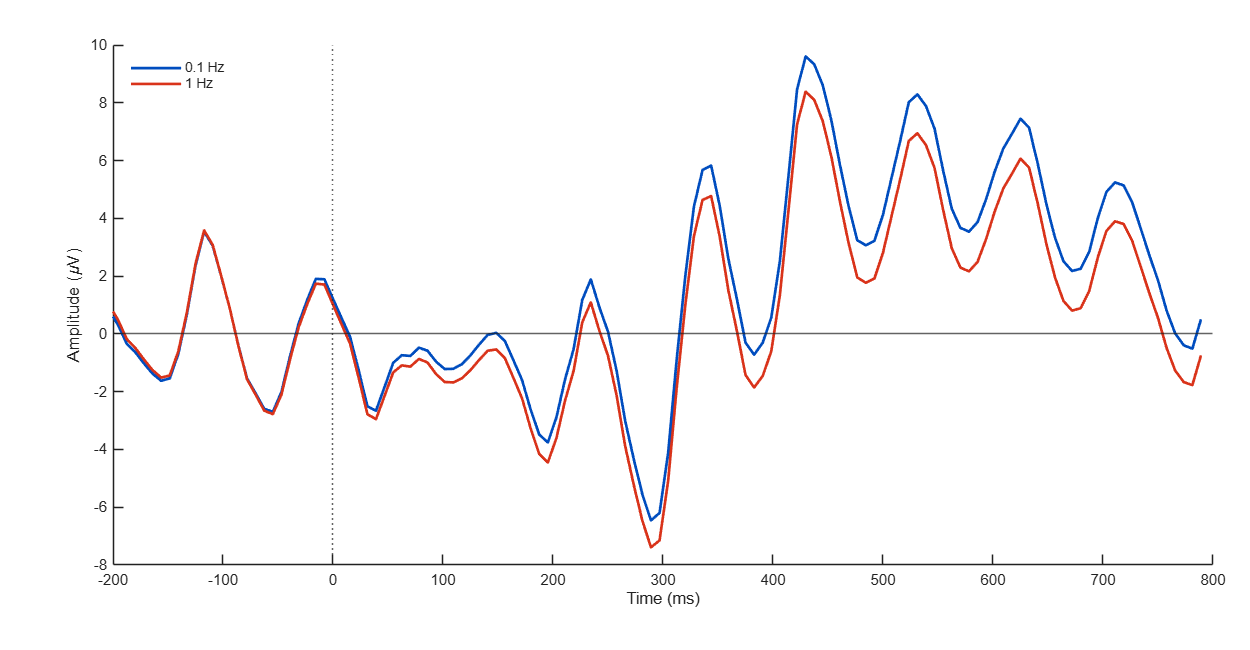
What does this show?
Your next questions, each answered in its own section:
Why do I need this step?
The reasons in detail, and the terms you need
Why 1 Hz helps ICA. Slow drift is large, and it changes over the whole recording. ICA then spends part of its effort on it, and the components become less clear. The official tutorial says ICA decompositions are notably higher quality, with less ambiguous components, when the data are high-passA filter that passes high frequencies and weakens slow drifts. filtered above 1 Hz, sometimes even 2 Hz.
Why 1 Hz harms the ERP. Slow ERP components such as P3 contain low frequencies. A 1 Hz filterA tool that weakens some frequencies in a signal and keeps others. removes part of them, so P3 becomes smaller. You will measure this yourself in this lesson’s scriptA MATLAB file of commands that runs processing steps in order..
Why copying is valid. ICA does not learn a signalValues that change over time, such as the voltage recorded on a channel.. It learns a fixed way to combine the channels, which the official tutorial calls a spatial filter. The two copies have the same channels and the same mixing in the head; only their frequencies differ. So the same weights separate the same sources in both copies.
The only limit
, as the official tutorial says: an artifactA non-brain signal mixed into the recording, such as blinks or muscle activity. that lives only below 1 Hz is not learned by ICA, so ICA does not remove it. In practice the tutorial has not found this to be a problem, because artifacts below 2 Hz usually appear above 2 Hz too.
The only limit
, as the official tutorial says: an artifactA non-brain signal mixed into the recording, such as blinks or muscle activity. that lives only below 1 Hz is not learned by ICA, so ICA does not remove it. In practice the tutorial has not found this to be a problem, because artifacts below 2 Hz usually appear above 2 Hz too.
Why do I need this step?
Why 1 Hz helps ICA. Slow drift is large, and it changes over the whole recording. ICA then spends part of its effort on it, and the components become less clear. The official tutorial says ICA decompositions are notably higher quality, with less ambiguous components, when the data are high-pass filtered above 1 Hz, sometimes even 2 Hz.
Why 1 Hz harms the ERP. Slow ERP components such as P3 contain low frequencies. A 1 Hz filter removes part of them, so P3 becomes smaller. You will measure this yourself in this lesson’s script.
Why copying is valid. ICA does not learn a signal. It learns a fixed way to combine the channels, which the official tutorial calls a spatial filter. The two copies have the same channels and the same mixing in the head; only their frequencies differ. So the same weights separate the same sources in both copies.
The only limit
, as the official tutorial says: an artifact that lives only below 1 Hz is not learned by ICA, so ICA does not remove it. In practice the tutorial has not found this to be a problem, because artifacts below 2 Hz usually appear above 2 Hz too.
The only limit
, as the official tutorial says: an artifact that lives only below 1 Hz is not learned by ICA, so ICA does not remove it. In practice the tutorial has not found this to be a problem, because artifacts below 2 Hz usually appear above 2 Hz too.
How do I do it in EEGLAB?
9 steps in the menus
Start with the two copies from the Starting point. Its script puts the main datasetOne EEG data file loaded in EEGLAB together with its information. in dataset 1 and the ICA copy in dataset 2.
First: check the two copies
- Open the Datasets . You see
D1 mainas dataset 1 andD1 ica1hzas dataset 2. - Choose dataset 2. In the main window, ICA weights shows Yes.
- Choose dataset 1. ICA weights shows No, and Channels per frame is the same as in dataset 2: 32 in D1.
Second: copy the weights
- With dataset 1 current, open Edit then Dataset info.
- Next to ICA weights array or text/binary file (if any):, press from other dataset, type
2, then OK. Three fields fill in automatically:ALLEEG(2).icaweights,ALLEEG(2).icasphere, andALLEEG(2).icachansind. - Press OK to close the window. ICA weights now shows Yes for dataset 1.
Third: compare the maps
- With dataset 1 current, open Plot then Component maps then In 2-D.
- Choose dataset 2 and open the same window. The maps are identical, in the same order. The blinkClosing and opening the eye; seen as large peaks on frontal channels. component is in the same place in both.
- Save dataset 1, the 0.1 Hz main copy and not the 1 Hz ICA copy, with File then Save current dataset as as
D1_main_ica.set. The ICLabelA tool that classifies each ICA component into seven classes with a probability for each. lesson starts from it.
When to use 2 Hz instead of 1
If many components stay ambiguous, with mixed or scattered maps, start again from dataset 1: filter a new copy at 2 Hz, run ICA on it, and copy its weights the same way. Dataset 1 stays at 0.1 Hz every time.
How do I do it in EEGLAB?
Start with the two copies from the Starting point. Its script puts the main dataset in dataset 1 and the ICA copy in dataset 2.
First: check the two copies
- Open the Datasets menu. You see
D1 mainas dataset 1 andD1 ica1hzas dataset 2. - Choose dataset 2. In the main window, ICA weights shows Yes.
- Choose dataset 1. ICA weights shows No, and Channels per frame is the same as in dataset 2: 32 in D1.
Second: copy the weights
- With dataset 1 current, open Edit then Dataset info.
- Next to ICA weights array or text/binary file (if any):, press from other dataset, type
2, then OK. Three fields fill in automatically:ALLEEG(2).icaweights,ALLEEG(2).icasphere, andALLEEG(2).icachansind. - Press OK to close the window. ICA weights now shows Yes for dataset 1.
Third: compare the maps
- With dataset 1 current, open Plot then Component maps then In 2-D.
- Choose dataset 2 and open the same window. The maps are identical, in the same order. The blink component is in the same place in both.
- Save dataset 1, the 0.1 Hz main copy and not the 1 Hz ICA copy, with File then Save current dataset as as
D1_main_ica.set. The ICLabel lesson starts from it.
When to use 2 Hz instead of 1
If many components stay ambiguous, with mixed or scattered maps, start again from dataset 1: filter a new copy at 2 Hz, run ICA on it, and copy its weights the same way. Dataset 1 stays at 0.1 Hz every time.
How do I write it as code?
The same steps in 26 lines of MATLAB
% EEG_main: main dataset (0.1 Hz); EEG_ica: ICA copy (1 Hz) with weights
% Copy the decomposition back to the main dataset
EEG_main.icaweights  = EEG_ica.icaweights;
EEG_main.icasphere   = EEG_ica.icasphere;
EEG_main.icachansind = EEG_ica.icachansind;
EEG_main.icawinv     = [];   % recomputed by eeg_checkset
EEG_main.icaact      = [];
EEG = eeg_checkset(EEG_main);

% Check: same weights and scalp maps in both copies
fprintf('Same weights: %d\n', isequal(EEG.icaweights, EEG_ica.icaweights));
fprintf('Largest scalp map difference: %g\n', max(abs(EEG.icawinv(:) - EEG_ica.icawinv(:))));
fprintf('ICA components: %d\n', size(EEG.icawinv, 2));

% Why two copies: ERP at Pz around 'square' events in each copy
epMain = pop_rmbase(pop_epoch(EEG, {'square'}, [-0.2 0.8]), [-200 0]);
epIca  = pop_rmbase(pop_epoch(EEG_ica, {'square'}, [-0.2 0.8]), [-200 0]);
pz  = find(strcmp({EEG.chanlocs.labels}, 'Pz'));
win = epMain.times >= 300 & epMain.times <= 600;
erpMain = mean(epMain.data(pz, :, :), 3);
erpIca  = mean(epIca.data(pz, :, :), 3);
fprintf('Mean at Pz, 300-600 ms: 0.1 Hz copy %.2f uV, 1 Hz copy %.2f uV\n', ...
    mean(erpMain(win)), mean(erpIca(win)));
figure;
plot(epMain.times, erpMain, epIca.times, erpIca);
legend('Main dataset (0.1 Hz)', 'ICA copy (1 Hz)');
xlabel('Time (ms)'); ylabel('Amplitude (uV)');

EEG = pop_saveset(EEG, 'filename', 'D1_main_ica.set', 'filepath', pwd);
The first block is the same weight-copy lines as in the Running ICA lesson. The check prints Same weights: 1, a scalp mapA top-down picture showing how a value is spread over the head. difference close to zero, and 31 components in D1.
The ERP block uses pop_epoch, which you will learn in station 5. Here it only shows the difference: in D1 the mean at Pz between 300 and 600 ms is about 4.3 µV in the main dataset, and about 3.1 µV in the 1 Hz copy. That is about 30% of the P3 lost if you continued on the ICA copy.
How do I write it as code?
% EEG_main: main dataset (0.1 Hz); EEG_ica: ICA copy (1 Hz) with weights
% Copy the decomposition back to the main dataset
EEG_main.icaweights  = EEG_ica.icaweights;
EEG_main.icasphere   = EEG_ica.icasphere;
EEG_main.icachansind = EEG_ica.icachansind;
EEG_main.icawinv     = [];   % recomputed by eeg_checkset
EEG_main.icaact      = [];
EEG = eeg_checkset(EEG_main);

% Check: same weights and scalp maps in both copies
fprintf('Same weights: %d\n', isequal(EEG.icaweights, EEG_ica.icaweights));
fprintf('Largest scalp map difference: %g\n', max(abs(EEG.icawinv(:) - EEG_ica.icawinv(:))));
fprintf('ICA components: %d\n', size(EEG.icawinv, 2));

% Why two copies: ERP at Pz around 'square' events in each copy
epMain = pop_rmbase(pop_epoch(EEG, {'square'}, [-0.2 0.8]), [-200 0]);
epIca  = pop_rmbase(pop_epoch(EEG_ica, {'square'}, [-0.2 0.8]), [-200 0]);
pz  = find(strcmp({EEG.chanlocs.labels}, 'Pz'));
win = epMain.times >= 300 & epMain.times <= 600;
erpMain = mean(epMain.data(pz, :, :), 3);
erpIca  = mean(epIca.data(pz, :, :), 3);
fprintf('Mean at Pz, 300-600 ms: 0.1 Hz copy %.2f uV, 1 Hz copy %.2f uV\n', ...
    mean(erpMain(win)), mean(erpIca(win)));
figure;
plot(epMain.times, erpMain, epIca.times, erpIca);
legend('Main dataset (0.1 Hz)', 'ICA copy (1 Hz)');
xlabel('Time (ms)'); ylabel('Amplitude (uV)');

EEG = pop_saveset(EEG, 'filename', 'D1_main_ica.set', 'filepath', pwd);
The first block is the same weight-copy lines as in the Running ICA lesson. The check prints Same weights: 1, a scalp map difference close to zero, and 31 components in D1.
The ERP block uses pop_epoch, which you will learn in station 5. Here it only shows the difference: in D1 the mean at Pz between 300 and 600 ms is about 4.3 µV in the main dataset, and about 3.1 µV in the 1 Hz copy. That is about 30% of the P3 lost if you continued on the ICA copy.
Which value should I choose?
Suitable values for your analysis goal
| Setting | Value | Why |
|---|---|---|
| High-pass for the ICA copy | 1 Hz | Official tutorial: ICA quality is notably higher above 1 Hz. |
| If components stay ambiguous | 2 Hz | The official tutorial mentions 2 Hz as well. It costs nothing, because the ERP stays on the main dataset. |
| High-pass for the main dataset | 0.1 Hz, unchanged | It keeps slow ERP components such as P3 (the filtering lesson). |
| What you copy | icaweights, icasphere, and icachansind | These three define the decomposition. icawinv and icaact are recomputed from the main data. |
| Channels in the two copies | Exactly the same, in the same order | The weights are tied to the channels. |
Which value should I choose?
| Setting | Value | Why |
|---|---|---|
| High-pass for the ICA copy | 1 Hz | Official tutorial: ICA quality is notably higher above 1 Hz. |
| If components stay ambiguous | 2 Hz | The official tutorial mentions 2 Hz as well. It costs nothing, because the ERP stays on the main dataset. |
| High-pass for the main dataset | 0.1 Hz, unchanged | It keeps slow ERP components such as P3 (the filtering lesson). |
| What you copy | icaweights, icasphere, and icachansind | These three define the decomposition. icawinv and icaact are recomputed from the main data. |
| Channels in the two copies | Exactly the same, in the same order | The weights are tied to the channels. |
How do I check it worked?
4 quick checks
- Main window: with dataset 1 current, ICA weights shows Yes.
- Same maps: the component maps of dataset 1 and dataset 2 are identical and in the same order.
- The script check: it prints
Same weights: 1andICA components: 31in D1. - The ERP stays whole: the mean at Pz between 300 and 600 ms is larger in the main dataset than in the 1 Hz copy, about 4.3 against 3.1 µV in D1.
How do I check it worked?
- Main window: with dataset 1 current, ICA weights shows Yes.
- Same maps: the component maps of dataset 1 and dataset 2 are identical and in the same order.
- The script check: it prints
Same weights: 1andICA components: 31in D1. - The ERP stays whole: the mean at Pz between 300 and 600 ms is larger in the main dataset than in the 1 Hz copy, about 4.3 against 3.1 µV in D1.
What mistakes do people make?
5 mistakes and how to avoid them
- Continuing the ERP on the 1 Hz copy. P3 shrinks, as the script shows. The ICA copy is only for computing the weights; the analysis continues on the main dataset.
- Copying only two of the three fields. The official tutorial mentions
icaweightsandicasphere. Copyicachansindtoo, or EEGLAB does not know which channels the weights belong to. The from other dataset button copies all three. - Different channels in the two copies. If you remove or interpolate a channel in one copy only, the weights no longer match. Do every channel step before you make the copy.
- Copying
icaactfrom the ICA copy. Those are the time courses of the 1 Hz data. Leaveicawinvandicaactempty and leteeg_checksetrecompute them from the main dataset. - Choosing a dataset number by guess. In from other dataset type the number of the ICA copy as shown in the Datasets menu. A wrong number copies other weights without an error.
What mistakes do people make?
- Continuing the ERP on the 1 Hz copy. P3 shrinks, as the script shows. The ICA copy is only for computing the weights; the analysis continues on the main dataset.
- Copying only two of the three fields. The official tutorial mentions
icaweightsandicasphere. Copyicachansindtoo, or EEGLAB does not know which channels the weights belong to. The from other dataset button copies all three. - Different channels in the two copies. If you remove or interpolate a channel in one copy only, the weights no longer match. Do every channel step before you make the copy.
- Copying
icaactfrom the ICA copy. Those are the time courses of the 1 Hz data. Leaveicawinvandicaactempty and leteeg_checksetrecompute them from the main dataset. - Choosing a dataset number by guess. In from other dataset type the number of the ICA copy as shown in the Datasets menu. A wrong number copies other weights without an error.
Your browser doesn't allow saving progress. All lessons are open, but completion marks won't be saved.
Done. Your progress is saved in this browser.UndoHow do I write it in my paper?
A Methods template: edit the data, settings and versions to match what you ran
A template: edit the data, settings and versions to match what you ran.
Independent component analysis (extended Infomax; Lee et al., 1999) was computed with runica ([31] components after PCA reduction to the data rank) on a copy of the data high-pass filtered at 1 Hz, and the resulting weights were applied to the 0.1 Hz high-pass filtered data.How do I write it in my paper?
A template: edit the data, settings and versions to match what you ran.
Independent component analysis (extended Infomax; Lee et al., 1999) was computed with runica ([31] components after PCA reduction to the data rank) on a copy of the data high-pass filtered at 1 Hz, and the resulting weights were applied to the 0.1 Hz high-pass filtered data.Where can I read more?
4 sources, official docs first
- EEGLAB TutorialDocumentationHow to deal with the aggressive high-pass filter applied before running ICA
- EEGLAB TutorialDocumentation5. Preprocess data > a. Filtering
- Makoto's preprocessing pipeline§4.1; §13.5 Tips for copying ICA results to other datasets
- Luck, Applied Event-Related Potential Data Analysis (1st edition)Chapter 9: Artifact Correction with ICA
Written for EEGLAB 2026.1 · 2026-10-29
Going further
- EEGLAB Tutorial: https://eeglab.org/tutorials/06_RejectArtifacts/RunICA.html (How to deal with the aggressive high-pass filter applied before running ICA)
- EEGLAB Tutorial: https://eeglab.org/tutorials/05_Preprocess/Filtering.html (5. Preprocess data > a. Filtering)
- Makoto's preprocessing pipeline: https://eeglab.ucsd.edu/wiki/Makoto%27s_preprocessing_pipeline (§4.1; §13.5 Tips for copying ICA results to other datasets)
- Luck, Applied Event-Related Potential Data Analysis (1st edition): https://socialsci.libretexts.org/Bookshelves/Psychology/Biological_Psychology/Applied_Event-Related_Potential_Data_Analysis_(Luck) (Chapter 9: Artifact Correction with ICA)
Need help?
Ask, share feedback, or report an error
- Report a scientific error · Needs a GitHub account. Don't have one? Use "Share your thoughts".