Station 6 · Lesson 1
ERPs & averaging
eeglab_data.set (D1) · Already applied: High-pass & low-pass filtering, Removing line noise (50/60 Hz), Bad channels, Channel interpolation, Re-referencing, Running ICA, 1-Hz filtering for ICA & copying weights, ICLabel & removing components, Extracting epochs, Baseline correction, Rejecting bad epochsDownload the data (opens in a new tab)Script to reach this state
% Shortcut: if you saved D1_epochs_clean.set in the epoch rejection lesson,
% keep the first line and the last three lines, and replace every line between them with:
% EEG = pop_loadset('D1_epochs_clean.set', pwd);
[ALLEEG, EEG, CURRENTSET, ALLCOM] = eeglab;
eeglabRoot = fileparts(which('eeglab'));
EEG = pop_loadset('eeglab_data.set', fullfile(eeglabRoot, 'sample_data'));
fullLocs = EEG.chanlocs;

% Main dataset: high-pass at 0.1 Hz, then 60 Hz line-noise removal
EEG = pop_eegfiltnew(EEG, 'locutoff', 0.1);
EEG = pop_eegfiltnew(EEG, 'locutoff', 58, 'hicutoff', 62, 'revfilt', 1);

% Bad channels you removed earlier, e.g. {'T7'}; leave empty if none
badChans = {};
if ~isempty(badChans)
    EEG = pop_select(EEG, 'rmchannel', badChans);
    EEG = pop_interp(EEG, fullLocs, 'spherical');
end

% Average reference, EOG channels excluded
eogIdx = find(ismember({EEG.chanlocs.labels}, {'EOG1', 'EOG2'}));
EEG = pop_reref(EEG, [], 'exclude', eogIdx);

% ICA on a 1-Hz copy, then copy the weights back
EEG_ica = pop_eegfiltnew(EEG, 'locutoff', 1);
EEG_ica = pop_runica(EEG_ica, 'icatype', 'runica', 'extended', 1);
EEG.icaweights  = EEG_ica.icaweights;
EEG.icasphere   = EEG_ica.icasphere;
EEG.icachansind = EEG_ica.icachansind;
EEG.icawinv     = [];
EEG.icaact      = [];
EEG = eeg_checkset(EEG);

% Remove components ICLabel rates above 90% Eye or Muscle
EEG = pop_iclabel(EEG, 'default');
EEG = pop_icflag(EEG, [NaN NaN; 0.9 1; 0.9 1; NaN NaN; NaN NaN; NaN NaN; NaN NaN]);
artifactComps = find(EEG.reject.gcompreject);
if ~isempty(artifactComps)
    EEG = pop_subcomp(EEG, artifactComps, 0);
end

% Low-pass at 30 Hz
EEG = pop_eegfiltnew(EEG, 'hicutoff', 30);
EEG.setname = 'D1 main clean lp30';

% Epochs around 'square', baseline -200 to 0 ms
EEG = pop_epoch(EEG, {'square'}, [-1 2], 'newname', 'D1 epochs', 'epochinfo', 'yes');
EEG = pop_rmbase(EEG, [-200 0]);

% Reject epochs beyond +/-100 uV
EEG = pop_eegthresh(EEG, 1, 1:EEG.nbchan, -100, 100, EEG.xmin, EEG.xmax, 0, 0);
if any(EEG.reject.rejthresh)
    EEG = pop_rejepoch(EEG, EEG.reject.rejthresh, 0);
end
EEG.setname = 'D1 epochs clean';
EEG = eeg_checkset(EEG);
EEG.filename = ''; EEG.filepath = ''; EEG.datfile = ''; EEG.saved = 'no';
[ALLEEG, EEG, CURRENTSET] = pop_newset(ALLEEG, EEG, 0, 'setname', 'D1 epochs clean', 'gui', 'off');
eeglab redraw;
Your browser's back button takes you to the exact place you were, so open anything you like.
The idea in brief
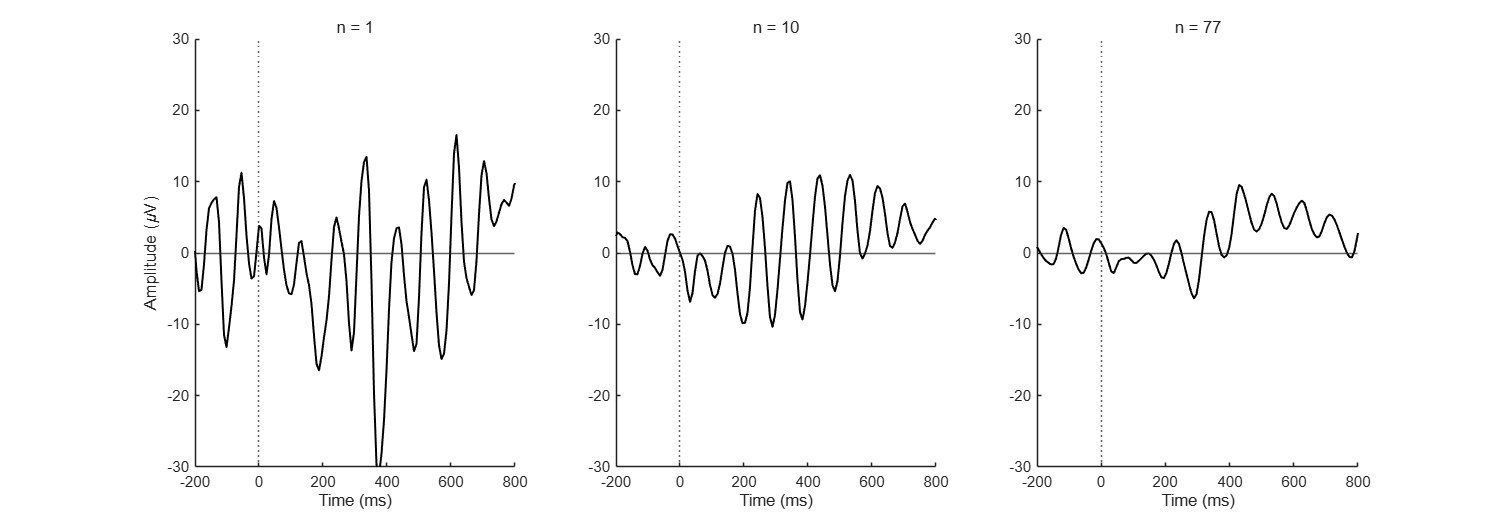
In each epochA short time segment cut out around an event., the brain’s response to the square is small, a few microvolts, with other, larger activity on top of it that has nothing to do with the stimulus. So you can hardly see the response in a single trialOne repetition of the task, usually around a single stimulus..
Before and after
Your next questions, each answered in its own section:
Why do I need this step?
The reasons in detail, and the terms you need
The idea: the response to the stimulus repeats with the same shape and timing in every trial, while the other activity varies at random. If you average all epochs point by point, the response stays and the random activity cancels out.
The resulting waveform is the eventA marker in the recording that flags a moment of interest, such as a stimulus.-related potential (ERP). Everything after it builds on it: measurement, comparing conditions, and statistics.
Why do I need this step?
The idea: the response to the stimulus repeats with the same shape and timing in every trial, while the other activity varies at random. If you average all epochs point by point, the response stays and the random activity cancels out.
The resulting waveform is the event-related potential (ERP). Everything after it builds on it: measurement, comparing conditions, and statistics.
How do I do it in EEGLAB?
4 steps in the menus
Start with the datasetOne EEG data file loaded in EEGLAB together with its information. D1 epochs clean open, as in “Starting point”.
EEGLAB has no separate “compute average” . The average is computed inside the ERPThe brain's average response to a given event across many trials. plotting menus, or with one line in a scriptA MATLAB file of commands that runs processing steps in order.. Here we display it once for a first look; the plotting options in detail come in station 7.
- Open Plot then Channel ERPs then In scalp/rect. array.
- The Topographic ERP plot - pop_plottopo() window opens. Keep Channels to plot at
1:32, leave Plot single trials and Plot in rect. array unchecked, and press Ok. - The average of each channelThe signal recorded from one electrode, as shown in EEGLAB. appears at its place on the head. Click the Pz trace to enlarge it in its own window.
- In the enlarged trace, look for two things after the vertical line at zero:
- A small negative wave around 200 ms, clearest at posterior channels such as POz and Oz.
- A large positive wave peaking around 400 ms, largest at central and parietal channels such as Cz and Pz.
Axis direction
In this window, positive is up (the 'ydir', 1 option in the last box). Some books and programs plot negative up, so always check the axis labels before you say “positive peak”.
Axis direction
In this window, positive is up (the 'ydir', 1 option in the last box). Some books and programs plot negative up, so always check the axis labels before you say “positive peak”.
How do I do it in EEGLAB?
Start with the dataset D1 epochs clean open, as in “Starting point”.
EEGLAB has no separate “compute average” menu. The average is computed inside the ERP plotting menus, or with one line in a script. Here we display it once for a first look; the plotting options in detail come in station 7.
- Open Plot then Channel ERPs then In scalp/rect. array.
- The Topographic ERP plot - pop_plottopo() window opens. Keep Channels to plot at
1:32, leave Plot single trials and Plot in rect. array unchecked, and press Ok. - The average of each channel appears at its place on the head. Click the Pz trace to enlarge it in its own window.
- In the enlarged trace, look for two things after the vertical line at zero:
- A small negative wave around 200 ms, clearest at posterior channels such as POz and Oz.
- A large positive wave peaking around 400 ms, largest at central and parietal channels such as Cz and Pz.
Axis direction
In this window, positive is up (the 'ydir', 1 option in the last box). Some books and programs plot negative up, so always check the axis labels before you say “positive peak”.
Axis direction
In this window, positive is up (the 'ydir', 1 option in the last box). Some books and programs plot negative up, so always check the axis labels before you say “positive peak”.
How do I write it as code?
The same steps in 19 lines of MATLAB
% The ERP is the mean over epochs: channels x time points
% (the same line pop_plottopo computes in the GUI step)
erp = mean(EEG.data, 3);
fprintf('Averaged %d epochs\n', EEG.trials);

% Plot the ERP at Pz, positive up
pz = find(strcmp({EEG.chanlocs.labels}, 'Pz'));
figure;
plot(EEG.times, erp(pz, :), 'k', 'LineWidth', 1.5);
xlim([-200 800]); grid on;
xline(0, '--'); yline(0);
xlabel('Time (ms)'); ylabel('Amplitude (\muV)');
title(sprintf('ERP at Pz, %d epochs', EEG.trials));

% Approximate latency of the largest positive peak between 250 and 600 ms
win = EEG.times >= 250 & EEG.times <= 600;
winTimes = EEG.times(win);
[peakAmp, iPeak] = max(erp(pz, win));
fprintf('Positive peak at Pz: %.1f uV at %.0f ms\n', peakAmp, winTimes(iPeak));

% Quick look at all channels, same as the GUI step
figure; pop_plottopo(EEG, 1:EEG.nbchan, EEG.setname, 0, 'ydir', 1);
How do I write it as code?
% The ERP is the mean over epochs: channels x time points
% (the same line pop_plottopo computes in the GUI step)
erp = mean(EEG.data, 3);
fprintf('Averaged %d epochs\n', EEG.trials);

% Plot the ERP at Pz, positive up
pz = find(strcmp({EEG.chanlocs.labels}, 'Pz'));
figure;
plot(EEG.times, erp(pz, :), 'k', 'LineWidth', 1.5);
xlim([-200 800]); grid on;
xline(0, '--'); yline(0);
xlabel('Time (ms)'); ylabel('Amplitude (\muV)');
title(sprintf('ERP at Pz, %d epochs', EEG.trials));

% Approximate latency of the largest positive peak between 250 and 600 ms
win = EEG.times >= 250 & EEG.times <= 600;
winTimes = EEG.times(win);
[peakAmp, iPeak] = max(erp(pz, win));
fprintf('Positive peak at Pz: %.1f uV at %.0f ms\n', peakAmp, winTimes(iPeak));

% Quick look at all channels, same as the GUI step
figure; pop_plottopo(EEG, 1:EEG.nbchan, EEG.setname, 0, 'ydir', 1);
Which value should I choose?
Suitable values for your analysis goal
| Setting | Value | Why |
|---|---|---|
| What goes into the average | Clean epochs from one conditionAn experimental situation compared with others, such as familiar vs unfamiliar. only | The average mixes whatever you give it. With two conditions, compute one average per condition. |
| Number of trials | As many as you can keep after rejectionExcluding epochs or data that are unfit for analysis., and about the same number per condition | noiseAny part of the recording that does not carry the information we want. in the average falls with the square root of the number of trials: 4 times the trials means half the noise. |
| Peak search window | Set before you look at the data, from the literature | The 250 to 600 ms window here is for one example only. Precise amplitudeThe size of a signal, measured in microvolts (µV) in EEG. and latency measurement comes in the ERPLAB lesson. |
Which value should I choose?
| Setting | Value | Why |
|---|---|---|
| What goes into the average | Clean epochs from one condition only | The average mixes whatever you give it. With two conditions, compute one average per condition. |
| Number of trials | As many as you can keep after rejection, and about the same number per condition | Noise in the average falls with the square root of the number of trials: 4 times the trials means half the noise. |
| Peak search window | Set before you look at the data, from the literature | The 250 to 600 ms window here is for one example only. Precise amplitude and latency measurement comes in the ERPLAB lesson. |
How do I check it worked?
4 quick checks
size(erp)returns32 384: channels × time points, with no epoch dimension.- At Pz there is a positive peak between roughly 300 and 500 ms, of about 10 µV. The official tutorial notes that the largest ERP variance in these data is at about 430 ms.
- The waveform before zero (the baseline period) is close to zero and fairly flat.
- If you plot the average of only 10 epochs, the waveform is rougher than the average of all epochs.
How do I check it worked?
size(erp)returns32 384: channels × time points, with no epoch dimension.- At Pz there is a positive peak between roughly 300 and 500 ms, of about 10 µV. The official tutorial notes that the largest ERP variance in these data is at about 430 ms.
- The waveform before zero (the baseline period) is close to zero and fairly flat.
- If you plot the average of only 10 epochs, the waveform is rougher than the average of all epochs.
What mistakes do people make?
5 mistakes and how to avoid them
- Mixing conditions in one average. In D1 the square appeared at two positions (the
positionfield). Averaging both positions together is fine as an example here, but comparing positions needs one average each. Comparing conditions is covered in the channel ERP plotting lesson in station 7. - Reading the highest peak as “the component”. A peak at one channel can come from more than one overlapping ERP component. The approximate latency here is for recognizing the waveform, not for a scientific conclusion.
- Confusing the axis direction. A positive wave plotted downward is misread as negative. Check the axis.
- Averaging before rejection. One epoch with a large artifact is enough to change the average. Reject first, as in the previous lesson.
- Very different trial counts between conditions. A condition with 20 trials and another with 80 differ in noise, so their peaks look different even when the response is the same.
What mistakes do people make?
- Mixing conditions in one average. In D1 the square appeared at two positions (the
positionfield). Averaging both positions together is fine as an example here, but comparing positions needs one average each. Comparing conditions is covered in the channel ERP plotting lesson in station 7. - Reading the highest peak as “the component”. A peak at one channel can come from more than one overlapping ERP component. The approximate latency here is for recognizing the waveform, not for a scientific conclusion.
- Confusing the axis direction. A positive wave plotted downward is misread as negative. Check the axis.
- Averaging before rejection. One epoch with a large artifact is enough to change the average. Reject first, as in the previous lesson.
- Very different trial counts between conditions. A condition with 20 trials and another with 80 differ in noise, so their peaks look different even when the response is the same.
Your browser doesn't allow saving progress. All lessons are open, but completion marks won't be saved.
Done. Your progress is saved in this browser.UndoHow do I write it in my paper?
A Methods template: edit the data, settings and versions to match what you ran
A template: edit the data, settings and versions to match what you ran.
ERPs were computed by averaging the [N] artifact-free epochs time-locked to the square stimulus (EEGLAB 2026.1).How do I write it in my paper?
A template: edit the data, settings and versions to match what you ran.
ERPs were computed by averaging the [N] artifact-free epochs time-locked to the square stimulus (EEGLAB 2026.1).Where can I read more?
2 sources, official docs first
- EEGLAB TutorialDocumentation8. Plot data > a. ERPs: Plotting ERPs in a Topographic Map
- Applied Event-Related Potential Data Analysis (Luck)Chapter 6: Assigning Events to Bins, Averaging, Baseline Correction, and Assessing Data Quality
Written for EEGLAB 2026.1 · 2026-10-28
Going further
- EEGLAB Tutorial: https://eeglab.org/tutorials/08_Plot_data/Data_Averaging.html (8. Plot data > a. ERPs: Plotting ERPs in a Topographic Map)
- Applied Event-Related Potential Data Analysis (Luck): https://socialsci.libretexts.org/Bookshelves/Psychology/Biological_Psychology/Applied_Event-Related_Potential_Data_Analysis_(Luck) (Chapter 6: Assigning Events to Bins, Averaging, Baseline Correction, and Assessing Data Quality)
Need help?
Ask, share feedback, or report an error
- Report a scientific error · Needs a GitHub account. Don't have one? Use "Share your thoughts".