Station 6 · Lesson 4
Time-frequency: ERSP & ITC
eeglab_data.set (D1) · Already applied: High-pass & low-pass filtering, Removing line noise (50/60 Hz), Bad channels, Channel interpolation, Re-referencing, Running ICA, 1-Hz filtering for ICA & copying weights, ICLabel & removing components, Extracting epochs, Baseline correction, Rejecting bad epochsDownload the data (opens in a new tab)Script to reach this state
% Shortcut: if you saved D1_epochs_clean.set in the epoch rejection lesson,
% keep the first line and the last three lines, and replace every line between them with:
% EEG = pop_loadset('D1_epochs_clean.set', pwd);
[ALLEEG, EEG, CURRENTSET, ALLCOM] = eeglab;
eeglabRoot = fileparts(which('eeglab'));
EEG = pop_loadset('eeglab_data.set', fullfile(eeglabRoot, 'sample_data'));
fullLocs = EEG.chanlocs;

% Main dataset: high-pass at 0.1 Hz, then 60 Hz line-noise removal
EEG = pop_eegfiltnew(EEG, 'locutoff', 0.1);
EEG = pop_eegfiltnew(EEG, 'locutoff', 58, 'hicutoff', 62, 'revfilt', 1);

% Bad channels you removed earlier, e.g. {'T7'}; leave empty if none
badChans = {};
if ~isempty(badChans)
    EEG = pop_select(EEG, 'rmchannel', badChans);
    EEG = pop_interp(EEG, fullLocs, 'spherical');
end

% Average reference, EOG channels excluded
eogIdx = find(ismember({EEG.chanlocs.labels}, {'EOG1', 'EOG2'}));
EEG = pop_reref(EEG, [], 'exclude', eogIdx);

% ICA on a 1-Hz copy, then copy the weights back
EEG_ica = pop_eegfiltnew(EEG, 'locutoff', 1);
EEG_ica = pop_runica(EEG_ica, 'icatype', 'runica', 'extended', 1);
EEG.icaweights  = EEG_ica.icaweights;
EEG.icasphere   = EEG_ica.icasphere;
EEG.icachansind = EEG_ica.icachansind;
EEG.icawinv     = [];
EEG.icaact      = [];
EEG = eeg_checkset(EEG);

% Remove components ICLabel rates above 90% Eye or Muscle
EEG = pop_iclabel(EEG, 'default');
EEG = pop_icflag(EEG, [NaN NaN; 0.9 1; 0.9 1; NaN NaN; NaN NaN; NaN NaN; NaN NaN]);
artifactComps = find(EEG.reject.gcompreject);
if ~isempty(artifactComps)
    EEG = pop_subcomp(EEG, artifactComps, 0);
end

% Low-pass at 30 Hz
EEG = pop_eegfiltnew(EEG, 'hicutoff', 30);
EEG.setname = 'D1 main clean lp30';

% Epochs around 'square', baseline -200 to 0 ms
EEG = pop_epoch(EEG, {'square'}, [-1 2], 'newname', 'D1 epochs', 'epochinfo', 'yes');
EEG = pop_rmbase(EEG, [-200 0]);

% Reject epochs beyond +/-100 uV
EEG = pop_eegthresh(EEG, 1, 1:EEG.nbchan, -100, 100, EEG.xmin, EEG.xmax, 0, 0);
if any(EEG.reject.rejthresh)
    EEG = pop_rejepoch(EEG, EEG.reject.rejthresh, 0);
end
EEG.setname = 'D1 epochs clean';
EEG = eeg_checkset(EEG);
EEG.filename = ''; EEG.filepath = ''; EEG.datfile = ''; EEG.saved = 'no';
[ALLEEG, EEG, CURRENTSET] = pop_newset(ALLEEG, EEG, 0, 'setname', 'D1 epochs clean', 'gui', 'off');
eeglab redraw;
Your browser's back button takes you to the exact place you were, so open anything you like.
The idea in brief
The ERPThe brain's average response to a given event across many trials. collects what repeats with the same shape and timing in every trialOne repetition of the task, usually around a single stimulus.. But some brain activity after the stimulus changes in strength without being in the same phaseWhere a wave is in its cycle at a given moment. every time, such as a drop in alpha. That activity cancels out in the average, so you do not see it in the ERP.
Before and after
Your next questions, each answered in its own section:
Why do I need this step?
The reasons in detail, and the terms you need
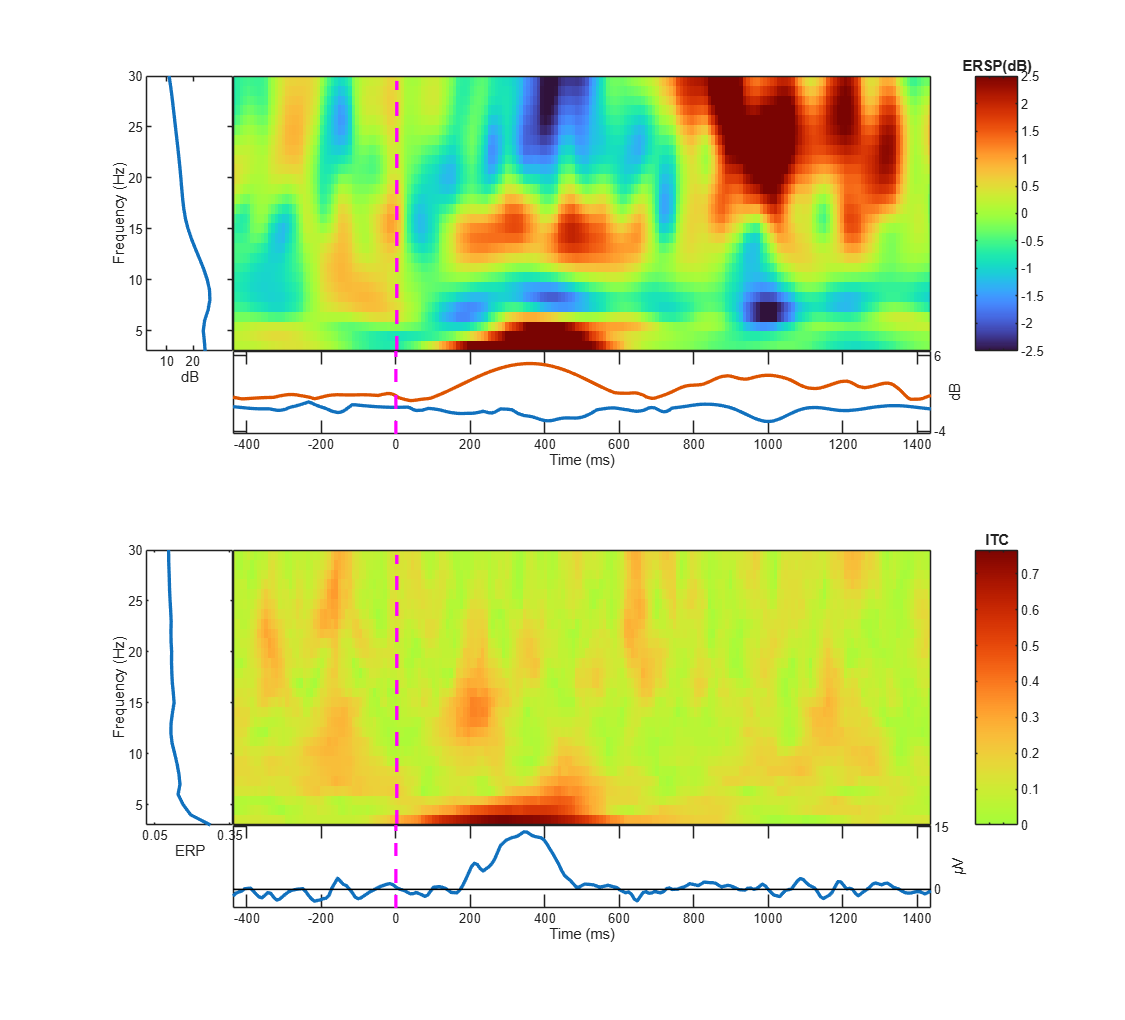
time-frequencyAnalysis showing how power at each frequency changes over time. analysis computes two things for each frequencyThe number of cycles per second, measured in hertz (Hz)., each moment, and each trial: the powerThe squared amplitude; how strong a signal is at a given frequency. and the phase. Then it gives you two maps:
- ERSP: the change in power at each time and frequency relative to baselineThe pre-stimulus period used as the zero level for comparison., in dB (decibel)A logarithmic scale for power that makes large and small values easy to compare.. It sees activity whether or not it is in the same phase.
- ITC: how consistent the phase is across trials at each time and frequency, from 0 (random phase) to 1 (the same phase in every trial). High ITCHow consistent the phase is across trials at each time and frequency. is a conditionAn experimental situation compared with others, such as familiar vs unfamiliar. for activity to appear in the ERP: activity with random phase cancels out in the average.
Why do I need this step?
Time-frequency analysis computes two things for each frequency, each moment, and each trial: the power and the phase. Then it gives you two maps:
- ERSP: the change in power at each time and frequency relative to baseline, in dB. It sees activity whether or not it is in the same phase.
- ITC: how consistent the phase is across trials at each time and frequency, from 0 (random phase) to 1 (the same phase in every trial). High ITC is a condition for activity to appear in the ERP: activity with random phase cancels out in the average.
How do I do it in EEGLAB?
9 steps in the menus
Start with the datasetOne EEG data file loaded in EEGLAB together with its information. D1 epochs clean open, as in “Starting point”.
- Open the . Where it is depends on your settings:
- If you turned on the legacy menus in the epoch rejection lesson: Plot then Time-frequency transforms then Channel time-frequency.
- If you did not: Plot then Channel time-frequency.
- The Plot channel time frequency — pop_newtimef() window opens. In Channel number, type
14, that is, channel Cz, or pick it with the … button. - Keep Sub epoch time limits [min max] (msec) at its value, that is, the whole epoch.
- In Frequency limits [min max] (Hz) or sequence, type
3 30. The data have a 30 Hz low-pass, so there is nothing meaningful above it. - Keep Baseline limits [min max] (msec) (0->pre-stim.) at
0, that is, the whole period before the stimulus. - Keep Wavelet cycles [min max/fact] or sequence at
3 0.8. - In Optional newtimef() arguments (see Help), type
'winsize', 128, a window 1 second long, so the analysis starts at 3 Hz. - Keep Plot Event Related Spectral Power and Plot Inter Trial Coherence checked, and press Ok. The computation takes a few seconds.
- Read the figure:
- Top (ERSP): red is an increase in power over baseline, blue a decrease, green no change. On the left is the spectrum of the baseline period.
- Bottom (ITC): red is consistent phase across trials. Below the map is the ERP of the same channel.
- Compare the two maps: the red area at low frequencies around 200 to 400 ms appears in both. This is the ERP itself, in the language of frequencies.
The map edges
The map does not start at -1000 ms or end at 1992 ms. Each point needs a 1-second window around it, so half a second is lost at each edge. That is why we cut long epochs in the epoching lesson.
The map edges
The map does not start at -1000 ms or end at 1992 ms. Each point needs a 1-second window around it, so half a second is lost at each edge. That is why we cut long epochs in the epoching lesson.
How do I do it in EEGLAB?
Start with the dataset D1 epochs clean open, as in “Starting point”.
- Open the menu. Where it is depends on your settings:
- If you turned on the legacy menus in the epoch rejection lesson: Plot then Time-frequency transforms then Channel time-frequency.
- If you did not: Plot then Channel time-frequency.
- The Plot channel time frequency — pop_newtimef() window opens. In Channel number, type
14, that is, channel Cz, or pick it with the … button. - Keep Sub epoch time limits [min max] (msec) at its value, that is, the whole epoch.
- In Frequency limits [min max] (Hz) or sequence, type
3 30. The data have a 30 Hz low-pass, so there is nothing meaningful above it. - Keep Baseline limits [min max] (msec) (0->pre-stim.) at
0, that is, the whole period before the stimulus. - Keep Wavelet cycles [min max/fact] or sequence at
3 0.8. - In Optional newtimef() arguments (see Help), type
'winsize', 128, a window 1 second long, so the analysis starts at 3 Hz. - Keep Plot Event Related Spectral Power and Plot Inter Trial Coherence checked, and press Ok. The computation takes a few seconds.
- Read the figure:
- Top (ERSP): red is an increase in power over baseline, blue a decrease, green no change. On the left is the spectrum of the baseline period.
- Bottom (ITC): red is consistent phase across trials. Below the map is the ERP of the same channel.
- Compare the two maps: the red area at low frequencies around 200 to 400 ms appears in both. This is the ERP itself, in the language of frequencies.
The map edges
The map does not start at -1000 ms or end at 1992 ms. Each point needs a 1-second window around it, so half a second is lost at each edge. That is why we cut long epochs in the epoching lesson.
The map edges
The map does not start at -1000 ms or end at 1992 ms. Each point needs a 1-second window around it, so half a second is lost at each edge. That is why we cut long epochs in the epoching lesson.
How do I write it as code?
The same steps in 14 lines of MATLAB
% ERSP and ITC at Cz, 3 to 30 Hz, wavelets from 3 cycles
cz = find(strcmp({EEG.chanlocs.labels}, 'Cz'));
figure;
[ersp, itc, powbase, times, freqs] = pop_newtimef(EEG, 1, cz, ...
    [EEG.xmin EEG.xmax]*1000, [3 0.8], 'freqs', [3 30], 'winsize', 128, ...
    'baseline', 0, 'padratio', 1, 'plotphase', 'off');

% ersp: frequencies x times in dB; itc: complex, its magnitude is 0 to 1
itcMag = abs(itc);
fprintf('Frequencies %.1f to %.1f Hz, times %.0f to %.0f ms\n', ...
    freqs(1), freqs(end), times(1), times(end));

% Where is the phase locking strongest?
[maxItc, idx] = max(itcMag(:));
[fi, ti] = ind2sub(size(itcMag), idx);
fprintf('Max ITC %.2f at %.1f Hz, %.0f ms\n', maxItc, freqs(fi), times(ti));
How do I write it as code?
% ERSP and ITC at Cz, 3 to 30 Hz, wavelets from 3 cycles
cz = find(strcmp({EEG.chanlocs.labels}, 'Cz'));
figure;
[ersp, itc, powbase, times, freqs] = pop_newtimef(EEG, 1, cz, ...
    [EEG.xmin EEG.xmax]*1000, [3 0.8], 'freqs', [3 30], 'winsize', 128, ...
    'baseline', 0, 'padratio', 1, 'plotphase', 'off');

% ersp: frequencies x times in dB; itc: complex, its magnitude is 0 to 1
itcMag = abs(itc);
fprintf('Frequencies %.1f to %.1f Hz, times %.0f to %.0f ms\n', ...
    freqs(1), freqs(end), times(1), times(end));

% Where is the phase locking strongest?
[maxItc, idx] = max(itcMag(:));
[fi, ti] = ind2sub(size(itcMag), idx);
fprintf('Max ITC %.2f at %.1f Hz, %.0f ms\n', maxItc, freqs(fi), times(ti));
Which value should I choose?
Suitable values for your analysis goal
| Setting | Value | Why |
|---|---|---|
| Number of cycles | 3 0.8 (the default) | 3 cycles at the lowest frequency, growing slowly with frequency. Fewer cycles give better time resolution and worse frequency resolution, and the other way around. |
| Window length | 'winsize', 128 (1 second at 128 Hz) | Lowest frequency = number of cycles ÷ window length in seconds, so 3 Hz here. A shorter window raises the lowest frequency. |
| Frequency range | 3 to 30 Hz | The window does not allow below 3 Hz, and the low-pass removed everything above 30 Hz. |
| Baseline | 0 (everything before the stimulus) | ERSP is relative to this period. Make sure it contains no response. |
| Channel | Cz here | The ERP in D1 is large at central and parietal channels. For a question about alpha, try posterior channels such as POz. |
Which value should I choose?
| Setting | Value | Why |
|---|---|---|
| Number of cycles | 3 0.8 (the default) | 3 cycles at the lowest frequency, growing slowly with frequency. Fewer cycles give better time resolution and worse frequency resolution, and the other way around. |
| Window length | 'winsize', 128 (1 second at 128 Hz) | Lowest frequency = number of cycles ÷ window length in seconds, so 3 Hz here. A shorter window raises the lowest frequency. |
| Frequency range | 3 to 30 Hz | The window does not allow below 3 Hz, and the low-pass removed everything above 30 Hz. |
| Baseline | 0 (everything before the stimulus) | ERSP is relative to this period. Make sure it contains no response. |
| Channel | Cz here | The ERP in D1 is large at central and parietal channels. For a question about alpha, try posterior channels such as POz. |
How do I check it worked?
4 quick checks
freqs(1)is about 3 andfreqs(end)about 30, andtimesruns from about -500 to 1500 ms.size(ersp)andsize(itc)are equal: number of frequencies × 200 time points.- The highest ITC is at a low frequency (about 3 to 7 Hz) at roughly 200 to 400 ms, with a value of roughly 0.5 to 0.8.
- In the ERSP, the same area is red: an increase of a few dB over baseline.
How do I check it worked?
freqs(1)is about 3 andfreqs(end)about 30, andtimesruns from about -500 to 1500 ms.size(ersp)andsize(itc)are equal: number of frequencies × 200 time points.- The highest ITC is at a low frequency (about 3 to 7 Hz) at roughly 200 to 400 ms, with a value of roughly 0.5 to 0.8.
- In the ERSP, the same area is red: an increase of a few dB over baseline.
What mistakes do people make?
5 mistakes and how to avoid them
- Short epochs. A 1-second window eats half a second at each edge. An epoch from -200 to 800 ms leaves almost nothing. Cut longer epochs for time-frequency analysis.
- Always reading red as “more activity”. Red is an increase relative to baseline. If the baseline period itself is unusual, the whole map changes.
- Mixing up ERSP and ITC. An ERSP increase without ITC means stronger activity with a different phase each time, so it will not show in the ERP. High ITC means the phase is consistent, which, together with enough amplitude, is what lets activity appear in the ERP.
- Analyzing frequencies above the low-pass. Above 30 Hz there is no signal in our data, and the ratios there are noise.
- Judging without statistics. A map without a test shows every change, even random ones. The Bootstrap significance level (Ex: 0.01 -> 1%) box hides what is not significant, and full statistics come in station 8.
What mistakes do people make?
- Short epochs. A 1-second window eats half a second at each edge. An epoch from -200 to 800 ms leaves almost nothing. Cut longer epochs for time-frequency analysis.
- Always reading red as “more activity”. Red is an increase relative to baseline. If the baseline period itself is unusual, the whole map changes.
- Mixing up ERSP and ITC. An ERSP increase without ITC means stronger activity with a different phase each time, so it will not show in the ERP. High ITC means the phase is consistent, which, together with enough amplitude, is what lets activity appear in the ERP.
- Analyzing frequencies above the low-pass. Above 30 Hz there is no signal in our data, and the ratios there are noise.
- Judging without statistics. A map without a test shows every change, even random ones. The Bootstrap significance level (Ex: 0.01 -> 1%) box hides what is not significant, and full statistics come in station 8.
Your browser doesn't allow saving progress. All lessons are open, but completion marks won't be saved.
Done. Your progress is saved in this browser.UndoHow do I write it in my paper?
A Methods template: edit the data, settings and versions to match what you ran
A template: edit the data, settings and versions to match what you ran.
Event-related spectral perturbation and inter-trial coherence were computed at Cz with newtimef using Morlet wavelets whose number of cycles increased linearly from 3 at 3 Hz to 6 at 30 Hz, relative to a −500 to 0 ms prestimulus baseline (EEGLAB 2026.1).How do I write it in my paper?
A template: edit the data, settings and versions to match what you ran.
Event-related spectral perturbation and inter-trial coherence were computed at Cz with newtimef using Morlet wavelets whose number of cycles increased linearly from 3 at 3 Hz to 6 at 30 Hz, relative to a −500 to 0 ms prestimulus baseline (EEGLAB 2026.1).Where can I read more?
3 sources, official docs first
- EEGLAB TutorialDocumentation8. Plot data > d. Time-Frequency
- EEGLAB TutorialDocumentationConcepts guide: time-frequency
- Time-Frequency Analysis of EEG Time Series Part 5: Practicum in EEGLABVideoFull video · 8:55
Written for EEGLAB 2026.1 · 2026-10-28
Going further
- EEGLAB Tutorial: https://eeglab.org/tutorials/08_Plot_data/Time-Frequency_decomposition.html (8. Plot data > d. Time-Frequency)
- EEGLAB Tutorial: https://eeglab.org/tutorials/ConceptsGuide/Time_frequency_tutorial.html (Concepts guide: time-frequency)
- Time-Frequency Analysis of EEG Time Series Part 5: Practicum in EEGLAB: https://www.youtube.com/watch?v=b0430f_W0mo (Full video)
Need help?
Ask, share feedback, or report an error
- Report a scientific error · Needs a GitHub account. Don't have one? Use "Share your thoughts".