Station 4 · Lesson 5
ICLabel & removing components
eeglab_data.set (D1) · Already applied: High-pass & low-pass filtering, Removing line noise (50/60 Hz), Bad channels, Channel interpolation, Re-referencing, Running ICA, 1-Hz filtering for ICA & copying weightsDownload the data (opens in a new tab)Script to reach this state
% Shortcut: if you saved D1_main_ica.set in the 1-Hz filtering lesson, keep
% the first line and the last two lines, and replace every line between them with:
% EEG = pop_loadset('D1_main_ica.set', pwd);
[ALLEEG, EEG, CURRENTSET, ALLCOM] = eeglab;
eeglabRoot = fileparts(which('eeglab'));
EEG = pop_loadset('eeglab_data.set', fullfile(eeglabRoot, 'sample_data'));
fullLocs = EEG.chanlocs;

% Main dataset: high-pass at 0.1 Hz, then 60 Hz line-noise removal
EEG = pop_eegfiltnew(EEG, 'locutoff', 0.1);
EEG = pop_eegfiltnew(EEG, 'locutoff', 58, 'hicutoff', 62, 'revfilt', 1);

% Bad channels you removed earlier, e.g. {'T7'}; leave empty if none
badChans = {};
if ~isempty(badChans)
    EEG = pop_select(EEG, 'rmchannel', badChans);
    EEG = pop_interp(EEG, fullLocs, 'spherical');
end

% Average reference, EOG channels excluded
eogIdx = find(ismember({EEG.chanlocs.labels}, {'EOG1', 'EOG2'}));
EEG = pop_reref(EEG, [], 'exclude', eogIdx);

% ICA on a 1-Hz copy, then copy the weights back
EEG_ica = pop_eegfiltnew(EEG, 'locutoff', 1);
EEG_ica = pop_runica(EEG_ica, 'icatype', 'runica', 'extended', 1);
EEG.icaweights  = EEG_ica.icaweights;
EEG.icasphere   = EEG_ica.icasphere;
EEG.icachansind = EEG_ica.icachansind;
EEG.icawinv     = [];
EEG.icaact      = [];
EEG = eeg_checkset(EEG);
EEG.filename = ''; EEG.filepath = ''; EEG.datfile = ''; EEG.saved = 'no';
[ALLEEG, EEG, CURRENTSET] = pop_newset(ALLEEG, EEG, 0, 'setname', 'D1 main', 'gui', 'off');
eeglab redraw;
Your browser's back button takes you to the exact place you were, so open anything you like.
The idea in brief
After running ICAA method that separates the recording into independent sources, some brain and some artifact. you have about 31 ICA components. Some are brain activity, and some are artifacts: non-brain signals mixed into the recording, such as blinks and muscleHigh-frequency electrical activity from muscles, often jaw and neck. activity.
Before and after
Before you trust any automatic classifier, train your own eye to read a component.
What does this show?
What does this show?
Your next questions, each answered in its own section:
Why do I need this step?
The reasons in detail, and the terms you need
Judging every component by eye takes time and experience. ICLabelA tool that classifies each ICA component into seven classes with a probability for each. is a pluginA package that adds new functions or menus to EEGLAB. that ships with EEGLAB. It was trained on thousands of components labeled by hand, and it gives each component a probability for seven classes.
ICLabel is an assistant, not a judge. You review its suggestion, then remove the artifactA non-brain signal mixed into the recording, such as blinks or muscle activity. components from the main datasetOne EEG data file loaded in EEGLAB together with its information..
Why do I need this step?
Judging every component by eye takes time and experience. ICLabel is a plugin that ships with EEGLAB. It was trained on thousands of components labeled by hand, and it gives each component a probability for seven classes.
ICLabel is an assistant, not a judge. You review its suggestion, then remove the artifact components from the main dataset.
How do I do it in EEGLAB?
13 steps in the menus
Start with the main dataset loaded and holding ICA weights, as in the Starting point.
First: classify the components
- Open Tools then Classify components using ICLabel then Label components.
- In Select which icversion of ICLabel to use:, keep Default (recommended) and press OK.
- The component scalp maps appear, each with its most likely class and probability above it.
- Click any component to open its panels: scalp mapA top-down picture showing how a value is spread over the head., spectrumHow a signal's strength is distributed across frequencies., time seriesThe values of a signal in time order., and the probability of each class.
Second: review by eye
For each component you plan to remove, check the three signs:
| Class | Scalp map | Spectrum | Time series |
|---|---|---|---|
| Eye, with the blinkClosing and opening the eye; seen as large peaks on frontal channels. as the example here | Strong at the front of the head, symmetric left and right | Highest at low frequencies, then falls smoothly | Large isolated peaks, one per blink |
| Muscle | A small, focal spot at the edge, near the temples or neck | Rises or stays high above 20 Hz | Fast, rough activity, often in bursts |
| Brain | Broad and smooth | A peak near 10 Hz, or a gradual fall as frequencyThe number of cycles per second, measured in hertz (Hz). increases | Ongoing oscillation without sharp peaks |
The other classes
Reading the other classes (heart, line noiseInterference from the mains supply at 60 Hz in Saudi Arabia or 50 Hz elsewhere., channel noise) is the next lesson: Reading artifact components.
The other classes
Reading the other classes (heart, line noiseInterference from the mains supply at 60 Hz in Saudi Arabia or 50 Hz elsewhere., channel noise) is the next lesson: Reading artifact components.
The component panels you open by clicking a component come from the Viewprops extension, which ships inside ICLabel. You can open them for all components at once from Tools then Classify components using ICLabel then View extended component properties; the window title starts with View components properties - pop_viewprops(). The Viewprops files are in the folder <EEGLAB>/plugins/ICLabel/viewprops. The menu adds this folder to the MATLAB path by itself, but a script must add it with an addpath line before pop_viewprops, as this lesson’s script does.
Third: flag artifact components
A flag is a mark on the component, not a removal. Removal is the next step.
- Open Tools then Classify components using ICLabel then Flag components as artifacts.
- The Select range for flagging component for rejection window shows a Min and a Max for each class. Defaults: Muscle from 0.9 to 1, Eye from 0.9 to 1, the rest empty.
- Press OK. The command window prints how many components were flagged.
Fourth: remove the components and compare
- Open Tools then Remove components from data.
- A window lists the flagged component numbers and asks whether to remove them. Press Manual rej. to see and edit the list, not Yes, because Yes removes them without review. Ignore the STUDY note in that window for now; it is for multi-participant analysis in station 8.
- The List of component(s) to remove from data field holds the flagged components. Edit it based on your review: add a component you are sure is an artifact, or delete a number you doubt. Then press OK.
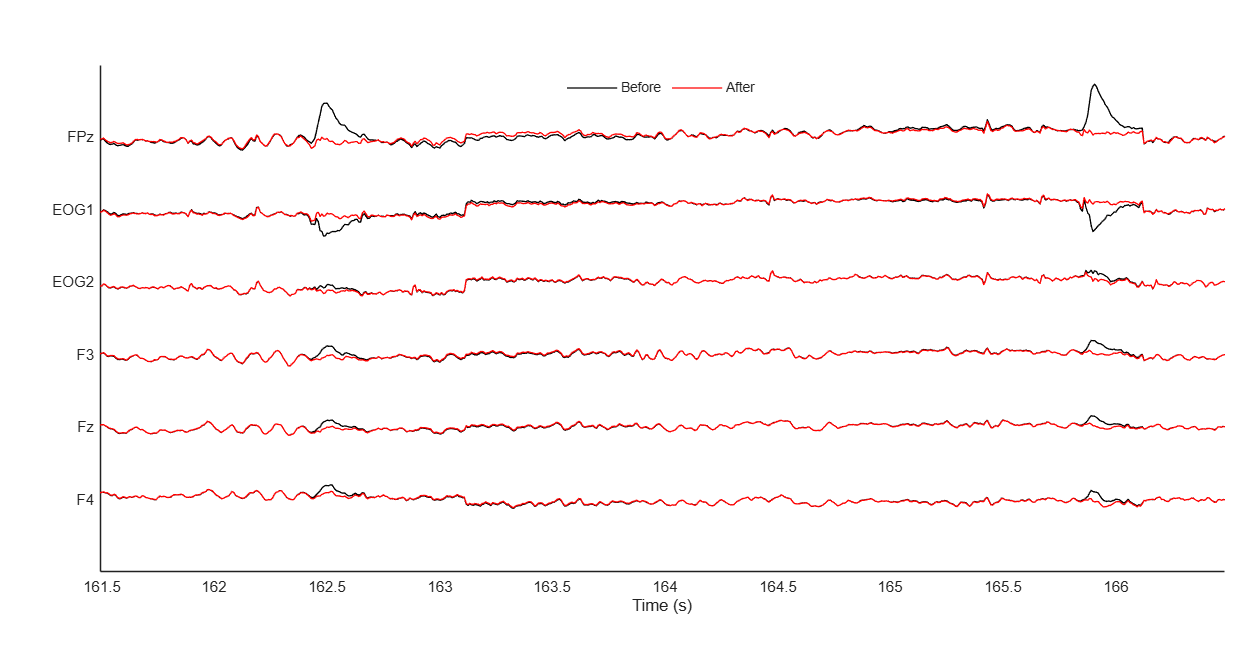
- A confirmation window appears. Press Plot single trials: black is before removal, red is after.
- If the blinks are gone and the rest of the signal is unchanged, press Accept.
- Name the new dataset
D1 main cleanand leave Overwrite it in memory (set=yes; unset=create a new dataset) unchecked. Save it with File then Save current dataset as asD1_main_clean.set; the power spectrum lesson can start from it.
Fifth: apply the postponed low-pass
Now that the data are clean, apply the 30 Hz low-pass from the filtering lesson: Tools then Filter the data then Basic FIR filter (new, default), and type 30 in Higher edge of the frequency pass band (Hz). Name the resulting dataset D1 main clean lp30, then save it with File then Save current dataset as. The epoching lesson starts from it.
How do I do it in EEGLAB?
Start with the main dataset loaded and holding ICA weights, as in the Starting point.
First: classify the components
- Open Tools then Classify components using ICLabel then Label components.
- In Select which icversion of ICLabel to use:, keep Default (recommended) and press OK.
- The component scalp maps appear, each with its most likely class and probability above it.
- Click any component to open its panels: scalp map, spectrum, time series, and the probability of each class.
Second: review by eye
For each component you plan to remove, check the three signs:
| Class | Scalp map | Spectrum | Time series |
|---|---|---|---|
| Eye, with the blink as the example here | Strong at the front of the head, symmetric left and right | Highest at low frequencies, then falls smoothly | Large isolated peaks, one per blink |
| Muscle | A small, focal spot at the edge, near the temples or neck | Rises or stays high above 20 Hz | Fast, rough activity, often in bursts |
| Brain | Broad and smooth | A peak near 10 Hz, or a gradual fall as frequency increases | Ongoing oscillation without sharp peaks |
The other classes
Reading the other classes (heart, line noise, channel noise) is the next lesson: Reading artifact components.
The other classes
Reading the other classes (heart, line noise, channel noise) is the next lesson: Reading artifact components.
The component panels you open by clicking a component come from the Viewprops extension, which ships inside ICLabel. You can open them for all components at once from Tools then Classify components using ICLabel then View extended component properties; the window title starts with View components properties - pop_viewprops(). The Viewprops files are in the folder <EEGLAB>/plugins/ICLabel/viewprops. The menu adds this folder to the MATLAB path by itself, but a script must add it with an addpath line before pop_viewprops, as this lesson’s script does.
Third: flag artifact components
A flag is a mark on the component, not a removal. Removal is the next step.
- Open Tools then Classify components using ICLabel then Flag components as artifacts.
- The Select range for flagging component for rejection window shows a Min and a Max for each class. Defaults: Muscle from 0.9 to 1, Eye from 0.9 to 1, the rest empty.
- Press OK. The command window prints how many components were flagged.
Fourth: remove the components and compare
- Open Tools then Remove components from data.
- A window lists the flagged component numbers and asks whether to remove them. Press Manual rej. to see and edit the list, not Yes, because Yes removes them without review. Ignore the STUDY note in that window for now; it is for multi-participant analysis in station 8.
- The List of component(s) to remove from data field holds the flagged components. Edit it based on your review: add a component you are sure is an artifact, or delete a number you doubt. Then press OK.
- A confirmation window appears. Press Plot single trials: black is before removal, red is after.
- If the blinks are gone and the rest of the signal is unchanged, press Accept.
- Name the new dataset
D1 main cleanand leave Overwrite it in memory (set=yes; unset=create a new dataset) unchecked. Save it with File then Save current dataset as asD1_main_clean.set; the power spectrum lesson can start from it.
Fifth: apply the postponed low-pass
Now that the data are clean, apply the 30 Hz low-pass from the filtering lesson: Tools then Filter the data then Basic FIR filter (new, default), and type 30 in Higher edge of the frequency pass band (Hz). Name the resulting dataset D1 main clean lp30, then save it with File then Save current dataset as. The epoching lesson starts from it.
How do I write it as code?
The same steps in 28 lines of MATLAB
% Classify all components with the default ICLabel classifier
EEG = pop_iclabel(EEG, 'default');

% One row per component, one column per class
classes = EEG.etc.ic_classification.ICLabel.classes;
probs   = EEG.etc.ic_classification.ICLabel.classifications;
disp(classes);
disp(round(probs(1:10, :) * 100));

% Flag components above 90% Muscle or Eye
% Row order: Brain, Muscle, Eye, Heart, Line Noise, Channel Noise, Other
thresh = [NaN NaN; 0.9 1; 0.9 1; NaN NaN; NaN NaN; NaN NaN; NaN NaN];
EEG = pop_icflag(EEG, thresh);
artifactComps = find(EEG.reject.gcompreject);

% Review the flagged components
% pop_viewprops is in the ICLabel plugin folder; the menu adds it to the path, a script must add it
addpath(fullfile(fileparts(which('iclabel')), 'viewprops'));
if ~isempty(artifactComps)
    pop_viewprops(EEG, 0, artifactComps);
end

% Remove them from the main dataset
if ~isempty(artifactComps)
    EEG = pop_subcomp(EEG, artifactComps, 0);
end
EEG.setname = 'D1 main clean';
EEG = pop_saveset(EEG, 'filename', 'D1_main_clean.set', 'filepath', pwd);

% Low-pass at 30 Hz, postponed until after ICA cleaning
EEG = pop_eegfiltnew(EEG, 'hicutoff', 30);
EEG.setname = 'D1 main clean lp30';
EEG = pop_saveset(EEG, 'filename', 'D1_main_clean_lp30.set', 'filepath', pwd);
If no component is flagged, the script skips the review and the removal. If your review changes the list, edit artifactComps by hand before the removal block.
How do I write it as code?
% Classify all components with the default ICLabel classifier
EEG = pop_iclabel(EEG, 'default');

% One row per component, one column per class
classes = EEG.etc.ic_classification.ICLabel.classes;
probs   = EEG.etc.ic_classification.ICLabel.classifications;
disp(classes);
disp(round(probs(1:10, :) * 100));

% Flag components above 90% Muscle or Eye
% Row order: Brain, Muscle, Eye, Heart, Line Noise, Channel Noise, Other
thresh = [NaN NaN; 0.9 1; 0.9 1; NaN NaN; NaN NaN; NaN NaN; NaN NaN];
EEG = pop_icflag(EEG, thresh);
artifactComps = find(EEG.reject.gcompreject);

% Review the flagged components
% pop_viewprops is in the ICLabel plugin folder; the menu adds it to the path, a script must add it
addpath(fullfile(fileparts(which('iclabel')), 'viewprops'));
if ~isempty(artifactComps)
    pop_viewprops(EEG, 0, artifactComps);
end

% Remove them from the main dataset
if ~isempty(artifactComps)
    EEG = pop_subcomp(EEG, artifactComps, 0);
end
EEG.setname = 'D1 main clean';
EEG = pop_saveset(EEG, 'filename', 'D1_main_clean.set', 'filepath', pwd);

% Low-pass at 30 Hz, postponed until after ICA cleaning
EEG = pop_eegfiltnew(EEG, 'hicutoff', 30);
EEG.setname = 'D1 main clean lp30';
EEG = pop_saveset(EEG, 'filename', 'D1_main_clean_lp30.set', 'filepath', pwd);
If no component is flagged, the script skips the review and the removal. If your review changes the list, edit artifactComps by hand before the removal block.
Which value should I choose?
Suitable values for your analysis goal
| Setting | Value | Why |
|---|---|---|
| Classifier version | Default | The option recommended in the ICLabel window itself, and the one tested in the published ICLabel paper. |
| Flagging threshold | Eye and Muscle above 90% | The default in EEGLAB 2026.1 and the official tutorial. A high threshold means ICLabel only flags what it is sure about, and the rest is left for your review. |
| Other classes (Heart, Line Noise, Channel Noise) | Not flagged automatically | Remove them only after reviewing them yourself. You learn to read them in the next lesson. |
| ICLabel version | 1.6 or newer | ICLabel 1.5, shipped with EEGLAB 2024.0, has a known bug, and the advice is to upgrade. |
ICLabel and the reference
ICLabel computes its features on average-referenced data. If your data are not average-referenced, it converts a temporary copy internally before computing. On our path the EEG channels are already average-referenced from the re-referencing lesson.
ICLabel and the reference
ICLabel computes its features on average-referenced data. If your data are not average-referenced, it converts a temporary copy internally before computing. On our path the EEG channels are already average-referenced from the re-referencing lesson.
In older papers you will see other tools for classifying components, such as MARA, ADJUST, and SASICA. These are older tools, and ICLabel is the default today.
Which value should I choose?
| Setting | Value | Why |
|---|---|---|
| Classifier version | Default | The option recommended in the ICLabel window itself, and the one tested in the published ICLabel paper. |
| Flagging threshold | Eye and Muscle above 90% | The default in EEGLAB 2026.1 and the official tutorial. A high threshold means ICLabel only flags what it is sure about, and the rest is left for your review. |
| Other classes (Heart, Line Noise, Channel Noise) | Not flagged automatically | Remove them only after reviewing them yourself. You learn to read them in the next lesson. |
| ICLabel version | 1.6 or newer | ICLabel 1.5, shipped with EEGLAB 2024.0, has a known bug, and the advice is to upgrade. |
ICLabel and the reference
ICLabel computes its features on average-referenced data. If your data are not average-referenced, it converts a temporary copy internally before computing. On our path the EEG channels are already average-referenced from the re-referencing lesson.
ICLabel and the reference
ICLabel computes its features on average-referenced data. If your data are not average-referenced, it converts a temporary copy internally before computing. On our path the EEG channels are already average-referenced from the re-referencing lesson.
In older papers you will see other tools for classifying components, such as MARA, ADJUST, and SASICA. These are older tools, and ICLabel is the default today.
How do I check it worked?
3 quick checks
- Compare the signal. Open Plot then Channel data (scroll) on
D1 main, then onD1 main clean. Blink peaks should be gone from the frontal channels, and the rest of the signal should be almost identical. - Count the components. In the command window, type
size(EEG.icawinv, 2). It should be the previous number minus the components you removed. - Open the component maps with Plot then Component maps then In 2-D on
D1 main clean. The blink component should no longer be among them.
How do I check it worked?
- Compare the signal. Open Plot then Channel data (scroll) on
D1 main, then onD1 main clean. Blink peaks should be gone from the frontal channels, and the rest of the signal should be almost identical. - Count the components. In the command window, type
size(EEG.icawinv, 2). It should be the previous number minus the components you removed. - Open the component maps with Plot then Component maps then In 2-D on
D1 main clean. The blink component should no longer be among them.
What mistakes do people make?
5 mistakes and how to avoid them
- Trusting ICLabel blindly. It is an automatic classifier and it is sometimes wrong. Review every component with the three signs before removing it.
- Removing everything that is not Brain. A component whose top class is Other may carry part of the brain activity. If you are not sure it is an artifact, keep it.
- Removing components from the ICA copy instead of the main dataset. The 1 Hz copy is only for computing ICA. Remove components from the main dataset filtered at 0.1 Hz.
- Copying component numbers. Component order changes between runs. Component 3 in the official tutorial, or in this lesson’s picture, may not be the blink in your data.
- An old ICLabel version. Check its version in File then Manage EEGLAB extensions, and update it if it is older than 1.6. EEGLAB 2026.1 ships with version 1.7.
What mistakes do people make?
- Trusting ICLabel blindly. It is an automatic classifier and it is sometimes wrong. Review every component with the three signs before removing it.
- Removing everything that is not Brain. A component whose top class is Other may carry part of the brain activity. If you are not sure it is an artifact, keep it.
- Removing components from the ICA copy instead of the main dataset. The 1 Hz copy is only for computing ICA. Remove components from the main dataset filtered at 0.1 Hz.
- Copying component numbers. Component order changes between runs. Component 3 in the official tutorial, or in this lesson’s picture, may not be the blink in your data.
- An old ICLabel version. Check its version in File then Manage EEGLAB extensions, and update it if it is older than 1.6. EEGLAB 2026.1 ships with version 1.7.
Your browser doesn't allow saving progress. All lessons are open, but completion marks won't be saved.
Done. Your progress is saved in this browser.UndoHow do I write it in my paper?
A Methods template: edit the data, settings and versions to match what you ran
A template: edit the data, settings and versions to match what you ran.
Components were classified with ICLabel (version 1.7; Pion-Tonachini et al., 2019), and components with a probability above 0.9 for the Eye or Muscle class were reviewed visually and removed ([N] components). Data were then low-pass filtered (passband edge 30 Hz, cutoff frequency [33.64] Hz at −6 dB, filter length [59] points; pop_eegfiltnew, firfilt plugin 2.8).How do I write it in my paper?
A template: edit the data, settings and versions to match what you ran.
Components were classified with ICLabel (version 1.7; Pion-Tonachini et al., 2019), and components with a probability above 0.9 for the Eye or Muscle class were reviewed visually and removed ([N] components). Data were then low-pass filtered (passband edge 30 Hz, cutoff frequency [33.64] Hz at −6 dB, filter length [59] points; pop_eegfiltnew, firfilt plugin 2.8).Where can I read more?
4 sources, official docs first
- EEGLAB TutorialDocumentation6. Reject artifacts > d. Indep. Comp. Analysis: Automated detection of artifactual ICA components
- EEGLAB TutorialDocumentationSubtracting ICA components from data
- ICLabel TutorialICLabel Tutorial
- ICA applied to EEG part 9: Automatically detecting ICA component classesVideoFull video · 5:24
Written for EEGLAB 2026.1 · 2026-10-28
Going further
- EEGLAB Tutorial: https://eeglab.org/tutorials/06_RejectArtifacts/RunICA.html (6. Reject artifacts > d. Indep. Comp. Analysis: Automated detection of artifactual ICA components)
- EEGLAB Tutorial: https://eeglab.org/tutorials/06_RejectArtifacts/RunICA.html (Subtracting ICA components from data)
- ICLabel Tutorial: https://labeling.ucsd.edu/tutorial/about (ICLabel Tutorial)
- ICA applied to EEG part 9: Automatically detecting ICA component classes: https://www.youtube.com/watch?v=Gi-0KiV_Az8 (Full video)
Need help?
Ask, share feedback, or report an error
- Report a scientific error · Needs a GitHub account. Don't have one? Use "Share your thoughts".