Station 3 · Lesson 6
Channel interpolation
eeglab_data.set (D1) · Already applied: High-pass & low-pass filtering, Removing line noise (50/60 Hz), Bad channelsDownload the data (opens in a new tab)Script to reach this state
[ALLEEG, EEG, CURRENTSET, ALLCOM] = eeglab;
eeglabRoot = fileparts(which('eeglab'));
EEG = pop_loadset('eeglab_data.set', fullfile(eeglabRoot, 'sample_data'));
fullLocs = EEG.chanlocs;

% Main dataset: high-pass at 0.1 Hz, then 60 Hz line-noise removal
EEG = pop_eegfiltnew(EEG, 'locutoff', 0.1);
EEG = pop_eegfiltnew(EEG, 'locutoff', 58, 'hicutoff', 62, 'revfilt', 1);
EEG.filename = ''; EEG.filepath = ''; EEG.datfile = ''; EEG.saved = 'no';
[ALLEEG, EEG, CURRENTSET] = pop_newset(ALLEEG, EEG, 0, 'setname', 'D1 hp0.1 notch60', 'gui', 'off');

% Bad channels you removed earlier, e.g. {'T7'}; leave empty if none
badChans = {};
if ~isempty(badChans)
    EEG = pop_select(EEG, 'rmchannel', badChans);
end
EEG.filename = ''; EEG.filepath = ''; EEG.datfile = ''; EEG.saved = 'no';
[ALLEEG, EEG, CURRENTSET] = pop_newset(ALLEEG, EEG, CURRENTSET, 'setname', 'D1 badch', 'gui', 'off');
eeglab redraw;
Your browser's back button takes you to the exact place you were, so open anything you like.
The idea in brief
In the previous lesson you removed the bad channels. Now you rebuild them by interpolationEstimating a removed channel's signal from the channels around it.: EEGLAB computes each removed channelThe signal recorded from one electrode, as shown in EEGLAB. from the channels around it, based on the electrodeThe physical sensor placed on the scalp to pick up the signal. locations on the head. D1 has no bad channelA channel that is flat or noisy for most of the recording., so you practice on a temporary copy that you do not save.
Why not carry on without them? For three reasons:
Before and after
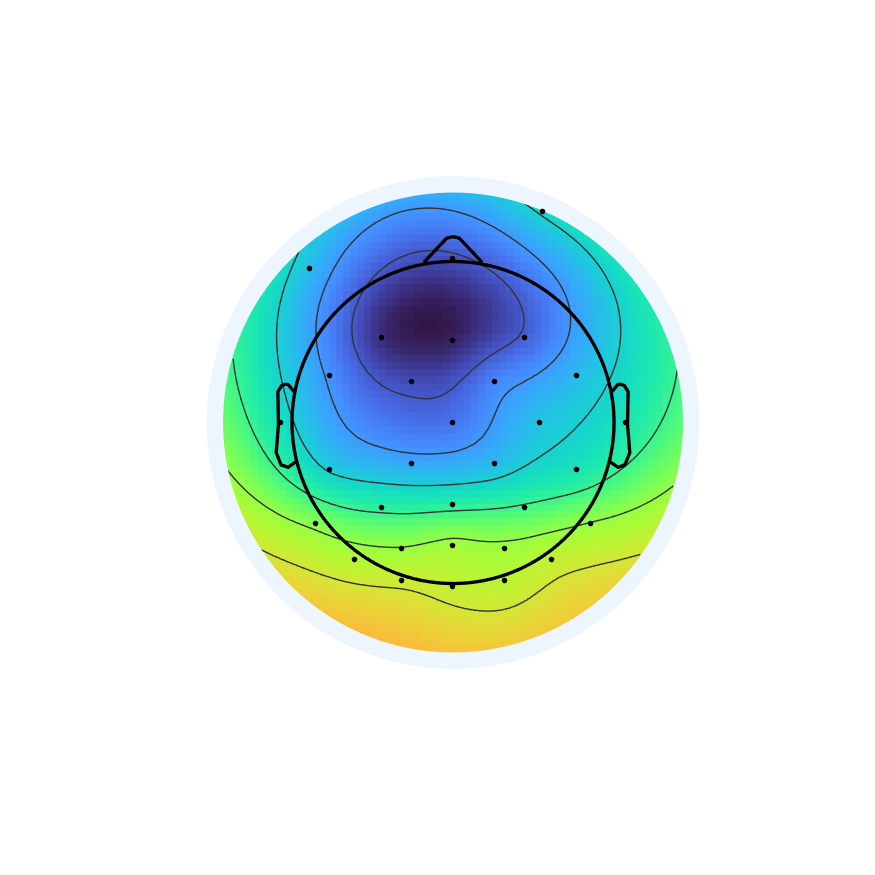
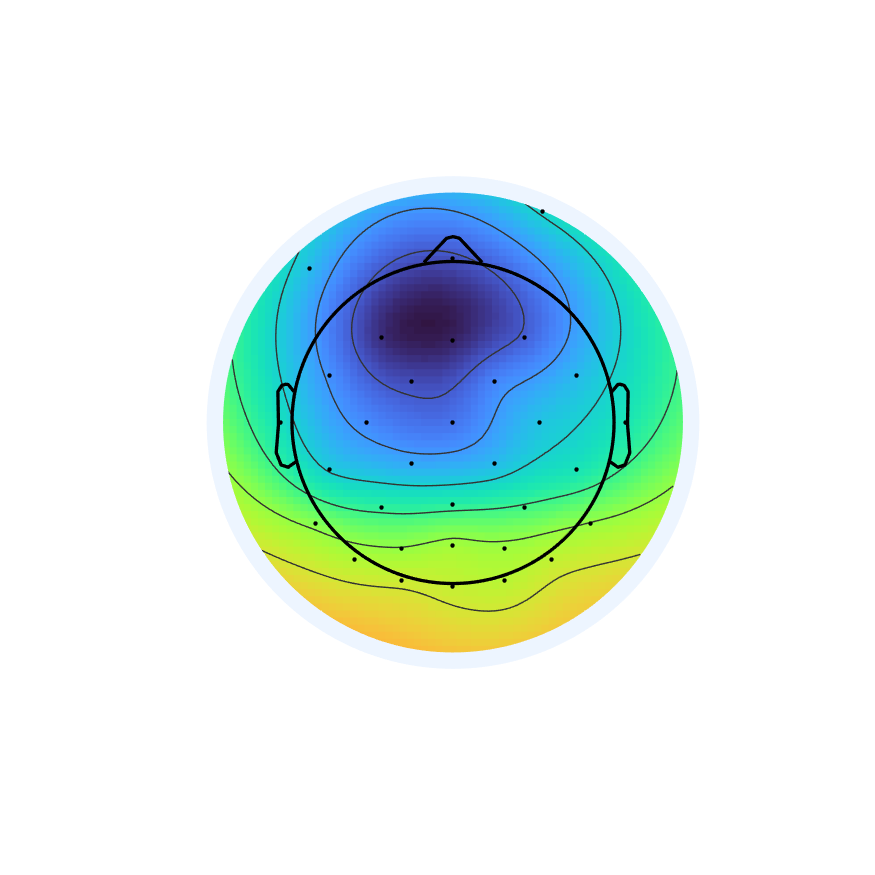
Drag the line to compare.
Your next questions, each answered in its own section:
Why do I need this step?
The reasons in detail, and the terms you need
- The average referenceA reference equal to the mean of all scalp channels. needs channels spread over the whole head. A missing channel on one side tilts the average toward the other side.
- Comparing participants needs the same channels for everyone.
- Scalp maps draw a gap where a channel is missing.
But interpolation has a price. An interpolated channel is a mix of the other channels, so it adds no new information. That is why each interpolated channel reduces the data rankThe number of truly independent channels; it drops after interpolation or average reference. by one. You will need this in the ICAA method that separates the recording into independent sources, some brain and some artifact. lessons.
Why do I need this step?
- The average reference needs channels spread over the whole head. A missing channel on one side tilts the average toward the other side.
- Comparing participants needs the same channels for everyone.
- Scalp maps draw a gap where a channel is missing.
But interpolation has a price. An interpolated channel is a mix of the other channels, so it adds no new information. That is why each interpolated channel reduces the data rank by one. You will need this in the ICA lessons.
How do I do it in EEGLAB?
12 steps in the menus
Start with the Starting point. Its scriptA MATLAB file of commands that runs processing steps in order. puts the datasetOne EEG data file loaded in EEGLAB together with its information. from before channel removal, D1 hp0.1 notch60, in dataset 1, and the main dataset D1 badch in dataset 2. You will need the number of dataset 1 for your own data, because it holds the locations of all channels.
First: practice on a good channel
- With
D1 badchcurrent, open Edit then Select data. TypeC3in Channel(s), check the box under on->remove these, then press OK. - Name the new dataset
D1 noC3. In the main window, Channels per frame is now 31. - Open Tools then Interpolate electrodes. A window titled Interpolate channel(s) — pop_interp() appears.
- Press Use all channels from other dataset, type
2, the number of theD1 badchdataset, in Dataset index, then OK. The nameC3appears under What channel(s) do you want to interpolate. - In Interpolation method, keep Spherical, leave Time range [min max] (s) empty, then press OK.
- The command window prints
Interpolating 1 channels.... Name the datasetD1 C3 back. The channel count is 32 again. - Compare
C3inD1 badchand inD1 C3 backwith Plot then Channel data (scroll). The two signals are very similar. - These are exercise copies, so do not save them. Go back to
D1 badch.
Second: interpolation on your own data
- With the dataset you removed bad channels from as current, open Tools then Interpolate electrodes.
- Press Use all channels from other dataset and type the number of the dataset from before the removal. The names of the removed channels appear.
- Keep Spherical and press OK. Name the result
D1 interpand save it. - In D1 no channel was removed, so if you try, EEGLAB says
No new channels selected. The main dataset staysD1 badch, and the re-referencingChanging the reference after recording by expressing voltages relative to a new one. lesson starts from it.
How do I do it in EEGLAB?
Start with the Starting point. Its script puts the dataset from before channel removal, D1 hp0.1 notch60, in dataset 1, and the main dataset D1 badch in dataset 2. You will need the number of dataset 1 for your own data, because it holds the locations of all channels.
First: practice on a good channel
- With
D1 badchcurrent, open Edit then Select data. TypeC3in Channel(s), check the box under on->remove these, then press OK. - Name the new dataset
D1 noC3. In the main window, Channels per frame is now 31. - Open Tools then Interpolate electrodes. A window titled Interpolate channel(s) — pop_interp() appears.
- Press Use all channels from other dataset, type
2, the number of theD1 badchdataset, in Dataset index, then OK. The nameC3appears under What channel(s) do you want to interpolate. - In Interpolation method, keep Spherical, leave Time range [min max] (s) empty, then press OK.
- The command window prints
Interpolating 1 channels.... Name the datasetD1 C3 back. The channel count is 32 again. - Compare
C3inD1 badchand inD1 C3 backwith Plot then Channel data (scroll). The two signals are very similar. - These are exercise copies, so do not save them. Go back to
D1 badch.
Second: interpolation on your own data
- With the dataset you removed bad channels from as current, open Tools then Interpolate electrodes.
- Press Use all channels from other dataset and type the number of the dataset from before the removal. The names of the removed channels appear.
- Keep Spherical and press OK. Name the result
D1 interpand save it. - In D1 no channel was removed, so if you try, EEGLAB says
No new channels selected. The main dataset staysD1 badch, and the re-referencing lesson starts from it.
How do I write it as code?
The same steps in 15 lines of MATLAB
% Rebuild the removed channels from the full channel list (fullLocs)
if ~isempty(badChans)
    EEG = pop_interp(EEG, fullLocs, 'spherical');
end
EEG.setname = 'D1 interp';
fprintf('Channels after interpolation: %d\n', EEG.nbchan);
EEG = pop_saveset(EEG, 'filename', 'D1_interp.set', 'filepath', pwd);

% Exercise: remove a good channel, rebuild it, compare with the original
testChan = 'C3';
EEG_drop = pop_select(EEG, 'rmchannel', {testChan});
EEG_back = pop_interp(EEG_drop, fullLocs, 'spherical');
iOrig = find(strcmp({EEG.chanlocs.labels}, testChan));
iBack = find(strcmp({EEG_back.chanlocs.labels}, testChan));
r = corrcoef(double(EEG.data(iOrig, :)), double(EEG_back.data(iBack, :)));
fprintf('Correlation between original and interpolated %s: %.2f\n', testChan, r(1, 2));
The variable fullLocs comes from the Starting point script: a copy of all channel locations before any removal. Always keep it at the start of processing.
How do I write it as code?
% Rebuild the removed channels from the full channel list (fullLocs)
if ~isempty(badChans)
    EEG = pop_interp(EEG, fullLocs, 'spherical');
end
EEG.setname = 'D1 interp';
fprintf('Channels after interpolation: %d\n', EEG.nbchan);
EEG = pop_saveset(EEG, 'filename', 'D1_interp.set', 'filepath', pwd);

% Exercise: remove a good channel, rebuild it, compare with the original
testChan = 'C3';
EEG_drop = pop_select(EEG, 'rmchannel', {testChan});
EEG_back = pop_interp(EEG_drop, fullLocs, 'spherical');
iOrig = find(strcmp({EEG.chanlocs.labels}, testChan));
iBack = find(strcmp({EEG_back.chanlocs.labels}, testChan));
r = corrcoef(double(EEG.data(iOrig, :)), double(EEG_back.data(iBack, :)));
fprintf('Correlation between original and interpolated %s: %.2f\n', testChan, r(1, 2));
The variable fullLocs comes from the Starting point script: a copy of all channel locations before any removal. Always keep it at the start of processing.
Which value should I choose?
Suitable values for your analysis goal
| Setting | Value | Why |
|---|---|---|
| Interpolation method | Spherical | The first option in the window and the default in pop_interp. It uses electrode positions on the surface of the head. |
| Source of locations | All channels from the dataset before removal, or fullLocs in a script | This is how EEGLAB knows the names and positions of the missing channels, and puts them back in their original order. |
| Where in the pipeline | After removing bad channels, before re-referencing | The average reference needs all channels. |
| Number of interpolated channels | Few | Each interpolated channel reduces the data rank by one and adds no new information. |
| Interpolate removed channel(s) in the re-referencing window | Not on our path | It interpolates and re-references in one step. We do the two steps separately so you can check each one. |
Which value should I choose?
| Setting | Value | Why |
|---|---|---|
| Interpolation method | Spherical | The first option in the window and the default in pop_interp. It uses electrode positions on the surface of the head. |
| Source of locations | All channels from the dataset before removal, or fullLocs in a script | This is how EEGLAB knows the names and positions of the missing channels, and puts them back in their original order. |
| Where in the pipeline | After removing bad channels, before re-referencing | The average reference needs all channels. |
| Number of interpolated channels | Few | Each interpolated channel reduces the data rank by one and adds no new information. |
| Interpolate removed channel(s) in the re-referencing window | Not on our path | It interpolates and re-references in one step. We do the two steps separately so you can check each one. |
How do I check it worked?
4 quick checks
- The channel count is complete: Channels per frame in the main window equals the original number. In D1 it is 32.
- Same order: in Plot then Channel locations then By name the interpolated channels appear in their places.
- The exercise: the script prints a correlation close to 0.98 between the original and the interpolated
C3. - The signal makes sense: in Plot then Channel data (scroll) the interpolated channel looks like its neighbors, with no flat line and no jumps.
How do I check it worked?
- The channel count is complete: Channels per frame in the main window equals the original number. In D1 it is 32.
- Same order: in Plot then Channel locations then By name the interpolated channels appear in their places.
- The exercise: the script prints a correlation close to 0.98 between the original and the interpolated
C3. - The signal makes sense: in Plot then Channel data (scroll) the interpolated channel looks like its neighbors, with no flat line and no jumps.
What mistakes do people make?
4 mistakes and how to avoid them
- Re-referencing before interpolating. An average reference over missing channels leans toward the side with more channels. Interpolate first, then re-reference.
- Losing the original locations. Once a channel is removed, EEGLAB only knows where it was from an earlier dataset or from
fullLocs. Keep the locations before any removal. - Forgetting that the rank dropped. If you interpolate two channels, the data rank is two below the channel count, and three below after an average reference: 32 channels give rank 29. Write this number down and compare it with what
pop_runicaprints when you run ICA. - Trusting edge channels too much. A channel at the edge of the cap, such as
T7, has neighbors on one side only, so its interpolation is less accurate than for a central channel such asC3.
What mistakes do people make?
- Re-referencing before interpolating. An average reference over missing channels leans toward the side with more channels. Interpolate first, then re-reference.
- Losing the original locations. Once a channel is removed, EEGLAB only knows where it was from an earlier dataset or from
fullLocs. Keep the locations before any removal. - Forgetting that the rank dropped. If you interpolate two channels, the data rank is two below the channel count, and three below after an average reference: 32 channels give rank 29. Write this number down and compare it with what
pop_runicaprints when you run ICA. - Trusting edge channels too much. A channel at the edge of the cap, such as
T7, has neighbors on one side only, so its interpolation is less accurate than for a central channel such asC3.
Your browser doesn't allow saving progress. All lessons are open, but completion marks won't be saved.
Done. Your progress is saved in this browser.UndoHow do I write it in my paper?
A Methods template: edit the data, settings and versions to match what you ran
A template: edit the data, settings and versions to match what you ran.
Removed channels were interpolated using spherical spline interpolation (pop_interp, EEGLAB 2026.1).How do I write it in my paper?
A template: edit the data, settings and versions to match what you ran.
Removed channels were interpolated using spherical spline interpolation (pop_interp, EEGLAB 2026.1).Where can I read more?
3 sources, official docs first
- EEGLAB TutorialDocumentationIssues with data rank deficiencies
- Makoto's preprocessing pipeline§7 Interpolate all the removed channels; §7.2
- Luck, Applied Event-Related Potential Data Analysis (1st edition)Chapter 7: Inspecting the EEG and Interpolating Bad Channels
Written for EEGLAB 2026.1 · 2026-10-29
Going further
- EEGLAB Tutorial: https://eeglab.org/tutorials/06_RejectArtifacts/RunICA.html (Issues with data rank deficiencies)
- Makoto's preprocessing pipeline: https://eeglab.ucsd.edu/wiki/Makoto%27s_preprocessing_pipeline (§7 Interpolate all the removed channels; §7.2)
- Luck, Applied Event-Related Potential Data Analysis (1st edition): https://socialsci.libretexts.org/Bookshelves/Psychology/Biological_Psychology/Applied_Event-Related_Potential_Data_Analysis_(Luck) (Chapter 7: Inspecting the EEG and Interpolating Bad Channels)
Need help?
Ask, share feedback, or report an error
- Report a scientific error · Needs a GitHub account. Don't have one? Use "Share your thoughts".