Station 6 · Lesson 2
Power spectrum (PSD)
eeglab_data.set (D1) · Already applied: High-pass & low-pass filtering, Removing line noise (50/60 Hz), Bad channels, Channel interpolation, Re-referencing, Running ICA, 1-Hz filtering for ICA & copying weights, ICLabel & removing componentsDownload the data (opens in a new tab)Script to reach this state
% Shortcut: if you saved D1_main_clean.set in the ICLabel lesson, keep
% the first line and the last three lines, and replace every line between them with:
% EEG = pop_loadset('D1_main_clean.set', pwd);
[ALLEEG, EEG, CURRENTSET, ALLCOM] = eeglab;
eeglabRoot = fileparts(which('eeglab'));
EEG = pop_loadset('eeglab_data.set', fullfile(eeglabRoot, 'sample_data'));
fullLocs = EEG.chanlocs;

% Main dataset: high-pass at 0.1 Hz, then 60 Hz line-noise removal
EEG = pop_eegfiltnew(EEG, 'locutoff', 0.1);
EEG = pop_eegfiltnew(EEG, 'locutoff', 58, 'hicutoff', 62, 'revfilt', 1);

% Bad channels you removed earlier, e.g. {'T7'}; leave empty if none
badChans = {};
if ~isempty(badChans)
    EEG = pop_select(EEG, 'rmchannel', badChans);
    EEG = pop_interp(EEG, fullLocs, 'spherical');
end

% Average reference, EOG channels excluded
eogIdx = find(ismember({EEG.chanlocs.labels}, {'EOG1', 'EOG2'}));
EEG = pop_reref(EEG, [], 'exclude', eogIdx);

% ICA on a 1-Hz copy, then copy the weights back
EEG_ica = pop_eegfiltnew(EEG, 'locutoff', 1);
EEG_ica = pop_runica(EEG_ica, 'icatype', 'runica', 'extended', 1);
EEG.icaweights  = EEG_ica.icaweights;
EEG.icasphere   = EEG_ica.icasphere;
EEG.icachansind = EEG_ica.icachansind;
EEG.icawinv     = [];
EEG.icaact      = [];
EEG = eeg_checkset(EEG);

% Remove components ICLabel rates above 90% Eye or Muscle
EEG = pop_iclabel(EEG, 'default');
EEG = pop_icflag(EEG, [NaN NaN; 0.9 1; 0.9 1; NaN NaN; NaN NaN; NaN NaN; NaN NaN]);
artifactComps = find(EEG.reject.gcompreject);
if ~isempty(artifactComps)
    EEG = pop_subcomp(EEG, artifactComps, 0);
end
EEG.setname = 'D1 main clean';
EEG.filename = ''; EEG.filepath = ''; EEG.datfile = ''; EEG.saved = 'no';
[ALLEEG, EEG, CURRENTSET] = pop_newset(ALLEEG, EEG, 0, 'setname', 'D1 main clean', 'gui', 'off');
eeglab redraw;
Your browser's back button takes you to the exact place you were, so open anything you like.
The idea in brief
The ERPThe brain's average response to a given event across many trials. answers “what happens after the stimulus?”. The powerThe squared amplitude; how strong a signal is at a given frequency. spectrumHow a signal's strength is distributed across frequencies. (PSD) answers a different question: which frequencies are in the signalValues that change over time, such as the voltage recorded on a channel., and how much power does each one have?
Before and after
Your next questions, each answered in its own section:
Why do I need this step?
The reasons in detail, and the terms you need
The spectrum is a core analysis tool, in resting-state and sleep studies for example. It is also the fastest check of your data quality: a clear alpha peak means a healthy brain signal, and a narrow peak at 50 or 60 Hz means line noiseInterference from the mains supply at 60 Hz in Saudi Arabia or 50 Hz elsewhere..
We compute it here on the continuous data after removing ICAA method that separates the recording into independent sources, some brain and some artifact. components and before the 30 Hz low-pass, so the full spectrum up to 64 Hz is visible.
Why do I need this step?
The spectrum is a core analysis tool, in resting-state and sleep studies for example. It is also the fastest check of your data quality: a clear alpha peak means a healthy brain signal, and a narrow peak at 50 or 60 Hz means line noise.
We compute it here on the continuous data after removing ICA components and before the 30 Hz low-pass, so the full spectrum up to 64 Hz is visible.
How do I do it in EEGLAB?
8 steps in the menus
Start with the datasetOne EEG data file loaded in EEGLAB together with its information. D1 main clean open, as in “Starting point”. This is a continuous dataset, not epochA short time segment cut out around an event.. The starting-point scriptA MATLAB file of commands that runs processing steps in order. reruns ICA, so it may take a few minutes, unless you use the shortcut line at its top.
- Open Plot then Channel spectra and maps.
- The Channel spectra and maps — pop_spectopo() window opens. Keep Epoch time range to analyze [min_ms max_ms]: at its value, that is, the whole recording.
- Keep Percent data to sample (1 to 100): at
100. - In Frequencies to plot as scalp maps (Hz):, type
10instead of the default6 10 22. - In Plotting frequency range [lo_Hz hi_Hz]:, type
1 64instead of the default2 25. The default hides line noiseAny part of the recording that does not carry the information we want. and everything above 25 Hz. - Keep Spectral and scalp map options (see topoplot): as it is, and press Ok.
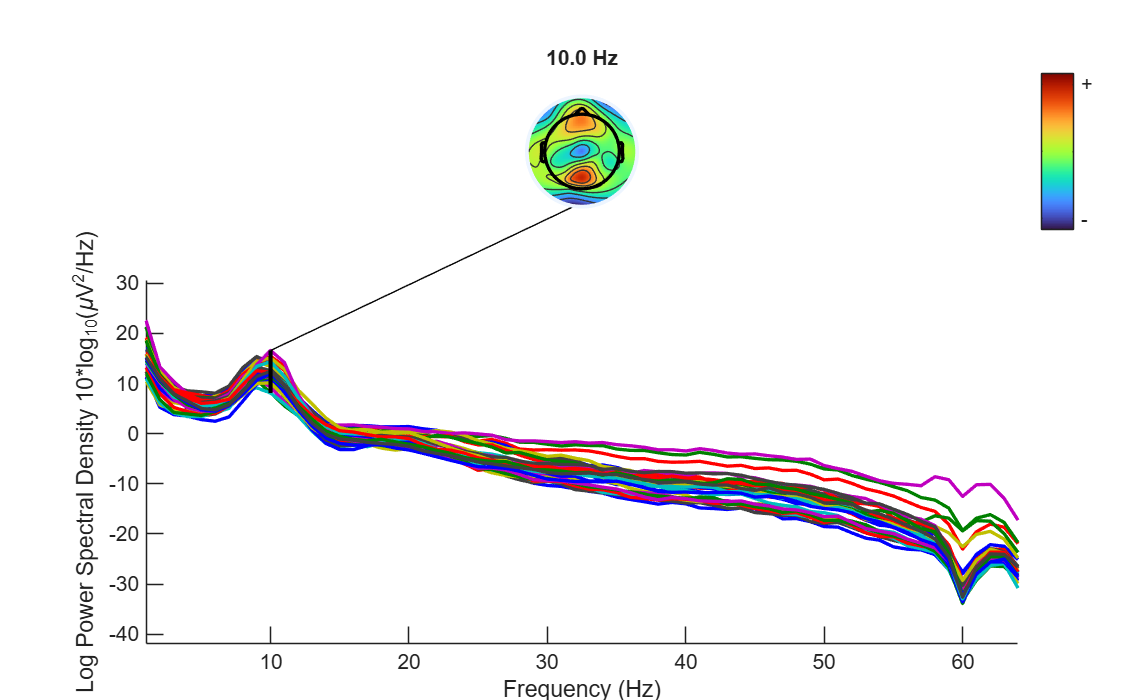
- Read the figure in this order:
- Alpha peak: a clear rise near 10 Hz. The scalp mapA top-down picture showing how a value is spread over the head. above it shows where it is strongest.
- 1/f decline: power falls gradually as frequencyThe number of cycles per second, measured in hertz (Hz). rises. This is the normal shape of every EEG signal.
- Narrow peaks or dips: a narrow peak at 60 Hz in uncleaned data means line noise. In our data you will find the opposite: a narrow dip between 58 and 62 Hz, left by the line-noise filter.
- Click any line to see its channel name.
About the scalp map
The scalp map in this figure is drawn by topoplot. Its options and how to read it in detail are in the scalp maps lesson in station 7.
About the scalp map
The scalp map in this figure is drawn by topoplot. Its options and how to read it in detail are in the scalp maps lesson in station 7.
How do I do it in EEGLAB?
Start with the dataset D1 main clean open, as in “Starting point”. This is a continuous dataset, not epochs. The starting-point script reruns ICA, so it may take a few minutes, unless you use the shortcut line at its top.
- Open Plot then Channel spectra and maps.
- The Channel spectra and maps — pop_spectopo() window opens. Keep Epoch time range to analyze [min_ms max_ms]: at its value, that is, the whole recording.
- Keep Percent data to sample (1 to 100): at
100. - In Frequencies to plot as scalp maps (Hz):, type
10instead of the default6 10 22. - In Plotting frequency range [lo_Hz hi_Hz]:, type
1 64instead of the default2 25. The default hides line noise and everything above 25 Hz. - Keep Spectral and scalp map options (see topoplot): as it is, and press Ok.
- Read the figure in this order:
- Alpha peak: a clear rise near 10 Hz. The scalp map above it shows where it is strongest.
- 1/f decline: power falls gradually as frequency rises. This is the normal shape of every EEG signal.
- Narrow peaks or dips: a narrow peak at 60 Hz in uncleaned data means line noise. In our data you will find the opposite: a narrow dip between 58 and 62 Hz, left by the line-noise filter.
- Click any line to see its channel name.
About the scalp map
The scalp map in this figure is drawn by topoplot. Its options and how to read it in detail are in the scalp maps lesson in station 7.
About the scalp map
The scalp map in this figure is drawn by topoplot. Its options and how to read it in detail are in the scalp maps lesson in station 7.
How do I write it as code?
The same steps in 15 lines of MATLAB
% Spectra of all channels from 1 to 64 Hz, with a scalp map at 10 Hz
figure;
[spectra, freqs] = pop_spectopo(EEG, 1, [0 EEG.xmax*1000], 'EEG', ...
    'freq', 10, 'freqrange', [1 64], 'electrodes', 'off');

% spectra: channels x frequencies, in 10*log10(uV^2/Hz)
fprintf('Frequency step: %.2f Hz\n', freqs(2) - freqs(1));

% Alpha peak at Pz between 8 and 13 Hz
pz = find(strcmp({EEG.chanlocs.labels}, 'Pz'));
alphaBand = freqs >= 8 & freqs <= 13;
alphaFreqs = freqs(alphaBand);
[peakPow, iPeak] = max(spectra(pz, alphaBand));
fprintf('Alpha peak at Pz: %.0f Hz, %.1f dB\n', alphaFreqs(iPeak), peakPow);

% Channels with the strongest 10 Hz power
[~, order] = sort(spectra(:, freqs == 10), 'descend');
disp({EEG.chanlocs(order(1:5)).labels});
How do I write it as code?
% Spectra of all channels from 1 to 64 Hz, with a scalp map at 10 Hz
figure;
[spectra, freqs] = pop_spectopo(EEG, 1, [0 EEG.xmax*1000], 'EEG', ...
    'freq', 10, 'freqrange', [1 64], 'electrodes', 'off');

% spectra: channels x frequencies, in 10*log10(uV^2/Hz)
fprintf('Frequency step: %.2f Hz\n', freqs(2) - freqs(1));

% Alpha peak at Pz between 8 and 13 Hz
pz = find(strcmp({EEG.chanlocs.labels}, 'Pz'));
alphaBand = freqs >= 8 & freqs <= 13;
alphaFreqs = freqs(alphaBand);
[peakPow, iPeak] = max(spectra(pz, alphaBand));
fprintf('Alpha peak at Pz: %.0f Hz, %.1f dB\n', alphaFreqs(iPeak), peakPow);

% Channels with the strongest 10 Hz power
[~, order] = sort(spectra(:, freqs == 10), 'descend');
disp({EEG.chanlocs(order(1:5)).labels});
Which value should I choose?
Suitable values for your analysis goal
| Setting | Value | Why |
|---|---|---|
| Plotting range | 1 to 64 Hz here (up to half the sampling rate) | The default 2 to 25 Hz hides line noise and muscle activity. To check quality, plot the full range. |
| Scalp map frequencies | 10 Hz for alpha | You can add others, such as 6 for theta and 20 for beta, depending on your question. |
| Percent of data | 100 | Lower values are faster, but on continuous data they use only the first part of the recording. D1 is small, so there is no need. |
| Window length | The default (1 second, 128 points) | Gives a frequency resolution of 1 Hz, enough to see the alpha peak. |
| Which data | Continuous, clean, before the low-pass | The 30 Hz low-pass removes everything above 30 Hz, so you would not see the full spectrum. |
Which value should I choose?
| Setting | Value | Why |
|---|---|---|
| Plotting range | 1 to 64 Hz here (up to half the sampling rate) | The default 2 to 25 Hz hides line noise and muscle activity. To check quality, plot the full range. |
| Scalp map frequencies | 10 Hz for alpha | You can add others, such as 6 for theta and 20 for beta, depending on your question. |
| Percent of data | 100 | Lower values are faster, but on continuous data they use only the first part of the recording. D1 is small, so there is no need. |
| Window length | The default (1 second, 128 points) | Gives a frequency resolution of 1 Hz, enough to see the alpha peak. |
| Which data | Continuous, clean, before the low-pass | The 30 Hz low-pass removes everything above 30 Hz, so you would not see the full spectrum. |
How do I check it worked?
4 quick checks
freqs(2) - freqs(1)equals 1 Hz, andsize(spectra)gives 32 channels by the number of frequencies.- The alpha peak at Pz is at roughly 9 to 11 Hz.
- The 10 Hz map is strongest at posterior channels, such as POz and Pz.
- At 58 to 62 Hz there is a narrow dip, not a peak.
How do I check it worked?
freqs(2) - freqs(1)equals 1 Hz, andsize(spectra)gives 32 channels by the number of frequencies.- The alpha peak at Pz is at roughly 9 to 11 Hz.
- The 10 Hz map is strongest at posterior channels, such as POz and Pz.
- At 58 to 62 Hz there is a narrow dip, not a peak.
What mistakes do people make?
5 mistakes and how to avoid them
- Judging the data from the default plotting range. From 2 to 25 Hz you cannot see 50 or 60 Hz at all. Change the range.
- Reading the decline as a problem. Power naturally falls with frequency (the 1/f decline). The problem is an unexpected narrow peak, or one channel whose spectrum is far from the others.
- Forgetting the vertical axis is logarithmic. A 10 dB difference means 10 times more power, not 10 microvolts.
- Computing the spectrum on very short epochs. Epochs shorter than the computation window lower the resolution. For an overall spectrum, continuous data are better.
- Assuming the line frequency. It is 60 Hz in Saudi Arabia and the US, and 50 Hz in Europe and most other Arab countries. Look at the spectrum before you assume.
What mistakes do people make?
- Judging the data from the default plotting range. From 2 to 25 Hz you cannot see 50 or 60 Hz at all. Change the range.
- Reading the decline as a problem. Power naturally falls with frequency (the 1/f decline). The problem is an unexpected narrow peak, or one channel whose spectrum is far from the others.
- Forgetting the vertical axis is logarithmic. A 10 dB difference means 10 times more power, not 10 microvolts.
- Computing the spectrum on very short epochs. Epochs shorter than the computation window lower the resolution. For an overall spectrum, continuous data are better.
- Assuming the line frequency. It is 60 Hz in Saudi Arabia and the US, and 50 Hz in Europe and most other Arab countries. Look at the spectrum before you assume.
Your browser doesn't allow saving progress. All lessons are open, but completion marks won't be saved.
Done. Your progress is saved in this browser.UndoHow do I write it in my paper?
A Methods template: edit the data, settings and versions to match what you ran
A template: edit the data, settings and versions to match what you ran.
Power spectral density was estimated for each channel from the continuous ICA-cleaned data using Welch’s method with 1-s Hamming windows and no overlap (pop_spectopo, EEGLAB 2026.1).How do I write it in my paper?
A template: edit the data, settings and versions to match what you ran.
Power spectral density was estimated for each channel from the continuous ICA-cleaned data using Welch’s method with 1-s Hamming windows and no overlap (pop_spectopo, EEGLAB 2026.1).Where can I read more?
3 sources, official docs first
- EEGLAB TutorialDocumentation8. Plot data > c. Channel spectra and maps
- EEGLAB TutorialDocumentationConcepts guide: time-frequency
- Time-Frequency Analysis of EEG Time Series Part 2: EEG Spectrum and ERSPVideoFull video · 9:05
Written for EEGLAB 2026.1 · 2026-10-28
Going further
- EEGLAB Tutorial: https://eeglab.org/tutorials/08_Plot_data/Plotting_Channel_Spectra_and_Maps.html (8. Plot data > c. Channel spectra and maps)
- EEGLAB Tutorial: https://eeglab.org/tutorials/ConceptsGuide/Time_frequency_tutorial.html (Concepts guide: time-frequency)
- Time-Frequency Analysis of EEG Time Series Part 2: EEG Spectrum and ERSP: https://www.youtube.com/watch?v=BcOuRxeZTtA (Full video)
Need help?
Ask, share feedback, or report an error
- Report a scientific error · Needs a GitHub account. Don't have one? Use "Share your thoughts".