Station 7 · Lesson 4
Publication-ready figures
eeglab_data.set (D1) · Already applied: High-pass & low-pass filtering, Removing line noise (50/60 Hz), Bad channels, Channel interpolation, Re-referencing, Running ICA, 1-Hz filtering for ICA & copying weights, ICLabel & removing components, Extracting epochs, Baseline correction, Rejecting bad epochsDownload the data (opens in a new tab)Script to reach this state
% Shortcut: if you saved D1_epochs_clean.set in the epoch rejection lesson, keep
% the first line and the last two lines (pop_newset, eeglab redraw), and replace
% every line between them with:
% EEG = pop_loadset('D1_epochs_clean.set', pwd);
[ALLEEG, EEG, CURRENTSET, ALLCOM] = eeglab;
eeglabRoot = fileparts(which('eeglab'));
EEG = pop_loadset('eeglab_data.set', fullfile(eeglabRoot, 'sample_data'));
fullLocs = EEG.chanlocs;

% Main dataset: high-pass at 0.1 Hz, then 60 Hz line-noise removal
EEG = pop_eegfiltnew(EEG, 'locutoff', 0.1);
EEG = pop_eegfiltnew(EEG, 'locutoff', 58, 'hicutoff', 62, 'revfilt', 1);

% Bad channels you removed earlier, e.g. {'T7'}; leave empty if none
badChans = {};
if ~isempty(badChans)
    EEG = pop_select(EEG, 'rmchannel', badChans);
    EEG = pop_interp(EEG, fullLocs, 'spherical');
end

% Average reference, EOG channels excluded
eogIdx = find(ismember({EEG.chanlocs.labels}, {'EOG1', 'EOG2'}));
EEG = pop_reref(EEG, [], 'exclude', eogIdx);

% ICA on a 1-Hz copy, then copy the weights back
EEG_ica = pop_eegfiltnew(EEG, 'locutoff', 1);
EEG_ica = pop_runica(EEG_ica, 'icatype', 'runica', 'extended', 1);
EEG.icaweights  = EEG_ica.icaweights;
EEG.icasphere   = EEG_ica.icasphere;
EEG.icachansind = EEG_ica.icachansind;
EEG.icawinv     = [];
EEG.icaact      = [];
EEG = eeg_checkset(EEG);

% Remove eye and muscle components, then low-pass at 30 Hz
EEG = pop_iclabel(EEG, 'default');
EEG = pop_icflag(EEG, [NaN NaN; 0.9 1; 0.9 1; NaN NaN; NaN NaN; NaN NaN; NaN NaN]);
artifactComps = find(EEG.reject.gcompreject);
if ~isempty(artifactComps)
    EEG = pop_subcomp(EEG, artifactComps, 0);
end
EEG = pop_eegfiltnew(EEG, 'hicutoff', 30);

% Epochs around 'square', baseline, and +/-100 uV rejection
EEG = pop_epoch(EEG, {'square'}, [-1 2], 'newname', 'D1 epochs', 'epochinfo', 'yes');
EEG = pop_rmbase(EEG, [-200 0]);
EEG = pop_eegthresh(EEG, 1, 1:EEG.nbchan, -100, 100, EEG.xmin, EEG.xmax, 0, 0);
badEpochs = find(EEG.reject.rejthresh);
if ~isempty(badEpochs)
    EEG = pop_rejepoch(EEG, EEG.reject.rejthresh, 0);
end
EEG.setname = 'D1 epochs clean';
EEG = eeg_checkset(EEG);
EEG = pop_saveset(EEG, 'filename', 'D1_epochs_clean.set', 'filepath', pwd);
EEG.filename = ''; EEG.filepath = ''; EEG.datfile = ''; EEG.saved = 'no';
[ALLEEG, EEG, CURRENTSET] = pop_newset(ALLEEG, EEG, 0, 'setname', 'D1 epochs clean', 'gui', 'off');
eeglab redraw;
Your browser's back button takes you to the exact place you were, so open anything you like.
The idea in brief
A figure you understand on your screen is not a figure ready for a paper. The journal shrinks it to about one column wide, small text becomes unreadable, and a screenshot turns blurry when zoomed.
Before and after
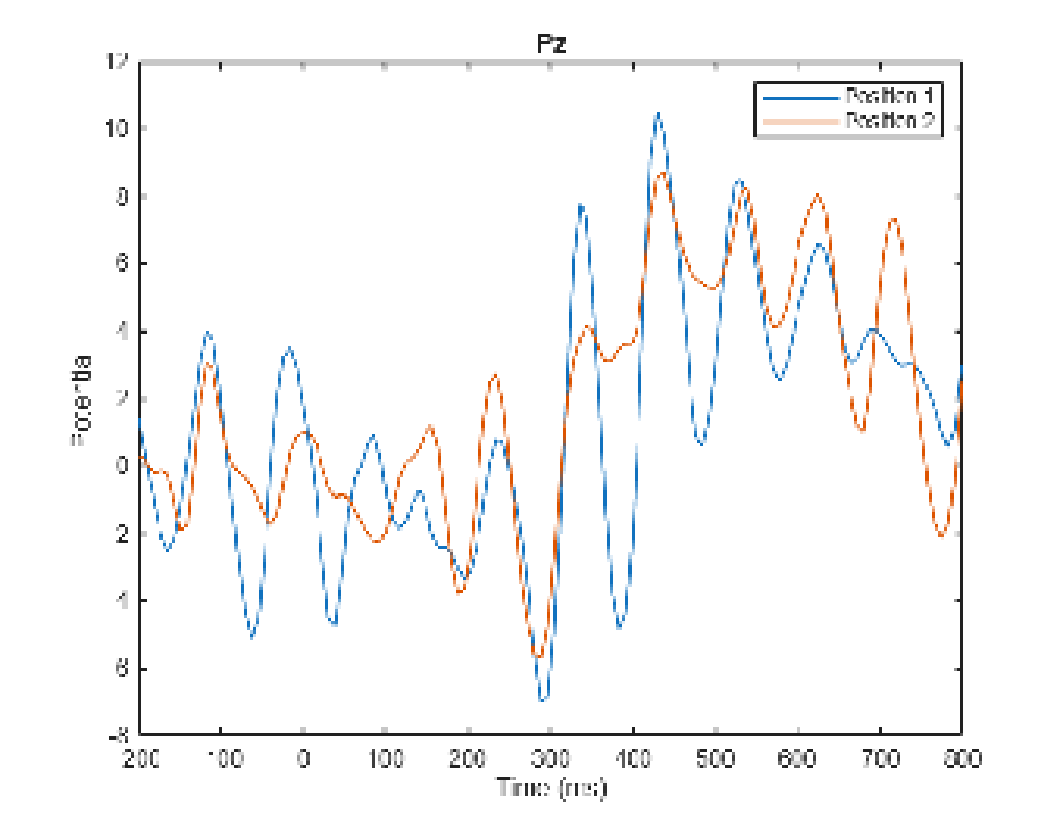
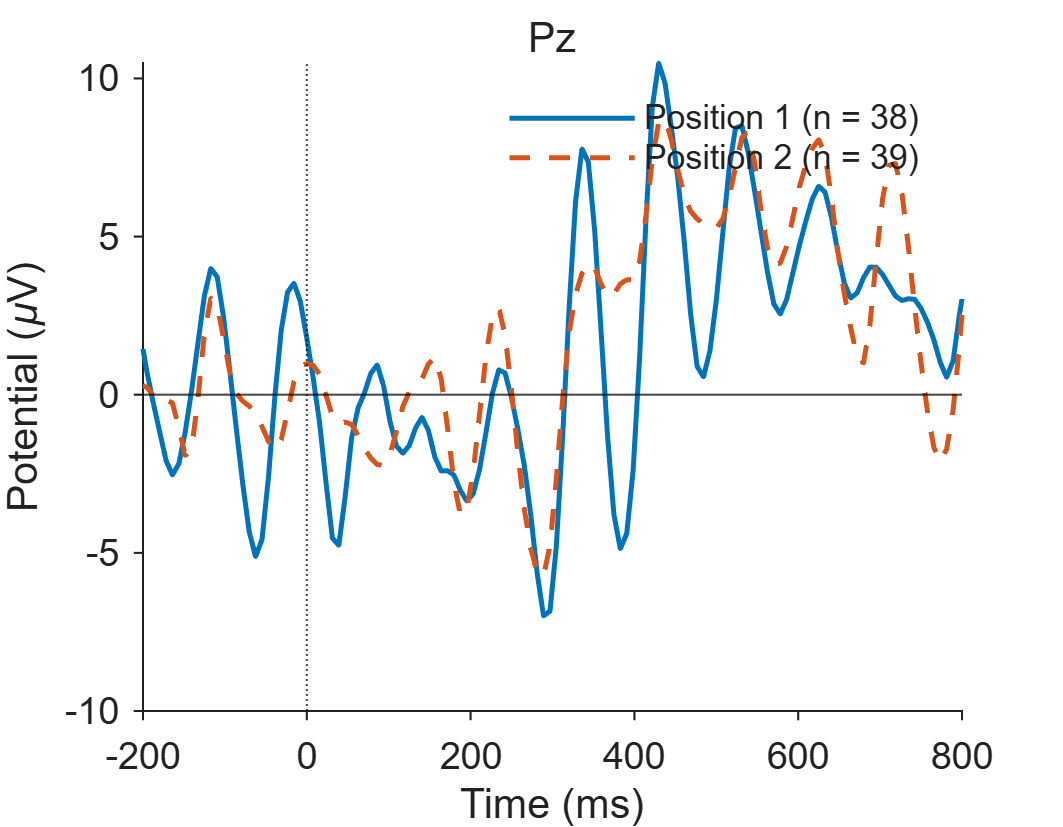
Drag the line to compare.
Your next questions, each answered in its own section:
Why do I need this step?
The reasons in detail, and the terms you need
Honesty matters even more than looks. Two maps of two conditions drawn on different color scales suggest a difference that is not there, or hide one that is. Reviewers notice.
This lesson takes two figures from the previous lessons and prepares them for publication: a vector format, a fixed size, a readable font, one color scale, and a data file that backs up what the figure shows.
Why do I need this step?
Honesty matters even more than looks. Two maps of two conditions drawn on different color scales suggest a difference that is not there, or hide one that is. Reviewers notice.
This lesson takes two figures from the previous lessons and prepares them for publication: a vector format, a fixed size, a readable font, one color scale, and a data file that backs up what the figure shows.
How do I do it in EEGLAB?
10 steps in the menus
Start with the D1 epochs clean datasetOne EEG data file loaded in EEGLAB together with its information. loaded, as in “Starting point”. For the maps, use D1 epochs clean scalp, the 30-channelThe signal recorded from one electrode, as shown in EEGLAB. copy without EOG1 and EOG2. If it is not open, make it as in step 0 of the scalp maps lesson (Edit then Select data). The GUIThe windows and menus used with the mouse instead of typed commands. is enough for maps of one dataset. Comparing two conditions in one figure needs the scriptA MATLAB file of commands that runs processing steps in order., as in the channel ERPThe brain's average response to a given event across many trials. lesson.
1. Find the scale limit
- With
D1 epochs clean scalpselected, open Plot then ERP map series then In 2-D. - Enter
100 200 300 400in Plotting ERP scalp maps at these latencies and[1 4]in Plot geometry (rows,col.); [] -> near square. Click Ok. - Read the top value on the color bar and round it up to a whole number. That is your limit.
2. Fix the scale and export
- Open the same window again. In the additional options field, enter
'electrodes', 'on', 'maplimits', [-5 5], replacing 5 with your limit. Use the same limit for every map you will compare with this one, even from another dataset. - In the figure window, open File then Save As and choose PDF or SVG as the file type. This is MATLAB’s own , not an EEGLAB menu.
- Open the file and zoom in: lines and letters stay sharp, and you can select the label text. That is what “vector” means.
3. Export the numbers behind the figure
- Open File then Export then Data and ICA activity to text file.
- In Output file name, enter
erp_all.txt. - Check Export ERP average instead of trials:, and leave Transpose matrix (elec -> cols):, Export channel labels/component numbers: and Export time values: checked as they are. Click Ok.
- You get a text file: the first row holds channel names, the first column holds time in milliseconds, and each following row is one time point. Put it in the paper’s supplementary material, or plot from it in another program.
How do I do it in EEGLAB?
Start with the D1 epochs clean dataset loaded, as in “Starting point”. For the maps, use D1 epochs clean scalp, the 30-channel copy without EOG1 and EOG2. If it is not open, make it as in step 0 of the scalp maps lesson (Edit then Select data). The GUI is enough for maps of one dataset. Comparing two conditions in one figure needs the script, as in the channel ERP lesson.
1. Find the scale limit
- With
D1 epochs clean scalpselected, open Plot then ERP map series then In 2-D. - Enter
100 200 300 400in Plotting ERP scalp maps at these latencies and[1 4]in Plot geometry (rows,col.); [] -> near square. Click Ok. - Read the top value on the color bar and round it up to a whole number. That is your limit.
2. Fix the scale and export
- Open the same window again. In the additional options field, enter
'electrodes', 'on', 'maplimits', [-5 5], replacing 5 with your limit. Use the same limit for every map you will compare with this one, even from another dataset. - In the figure window, open File then Save As and choose PDF or SVG as the file type. This is MATLAB’s own menu, not an EEGLAB menu.
- Open the file and zoom in: lines and letters stay sharp, and you can select the label text. That is what “vector” means.
3. Export the numbers behind the figure
- Open File then Export then Data and ICA activity to text file.
- In Output file name, enter
erp_all.txt. - Check Export ERP average instead of trials:, and leave Transpose matrix (elec -> cols):, Export channel labels/component numbers: and Export time values: checked as they are. Click Ok.
- You get a text file: the first row holds channel names, the first column holds time in milliseconds, and each following row is one time point. Put it in the paper’s supplementary material, or plot from it in another program.
How do I write it as code?
The same steps in 46 lines of MATLAB
EEG = pop_loadset('D1_epochs_clean.set', pwd);
pos = eeg_getepochevent(EEG, 'type', {'square'}, 'timewin', [-5 5], 'fieldname', 'position');
EEG_pos1 = pop_select(EEG, 'trial', find(pos == 1));
EEG_pos2 = pop_select(EEG, 'trial', find(pos == 2));
EEG_pos1.setname = 'D1 epochs clean pos1';
EEG_pos2.setname = 'D1 epochs clean pos2';
chan = find(strcmp({EEG.chanlocs.labels}, 'Pz'));
scalp = find(~ismember({EEG.chanlocs.labels}, {'EOG1', 'EOG2'}));   % EOG is not on the average reference
erp1 = mean(EEG_pos1.data, 3);
erp2 = mean(EEG_pos2.data, 3);

% Figure 1: Pz waveforms at single-column size, 9-pt font, white background
fig1 = figure('Color', 'w', 'Units', 'centimeters', 'Position', [2 2 9 7]);
hold on;
plot(EEG.times, erp1(chan, :), 'Color', [0 0.45 0.74], 'LineWidth', 1.2);
plot(EEG.times, erp2(chan, :), 'Color', [0.85 0.33 0.10], 'LineWidth', 1.2, 'LineStyle', '--');
xline(0, 'k:'); yline(0, 'k-');
xlim([-200 800]);
set(gca, 'YDir', 'normal', 'FontName', 'Arial', 'FontSize', 9, 'TickDir', 'out', 'Box', 'off');
xlabel('Time (ms)'); ylabel('Potential (\muV)');
legend({sprintf('Position 1 (n = %d)', EEG_pos1.trials), ...
        sprintf('Position 2 (n = %d)', EEG_pos2.trials)}, 'Location', 'northeast', 'Box', 'off');
title('Pz', 'FontWeight', 'normal');
exportgraphics(fig1, 'fig_pz_erp.pdf', 'ContentType', 'vector', 'BackgroundColor', 'white');

% Figure 2: 300 to 500 ms maps for both conditions on one shared symmetric scale
win = EEG.times >= 300 & EEG.times <= 500;
map1 = mean(erp1(scalp, win), 2);
map2 = mean(erp2(scalp, win), 2);
lim = ceil(max(abs([map1; map2])));
fprintf('Shared color scale: -%d to %d uV\n', lim, lim);
fig2 = figure('Color', 'w', 'Units', 'centimeters', 'Position', [2 2 12 6]);
subplot(1, 2, 1);
topoplot(map1, EEG.chanlocs(scalp), 'maplimits', [-lim lim], 'electrodes', 'on');
title('Position 1', 'FontName', 'Arial', 'FontSize', 9, 'FontWeight', 'normal');
ax = subplot(1, 2, 2);
topoplot(map2, EEG.chanlocs(scalp), 'maplimits', [-lim lim], 'electrodes', 'on');
title('Position 2', 'FontName', 'Arial', 'FontSize', 9, 'FontWeight', 'normal');
axPos = ax.Position;
cb = colorbar('FontName', 'Arial', 'FontSize', 9);
ax.Position = axPos;   % keep both maps the same size
cb.Position = [0.92 0.25 0.02 0.5];
ylabel(cb, '\muV');
exportgraphics(fig2, 'fig_maps_300_500.pdf', 'ContentType', 'vector', 'BackgroundColor', 'white');
exportgraphics(fig2, 'fig_maps_300_500.png', 'Resolution', 600, 'BackgroundColor', 'white');

% The numbers behind the figures: one row per time point, one column per channel
pop_export(EEG_pos1, 'erp_pos1.txt', 'erp', 'on', 'transpose', 'on', 'elec', 'on', 'time', 'on', 'precision', 4);
pop_export(EEG_pos2, 'erp_pos2.txt', 'erp', 'on', 'transpose', 'on', 'elec', 'on', 'time', 'on', 'precision', 4);
How do I write it as code?
EEG = pop_loadset('D1_epochs_clean.set', pwd);
pos = eeg_getepochevent(EEG, 'type', {'square'}, 'timewin', [-5 5], 'fieldname', 'position');
EEG_pos1 = pop_select(EEG, 'trial', find(pos == 1));
EEG_pos2 = pop_select(EEG, 'trial', find(pos == 2));
EEG_pos1.setname = 'D1 epochs clean pos1';
EEG_pos2.setname = 'D1 epochs clean pos2';
chan = find(strcmp({EEG.chanlocs.labels}, 'Pz'));
scalp = find(~ismember({EEG.chanlocs.labels}, {'EOG1', 'EOG2'}));   % EOG is not on the average reference
erp1 = mean(EEG_pos1.data, 3);
erp2 = mean(EEG_pos2.data, 3);

% Figure 1: Pz waveforms at single-column size, 9-pt font, white background
fig1 = figure('Color', 'w', 'Units', 'centimeters', 'Position', [2 2 9 7]);
hold on;
plot(EEG.times, erp1(chan, :), 'Color', [0 0.45 0.74], 'LineWidth', 1.2);
plot(EEG.times, erp2(chan, :), 'Color', [0.85 0.33 0.10], 'LineWidth', 1.2, 'LineStyle', '--');
xline(0, 'k:'); yline(0, 'k-');
xlim([-200 800]);
set(gca, 'YDir', 'normal', 'FontName', 'Arial', 'FontSize', 9, 'TickDir', 'out', 'Box', 'off');
xlabel('Time (ms)'); ylabel('Potential (\muV)');
legend({sprintf('Position 1 (n = %d)', EEG_pos1.trials), ...
        sprintf('Position 2 (n = %d)', EEG_pos2.trials)}, 'Location', 'northeast', 'Box', 'off');
title('Pz', 'FontWeight', 'normal');
exportgraphics(fig1, 'fig_pz_erp.pdf', 'ContentType', 'vector', 'BackgroundColor', 'white');

% Figure 2: 300 to 500 ms maps for both conditions on one shared symmetric scale
win = EEG.times >= 300 & EEG.times <= 500;
map1 = mean(erp1(scalp, win), 2);
map2 = mean(erp2(scalp, win), 2);
lim = ceil(max(abs([map1; map2])));
fprintf('Shared color scale: -%d to %d uV\n', lim, lim);
fig2 = figure('Color', 'w', 'Units', 'centimeters', 'Position', [2 2 12 6]);
subplot(1, 2, 1);
topoplot(map1, EEG.chanlocs(scalp), 'maplimits', [-lim lim], 'electrodes', 'on');
title('Position 1', 'FontName', 'Arial', 'FontSize', 9, 'FontWeight', 'normal');
ax = subplot(1, 2, 2);
topoplot(map2, EEG.chanlocs(scalp), 'maplimits', [-lim lim], 'electrodes', 'on');
title('Position 2', 'FontName', 'Arial', 'FontSize', 9, 'FontWeight', 'normal');
axPos = ax.Position;
cb = colorbar('FontName', 'Arial', 'FontSize', 9);
ax.Position = axPos;   % keep both maps the same size
cb.Position = [0.92 0.25 0.02 0.5];
ylabel(cb, '\muV');
exportgraphics(fig2, 'fig_maps_300_500.pdf', 'ContentType', 'vector', 'BackgroundColor', 'white');
exportgraphics(fig2, 'fig_maps_300_500.png', 'Resolution', 600, 'BackgroundColor', 'white');

% The numbers behind the figures: one row per time point, one column per channel
pop_export(EEG_pos1, 'erp_pos1.txt', 'erp', 'on', 'transpose', 'on', 'elec', 'on', 'time', 'on', 'precision', 4);
pop_export(EEG_pos2, 'erp_pos2.txt', 'erp', 'on', 'transpose', 'on', 'elec', 'on', 'time', 'on', 'precision', 4);
Which value should I choose?
Suitable values for your analysis goal
| Setting | Value | Why |
|---|---|---|
| Format | PDF, SVG or EPS (vector) for waveforms, and PNG at 600 dpi for maps if the vector file is heavy | Vector files stay sharp at any zoom, and journals usually accept them. A scalp mapA top-down picture showing how a value is spread over the head. holds thousands of colored polygons, so its vector file can get large. Never use JPEG, which adds noiseAny part of the recording that does not carry the information we want. around lines. |
| Width | About 9 cm for one column, about 18 cm for two | Draw at the final size from the start instead of shrinking later. Check the journal’s guide, as sizes differ slightly. |
| Font size | 8 to 10 pt at final size | Below 7 pt is unreadable in print. Because you draw at final size, what you choose here is what the reader sees. |
| Lines | 1 to 1.5 pt, with two different styles for two conditions | Line style (solid and dashed) separates the conditions even in black-and-white print, and for readers who have trouble telling colors apart. |
| Color scale | One symmetric scale for all maps being compared, with a color bar and its unit | This is the single most important honesty check. Round the limit to a whole number and state it in the caption. |
| Polarity | Positive up, and say so | Some labs plot negative up. Whatever you choose, the reader needs to see it on the axis or in the caption. |
exportgraphics | Needs MATLAB R2020a or later | On an older release, use print(fig1, 'fig_pz_erp', '-dpdf', '-painters'). |
Which value should I choose?
| Setting | Value | Why |
|---|---|---|
| Format | PDF, SVG or EPS (vector) for waveforms, and PNG at 600 dpi for maps if the vector file is heavy | Vector files stay sharp at any zoom, and journals usually accept them. A scalp map holds thousands of colored polygons, so its vector file can get large. Never use JPEG, which adds noise around lines. |
| Width | About 9 cm for one column, about 18 cm for two | Draw at the final size from the start instead of shrinking later. Check the journal’s guide, as sizes differ slightly. |
| Font size | 8 to 10 pt at final size | Below 7 pt is unreadable in print. Because you draw at final size, what you choose here is what the reader sees. |
| Lines | 1 to 1.5 pt, with two different styles for two conditions | Line style (solid and dashed) separates the conditions even in black-and-white print, and for readers who have trouble telling colors apart. |
| Color scale | One symmetric scale for all maps being compared, with a color bar and its unit | This is the single most important honesty check. Round the limit to a whole number and state it in the caption. |
| Polarity | Positive up, and say so | Some labs plot negative up. Whatever you choose, the reader needs to see it on the axis or in the caption. |
exportgraphics | Needs MATLAB R2020a or later | On an older release, use print(fig1, 'fig_pz_erp', '-dpdf', '-painters'). |
How do I check it worked?
4 quick checks
- Zoom the PDF to 400%: waveforms and letters stay sharp, and you can select the axis text with the cursor.
- The page size of
fig_pz_erp.pdfis about 9 × 7 cm in the file properties. - The two maps in
fig_maps_300_500.pdfhave 30 electrodeThe physical sensor placed on the scalp to pick up the signal. dots each, none below the eyes, are the same size and share one color bar whose limits match the number printed by theShared color scaleline. erp_pos1.txthas a header row, then 384 rows (one point every 7.8 ms from -1000 to 1992 ms), and 33 columns: time, then 32 channels.
How do I check it worked?
- Zoom the PDF to 400%: waveforms and letters stay sharp, and you can select the axis text with the cursor.
- The page size of
fig_pz_erp.pdfis about 9 × 7 cm in the file properties. - The two maps in
fig_maps_300_500.pdfhave 30 electrode dots each, none below the eyes, are the same size and share one color bar whose limits match the number printed by theShared color scaleline. erp_pos1.txthas a header row, then 384 rows (one point every 7.8 ms from -1000 to 1992 ms), and 33 columns: time, then 32 channels.
What mistakes do people make?
6 mistakes and how to avoid them
- Screenshots. They have your screen’s resolution and degrade in print. Always export the figure from MATLAB.
- Drawing large, then shrinking. A 10-pt font on a 25-cm figure becomes 3.6 pt once shrunk to 9 cm. Set the size before you plot.
- One color scale per map. If you plot each conditionAn experimental situation compared with others, such as familiar vs unfamiliar. in its own window, EEGLAB picks each window’s limits from its own data. Set
maplimitsto the same value in every window. - EEGLAB’s light blue background. EEGLAB plot windows default to a very light blue. Make the background white on export, as the script does.
- An incomplete caption. Under every ERP figure, state the channel, referenceThe point against which each channel's voltage is measured., filters, trials per condition and polarity. Without them the figure cannot be interpreted.
- Polishing the data. Do not add smoothing or crop the axis to enlarge a difference. What you export must match the data file.
What mistakes do people make?
- Screenshots. They have your screen’s resolution and degrade in print. Always export the figure from MATLAB.
- Drawing large, then shrinking. A 10-pt font on a 25-cm figure becomes 3.6 pt once shrunk to 9 cm. Set the size before you plot.
- One color scale per map. If you plot each condition in its own window, EEGLAB picks each window’s limits from its own data. Set
maplimitsto the same value in every window. - EEGLAB’s light blue background. EEGLAB plot windows default to a very light blue. Make the background white on export, as the script does.
- An incomplete caption. Under every ERP figure, state the channel, reference, filters, trials per condition and polarity. Without them the figure cannot be interpreted.
- Polishing the data. Do not add smoothing or crop the axis to enlarge a difference. What you export must match the data file.
Your browser doesn't allow saving progress. All lessons are open, but completion marks won't be saved.
Done. Your progress is saved in this browser.UndoHow do I write it in my paper?
A Methods template: edit the data, settings and versions to match what you ran
A template: edit the data, settings and versions to match what you ran.
Figures were exported as vector PDF files with MATLAB exportgraphics; scalp maps of both conditions (30 average-referenced scalp channels) share one symmetric color scale of ±[X] µV (topoplot, EEGLAB 2026.1).How do I write it in my paper?
A template: edit the data, settings and versions to match what you ran.
Figures were exported as vector PDF files with MATLAB exportgraphics; scalp maps of both conditions (30 average-referenced scalp channels) share one symmetric color scale of ±[X] µV (topoplot, EEGLAB 2026.1).Where can I read more?
2 sources, official docs first
- EEGLAB TutorialDocumentation11. Write scripts > d. Advanced plots
- EEGLAB TutorialDocumentationReference Topics > Exporting Data: Exporting data to an ASCII text file
Written for EEGLAB 2026.1 · 2026-10-28
Going further
- EEGLAB Tutorial: https://eeglab.org/tutorials/11_Scripting/EEG_scalp_measures.html (11. Write scripts > d. Advanced plots)
- EEGLAB Tutorial: https://eeglab.org/tutorials/misc/Exporting_Data.html (Reference Topics > Exporting Data: Exporting data to an ASCII text file)
Need help?
Ask, share feedback, or report an error
- Report a scientific error · Needs a GitHub account. Don't have one? Use "Share your thoughts".