Station 10 · Lesson 1
Source localization with DIPFIT
eeglab_data.set (D1) · Already applied: High-pass & low-pass filtering, Removing line noise (50/60 Hz), Bad channels, Channel interpolation, Re-referencing, Running ICA, 1-Hz filtering for ICA & copying weightsDownload the data (opens in a new tab)Script to reach this state
[ALLEEG, EEG, CURRENTSET, ALLCOM] = eeglab;
eeglabRoot = fileparts(which('eeglab'));
EEG = pop_loadset('eeglab_data.set', fullfile(eeglabRoot, 'sample_data'));
fullLocs = EEG.chanlocs;

% Main dataset: high-pass at 0.1 Hz, then 60 Hz line-noise removal
EEG = pop_eegfiltnew(EEG, 'locutoff', 0.1);
EEG = pop_eegfiltnew(EEG, 'locutoff', 58, 'hicutoff', 62, 'revfilt', 1);

% Bad channels you removed earlier, e.g. {'T7'}; leave empty if none
badChans = {};
if ~isempty(badChans)
    EEG = pop_select(EEG, 'rmchannel', badChans);
    EEG = pop_interp(EEG, fullLocs, 'spherical');
end

% Average reference, EOG channels excluded
eogIdx = find(ismember({EEG.chanlocs.labels}, {'EOG1', 'EOG2'}));
EEG = pop_reref(EEG, [], 'exclude', eogIdx);
EEG.setname = 'D1 main';

% ICA on a 1-Hz copy, then copy the weights back
EEG_ica = pop_eegfiltnew(EEG, 'locutoff', 1);
EEG_ica = pop_runica(EEG_ica, 'icatype', 'runica', 'extended', 1);
EEG.icaweights  = EEG_ica.icaweights;
EEG.icasphere   = EEG_ica.icasphere;
EEG.icachansind = EEG_ica.icachansind;
EEG.icawinv     = [];
EEG.icaact      = [];
EEG = eeg_checkset(EEG);

% Show the dataset in the main EEGLAB window
EEG.filename = ''; EEG.filepath = ''; EEG.datfile = ''; EEG.saved = 'no';
[ALLEEG, EEG, CURRENTSET] = pop_newset(ALLEEG, EEG, 0, 'setname', 'D1 main', 'gui', 'off');
eeglab redraw;
Your browser's back button takes you to the exact place you were, so open anything you like.
The idea in brief
Every ICAA method that separates the recording into independent sources, some brain and some artifact. component has a fixed scalp mapA top-down picture showing how a value is spread over the head.. The natural next question is: where in the brain could this map come from?
Before and after
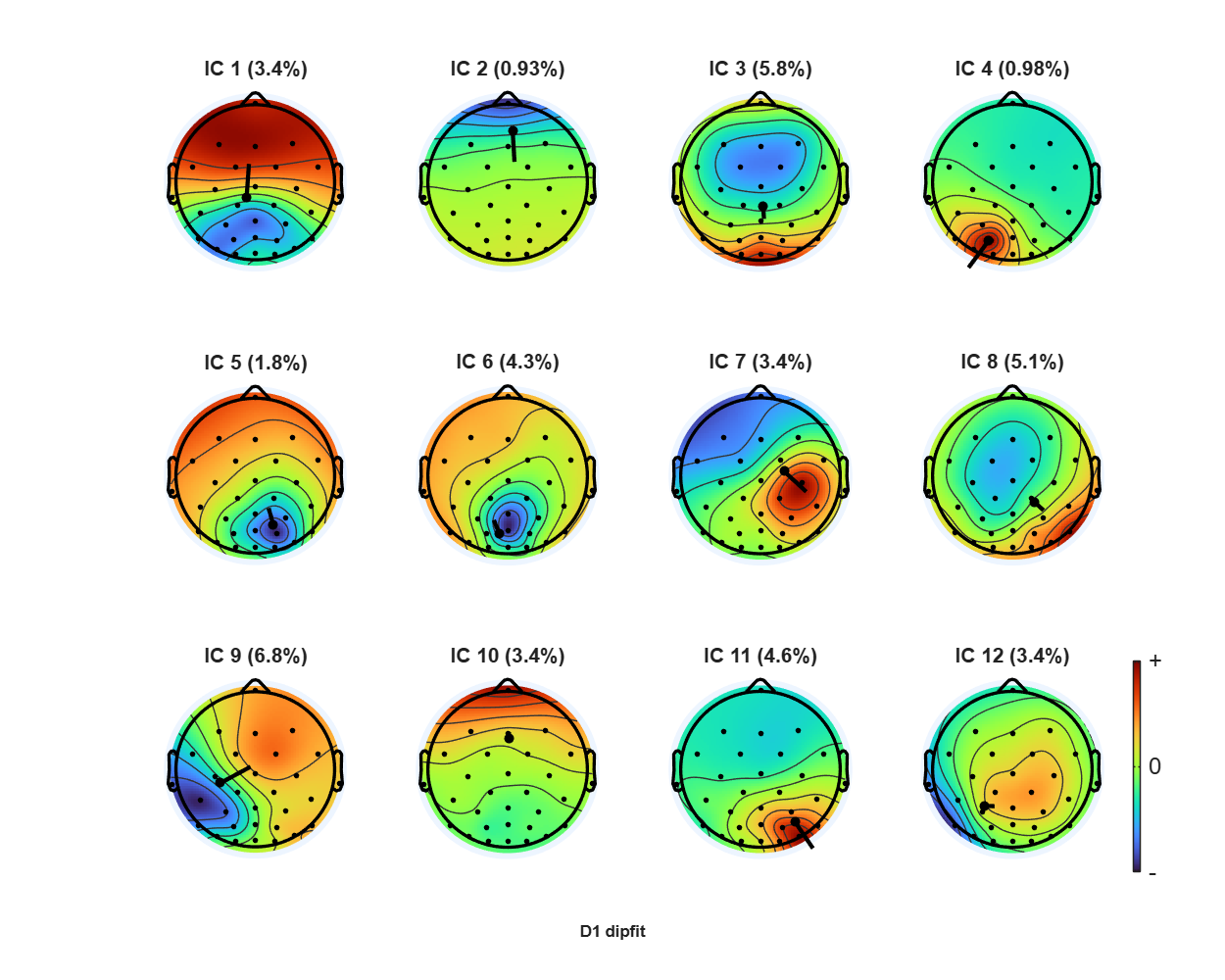
What does this show?
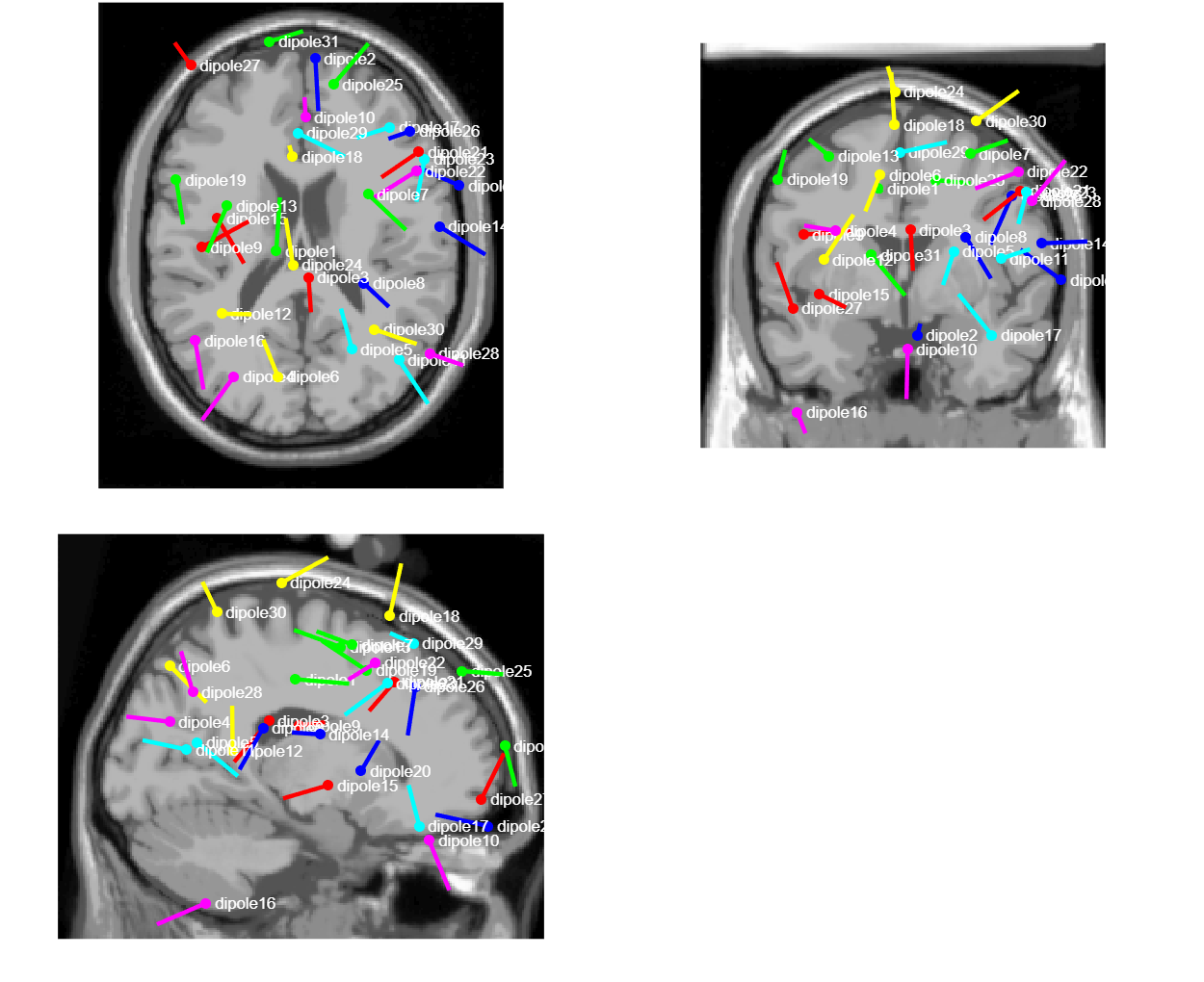
What does this show?
Your next questions, each answered in its own section:
Why do I need this step?
The reasons in detail, and the terms you need
The DIPFIT pluginA package that adds new functions or menus to EEGLAB. answers with a simple model: one small source inside the head, called a dipole, like a tiny battery with a position and an orientation. DIPFIT searches for the position that produces a map as close as possible to the component’s map.
What the fit cannot explain is the residual variance. The lower it is, the closer the component is to a single source in the brain. This helps you recognize brain components, and you will need it later when clusteringGrouping similar ICA components from many participants together. ICA components across participants.
If you have an MRI scan for each participant, the NFT plugin builds a head model for that person instead of the template. You will find it in the extension manager.
Why do I need this step?
The DIPFIT plugin answers with a simple model: one small source inside the head, called a dipole, like a tiny battery with a position and an orientation. DIPFIT searches for the position that produces a map as close as possible to the component’s map.
What the fit cannot explain is the residual variance. The lower it is, the closer the component is to a single source in the brain. This helps you recognize brain components, and you will need it later when clustering ICA components across participants.
If you have an MRI scan for each participant, the NFT plugin builds a head model for that person instead of the template. You will find it in the extension manager.
How do I do it in EEGLAB?
16 steps in the menus
Start from the main datasetOne EEG data file loaded in EEGLAB together with its information. with its ICA weights, as in “Starting point”. Step 4 changes the channelThe signal recorded from one electrode, as shown in EEGLAB. locations of the open dataset, so at the end of the lesson save the result to a new file, not over your main dataset.
First: check that Fieldtrip-lite is installed
- DIPFIT computes the fit with functions from FieldTrip. They are not inside EEGLAB itself; they come in a separate plugin called Fieldtrip-lite. To check, type in the command window:
exist('ft_dipolefitting', 'file')If it prints 2, Fieldtrip-lite is installed, so go to step 3. If it prints 0, it is not installed.
2. To install it, open File then Manage EEGLAB extensions, search for Fieldtrip-lite, install it, then restart eeglab. If you skip this step, EEGLAB asks you when you open the DIPFIT settings in step 6: Fieldtrip-lite extension is not installed. Do you want to download it now?. Click Yes. The IC clustering lesson in station 8 also needs this plugin.
Second: match the channel names with the head model’s electrode file
- Open Edit then Channel locations.
- Click Look up locs and pick the item described as use MNI coordinate file for BEM dipfit model. Click Ok.
- Click Ok in the channel locations window. The command window prints
Channel lookup: no location for EOG1,EOG2, because the two channels are not in the template file. This is intended: eye channels do not enter the fit.
Third: choose the head model
- Open Tools then Source localization using DIPFIT then Head model and settings.
- Under Select a head model, keep the default Template Boundary Element Model (MNI).
- Look at the Matrix to align chan. locs. with head model box. It must be filled, mostly zeros and ones with the number
-1.5708, a 90-degree rotation between the nose direction in EEGLAB and in the model. If it is empty, go back to step 4. - Click Ok. The command window prints
Warning: 2 channels without coordinates removed from dipole fitting, which are the same two eye channels.
Fourth: automatic fit for all components
- Open Tools then Source localization using DIPFIT then Component dipole autofit.
- Leave Component indices (default:all) empty, so every component is fitted.
- Leave Rejection threshold RV (%) at
100, so every component keeps its dipoleA model of a small electrical source in the brain with a position and direction. and you read its residual varianceThe share of a scalp map that the dipole model fails to explain. yourself. - Check Plot resulting dipoles using dipplot (check) and click Ok. The fit takes a few minutes, and the command window prints its progress.
Fifth: read the result
- Open Plot then Component maps then In 2-D, type
1:12for the component numbers, and check Plot associated dipole(s) (if present). - Open Tools then Source localization using DIPFIT then Component dipole plot, check Plot summary mode, and click Ok. One window shows all the dipoles from three views (top, back and side), with the list of components and their residual variance.
- For each component: is the dipole inside the brain? What is its residual variance? Compare the blinkClosing and opening the eye; seen as large peaks on frontal channels. component you identified in the ICLabel lesson with a brain component such as a posterior alpha component.
- Save with File then Save current dataset as as
D1_dipfit.set.
How do I do it in EEGLAB?
Start from the main dataset with its ICA weights, as in “Starting point”. Step 4 changes the channel locations of the open dataset, so at the end of the lesson save the result to a new file, not over your main dataset.
First: check that Fieldtrip-lite is installed
- DIPFIT computes the fit with functions from FieldTrip. They are not inside EEGLAB itself; they come in a separate plugin called Fieldtrip-lite. To check, type in the command window:
exist('ft_dipolefitting', 'file')If it prints 2, Fieldtrip-lite is installed, so go to step 3. If it prints 0, it is not installed.
2. To install it, open File then Manage EEGLAB extensions, search for Fieldtrip-lite, install it, then restart eeglab. If you skip this step, EEGLAB asks you when you open the DIPFIT settings in step 6: Fieldtrip-lite extension is not installed. Do you want to download it now?. Click Yes. The IC clustering lesson in station 8 also needs this plugin.
Second: match the channel names with the head model’s electrode file
- Open Edit then Channel locations.
- Click Look up locs and pick the item described as use MNI coordinate file for BEM dipfit model. Click Ok.
- Click Ok in the channel locations window. The command window prints
Channel lookup: no location for EOG1,EOG2, because the two channels are not in the template file. This is intended: eye channels do not enter the fit.
Third: choose the head model
- Open Tools then Source localization using DIPFIT then Head model and settings.
- Under Select a head model, keep the default Template Boundary Element Model (MNI).
- Look at the Matrix to align chan. locs. with head model box. It must be filled, mostly zeros and ones with the number
-1.5708, a 90-degree rotation between the nose direction in EEGLAB and in the model. If it is empty, go back to step 4. - Click Ok. The command window prints
Warning: 2 channels without coordinates removed from dipole fitting, which are the same two eye channels.
Fourth: automatic fit for all components
- Open Tools then Source localization using DIPFIT then Component dipole autofit.
- Leave Component indices (default:all) empty, so every component is fitted.
- Leave Rejection threshold RV (%) at
100, so every component keeps its dipole and you read its residual variance yourself. - Check Plot resulting dipoles using dipplot (check) and click Ok. The fit takes a few minutes, and the command window prints its progress.
Fifth: read the result
- Open Plot then Component maps then In 2-D, type
1:12for the component numbers, and check Plot associated dipole(s) (if present). - Open Tools then Source localization using DIPFIT then Component dipole plot, check Plot summary mode, and click Ok. One window shows all the dipoles from three views (top, back and side), with the list of components and their residual variance.
- For each component: is the dipole inside the brain? What is its residual variance? Compare the blink component you identified in the ICLabel lesson with a brain component such as a posterior alpha component.
- Save with File then Save current dataset as as
D1_dipfit.set.
How do I write it as code?
The same steps in 25 lines of MATLAB
% DIPFIT needs the Fieldtrip-lite plugin: install it once if missing
if ~exist('ft_dipolefitting', 'file')
    plugin_askinstall('Fieldtrip-lite', 'ft_dipolefitting', true);
end

% Work on a copy: the lookup below changes channel coordinates
EEG.setname = 'D1 dipfit';

% Template electrode positions that match the BEM head model.
% Channels missing from the template (EOG1, EOG2) lose their
% coordinates and are left out of the fit.
EEG = pop_chanedit(EEG, 'lookup', 'standard_1005.elc');

% Template BEM head model (MNI); the alignment matrix is set
% automatically from the template file name
EEG = pop_dipfit_settings(EEG, 'model', 'standardBEM');
disp(EEG.dipfit.coord_transform);   % expect 0 0 0 0 0 -1.5708 1 1 1

% Coarse grid scan + fine fit for all components, keep every dipole
EEG = pop_multifit(EEG, [], 'threshold', 100);

% Residual variance per component, in percent
rv = 100 * [EEG.dipfit.model.rv];
fprintf('IC %2d: RV = %5.1f%%\n', [1:numel(rv); rv]);
fprintf('%d of %d components below 15%% RV\n', sum(rv < 15), numel(rv));

% Scalp maps of the first 12 components with their dipoles
pop_topoplot(EEG, 0, 1:12, 'D1 dipfit', 0, 1);

% Summary view of all dipoles: top, back and side, with component numbers
pop_dipplot(EEG, 1:numel(EEG.dipfit.model), 'normlen', 'on', 'summary', 'on', 'num', 'on');

EEG = pop_saveset(EEG, 'filename', 'D1_dipfit.set', 'filepath', pwd);
How do I write it as code?
% DIPFIT needs the Fieldtrip-lite plugin: install it once if missing
if ~exist('ft_dipolefitting', 'file')
    plugin_askinstall('Fieldtrip-lite', 'ft_dipolefitting', true);
end

% Work on a copy: the lookup below changes channel coordinates
EEG.setname = 'D1 dipfit';

% Template electrode positions that match the BEM head model.
% Channels missing from the template (EOG1, EOG2) lose their
% coordinates and are left out of the fit.
EEG = pop_chanedit(EEG, 'lookup', 'standard_1005.elc');

% Template BEM head model (MNI); the alignment matrix is set
% automatically from the template file name
EEG = pop_dipfit_settings(EEG, 'model', 'standardBEM');
disp(EEG.dipfit.coord_transform);   % expect 0 0 0 0 0 -1.5708 1 1 1

% Coarse grid scan + fine fit for all components, keep every dipole
EEG = pop_multifit(EEG, [], 'threshold', 100);

% Residual variance per component, in percent
rv = 100 * [EEG.dipfit.model.rv];
fprintf('IC %2d: RV = %5.1f%%\n', [1:numel(rv); rv]);
fprintf('%d of %d components below 15%% RV\n', sum(rv < 15), numel(rv));

% Scalp maps of the first 12 components with their dipoles
pop_topoplot(EEG, 0, 1:12, 'D1 dipfit', 0, 1);

% Summary view of all dipoles: top, back and side, with component numbers
pop_dipplot(EEG, 1:numel(EEG.dipfit.model), 'normlen', 'on', 'summary', 'on', 'num', 'on');

EEG = pop_saveset(EEG, 'filename', 'D1_dipfit.set', 'filepath', pwd);
Which value should I choose?
Suitable values for your analysis goal
| Setting | Value | Why |
|---|---|---|
| Head model | Template Boundary Element Model (MNI) | The official documentation: the spherical model (BESA) is kept for backward compatibility and is not meant for publication; the BEM model is closer to a real head shape (Head model page). |
| Dipole acceptance limit | Residual variance below 15% | The default EEGLAB limit for selecting components before clustering, with a paper that justifies it on the same page (STUDY ICA clusters). A starting rule, not a law. |
| Rejection threshold during the fit | 100% while learning | You keep every dipole and read it. In a project script you can set it to 15, so the rest are flagged automatically. |
| Number of dipoles | One; two symmetric dipoles only when the map is symmetric across hemispheres | The Fit bilateral dipoles (check) option is made for this case (DIPFIT page, Fitting symmetrical dipoles). |
Which value should I choose?
| Setting | Value | Why |
|---|---|---|
| Head model | Template Boundary Element Model (MNI) | The official documentation: the spherical model (BESA) is kept for backward compatibility and is not meant for publication; the BEM model is closer to a real head shape (Head model page). |
| Dipole acceptance limit | Residual variance below 15% | The default EEGLAB limit for selecting components before clustering, with a paper that justifies it on the same page (STUDY ICA clusters). A starting rule, not a law. |
| Rejection threshold during the fit | 100% while learning | You keep every dipole and read it. In a project script you can set it to 15, so the rest are flagged automatically. |
| Number of dipoles | One; two symmetric dipoles only when the map is symmetric across hemispheres | The Fit bilateral dipoles (check) option is made for this case (DIPFIT page, Fitting symmetrical dipoles). |
How do I check it worked?
5 quick checks
exist('ft_dipolefitting', 'file')prints2.EEG.dipfit.coord_transformis not empty and contains-1.5708.numel(EEG.dipfit.model)equals your number of ICA components.- The blink component sits at the front of the head, and the posterior alpha component sits in the back of the brain.
- The script prints the number of components below 15%. Note it: you will need it for ICA component clustering.
How do I check it worked?
exist('ft_dipolefitting', 'file')prints2.EEG.dipfit.coord_transformis not empty and contains-1.5708.numel(EEG.dipfit.model)equals your number of ICA components.- The blink component sits at the front of the head, and the posterior alpha component sits in the back of the brain.
- The script prints the number of components below 15%. Note it: you will need it for ICA component clustering.
What mistakes do people make?
5 mistakes and how to avoid them
- Leaving the alignment matrix empty. Without alignment between electrode positions and the head model, dipoles land in the wrong places. Make sure it is filled before fitting.
- Changing channel locations after setting up the model. If you edit the locations, open Head model and settings again so the alignment is recomputed.
- Reading the position as a precise anatomical address. The model and electrodes are templates, so the error can reach centimeters. Write “near” a region, not “in” a specific gyrus.
- Taking a low residual variance as proof of a brain source. A blink component can fit well with low residual variance, yet its position is at the front of the head near the eyes. Read the position, the map and the spectrum together, as in the ICLabel lesson.
- Including eye channels in the fit. The head model is weak near the eyes, and the official documentation advises leaving them out. In this lesson they were excluded automatically because they had no location after step 2.
What mistakes do people make?
- Leaving the alignment matrix empty. Without alignment between electrode positions and the head model, dipoles land in the wrong places. Make sure it is filled before fitting.
- Changing channel locations after setting up the model. If you edit the locations, open Head model and settings again so the alignment is recomputed.
- Reading the position as a precise anatomical address. The model and electrodes are templates, so the error can reach centimeters. Write “near” a region, not “in” a specific gyrus.
- Taking a low residual variance as proof of a brain source. A blink component can fit well with low residual variance, yet its position is at the front of the head near the eyes. Read the position, the map and the spectrum together, as in the ICLabel lesson.
- Including eye channels in the fit. The head model is weak near the eyes, and the official documentation advises leaving them out. In this lesson they were excluded automatically because they had no location after step 2.
Your browser doesn't allow saving progress. All lessons are open, but completion marks won't be saved.
Done. Your progress is saved in this browser.UndoHow do I write it in my paper?
A Methods template: edit the data, settings and versions to match what you ran
A template: edit the data, settings and versions to match what you ran.
Equivalent current dipoles were fitted to each independent component (pop_multifit, dipfit plugin 5.6, EEGLAB 2026.1) using the template boundary element head model (MNI) and template electrode positions (standard_1005); components with residual variance above 15% were considered non-dipolar.How do I write it in my paper?
A template: edit the data, settings and versions to match what you ran.
Equivalent current dipoles were fitted to each independent component (pop_multifit, dipfit plugin 5.6, EEGLAB 2026.1) using the template boundary element head model (MNI) and template electrode positions (standard_1005); components with residual variance above 15% were considered non-dipolar.Where can I read more?
4 sources, official docs first
- EEGLAB TutorialDocumentation9. Source analysis > a. Head model
- EEGLAB TutorialDocumentation9. Source analysis > b. Indep. Comp. sources
- EEGLAB TutorialDocumentation10. Group analysis > STUDY ICA clusters (residual variance threshold)
- ICA applied to EEG part 5: Source localization of ICA componentsVideoFull video · 14:05
Written for EEGLAB 2026.1 · 2026-10-28
Going further
- EEGLAB Tutorial: https://eeglab.org/tutorials/09_source/Model_Settings.html (9. Source analysis > a. Head model)
- EEGLAB Tutorial: https://eeglab.org/tutorials/09_source/DIPFIT.html (9. Source analysis > b. Indep. Comp. sources)
- EEGLAB Tutorial: https://eeglab.org/tutorials/10_Group_analysis/component_clustering_tools.html (10. Group analysis > STUDY ICA clusters (residual variance threshold))
- ICA applied to EEG part 5: Source localization of ICA components: https://www.youtube.com/watch?v=kQI3Yzv1wqs (Full video)
Need help?
Ask, share feedback, or report an error
- Report a scientific error · Needs a GitHub account. Don't have one? Use "Share your thoughts".