Station 2 · Lesson 1
Importing raw files: EDF, BDF & BrainVision
S001R03.edf (D2) · Nothing yet: the data as downloaded.Download the data (opens in a new tab)Script to reach this state
[ALLEEG, EEG, CURRENTSET, ALLCOM] = eeglab;
% Folder where you keep the course data (change it)
dataFolder = 'C:\Users\me\Documents\eeg-course';
if ~exist(dataFolder, 'dir'), mkdir(dataFolder); end
websave(fullfile(dataFolder, 'S001R03.edf'), ...
    'https://physionet.org/files/eegmmidb/1.0.0/S001/S001R03.edf');
Your browser's back button takes you to the exact place you were, so open anything you like.
The idea in brief
Every EEGA recording of the brain's electrical activity from electrodes on the scalp. system saves its recordings in its own format. EEGLAB, however, works on a single structure: the EEG structA MATLAB variable that groups several named fields together..
Importing turns the system’s file into this structure: the signalValues that change over time, such as the voltage recorded on a channel., the channelThe signal recorded from one electrode, as shown in EEGLAB. names, the sampling rateThe number of samples recorded per second on each channel. and the events.
Any mistake here carries into every later step. A missing channel or lost events means a wrong analysis from the start.
Before and after
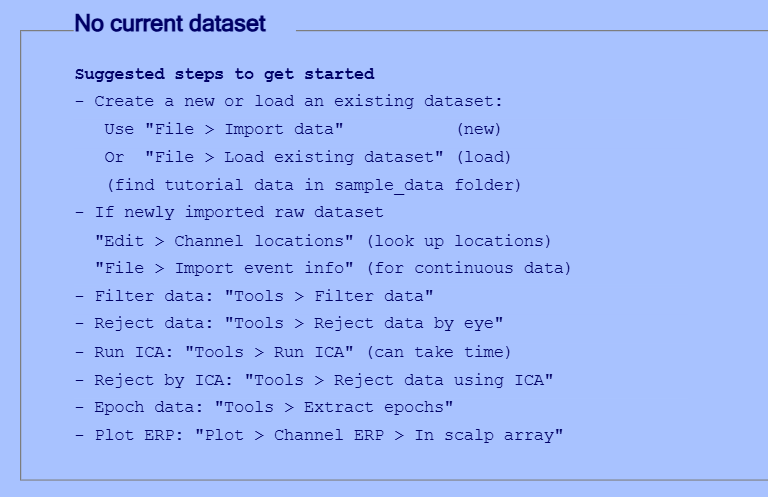
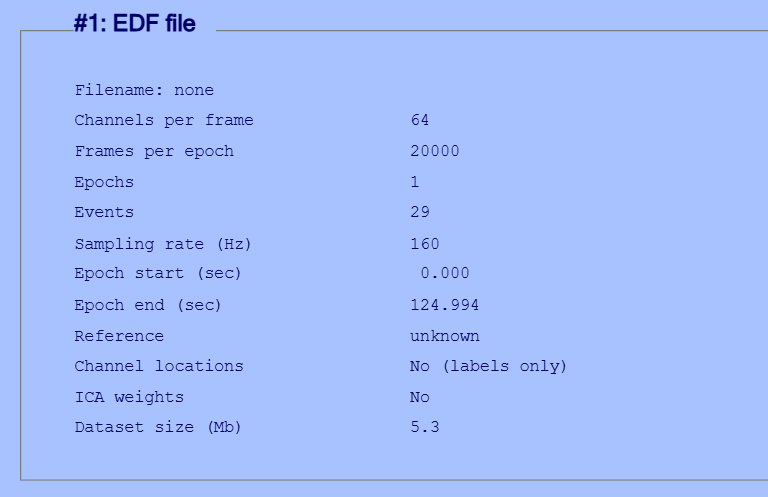
Drag the line to compare.
Your next questions, each answered in its own section:
How do I do it in EEGLAB?
14 steps in the menus
1. Download the practice file
We use one file from the open PhysioNet datasetOne EEG data file loaded in EEGLAB together with its information. on hand movement and motor imagery: S001R03.edf. It has 64 channels at 160 Hz, lasts about two minutes, and stores its events inside the file.
- Open the dataset page: EEG Motor Movement/Imagery Dataset.
- Go into the
S001folder and downloadS001R03.edf. - Put it in a folder for these lessons, away from the EEGLAB folder.
2. Import the file
- In the EEGLAB window, open: File then Import data then Using EEGLAB functions and plugins then From EDF/EDF+/GDF files (BIOSIG toolbox)
- If Biosig is not installed, EEGLAB asks to download it. Click Yes.
- Select the file
S001R03.edf. - The Load data using BIOSIG — pop_biosig() window opens. Leave every field at its default value:
- Channel list (default all): empty, meaning all channels.
- Data range (in seconds) to read (default all [0 …]) empty, meaning the whole recording.
- Import EDF+ annotations (try also mexSLOAD below) ticked. Annotations are text notes stored inside an EDF+ file with their timing, and the events in this file come from them.
- Click OK.
3. Name the dataset and save it
- A window opens to name the new dataset. In the Name it: field, type
S001R03. - Tick Save it as file: and choose a name such as
S001R03.setin your lessons folder. - Click OK.
Saving as .set means you will not repeat the import in the next lesson. The original .edf file stays as it is.
4. A BDF or BrainVision file instead of EDF
- BDF (BioSemi systems): the same pluginA package that adds new functions or menus to EEGLAB., from File then Import data then Using EEGLAB functions and plugins then From Biosemi BDF file (BIOSIG toolbox). Type a referenceThe point against which each channel's voltage is measured. channel number in the Reference chan(s) indices - recommended for BIOSEMI field, such as the two mastoid channels. The channel number depends on your electrodeThe physical sensor placed on the scalp to pick up the signal. order, so check your system’s montage file. The reason is under “Common mistakes”.
- BrainVision (Brain Products systems): a recording is three files with the same name:
.vhdr,.vmrkand.eeg. Open File then Import data then Using EEGLAB functions and plugins then From Brain Vis. Rec. .vhdr file and select the.vhdrfile. If the bva-io plugin is not installed, EEGLAB offers to download it. After installation the is called From Brain Vis. Rec. .vhdr or .ahdr file. - A format you do not know: try File then Import data then Using the FILE-IO interface, then File then Import data then Using the BIOSIG interface. If both fail, search for your system’s name in File then Manage EEGLAB extensions. The documentation says these steps work in about 90% of cases.
From a scriptA MATLAB file of commands that runs processing steps in order., the first two formats look like this. The file names are examples:
% BioSemi BDF: pick a temporary reference at import. Here: the average of
% the external mastoid electrodes EXG1 and EXG2 (channels 65 and 66 in a
% 64-channel cap). Check the channel order of your own montage.
EEG = pop_biosig(fullfile(dataFolder, 'sub01.bdf'), 'ref', [65 66]);

% BrainVision: give the folder and the .vhdr header file (needs bva-io)
EEG = pop_loadbv(dataFolder, 'sub01.vhdr');
How do I do it in EEGLAB?
1. Download the practice file
We use one file from the open PhysioNet dataset on hand movement and motor imagery: S001R03.edf. It has 64 channels at 160 Hz, lasts about two minutes, and stores its events inside the file.
- Open the dataset page: EEG Motor Movement/Imagery Dataset.
- Go into the
S001folder and downloadS001R03.edf. - Put it in a folder for these lessons, away from the EEGLAB folder.
2. Import the file
- In the EEGLAB window, open: File then Import data then Using EEGLAB functions and plugins then From EDF/EDF+/GDF files (BIOSIG toolbox)
- If Biosig is not installed, EEGLAB asks to download it. Click Yes.
- Select the file
S001R03.edf. - The Load data using BIOSIG — pop_biosig() window opens. Leave every field at its default value:
- Channel list (default all): empty, meaning all channels.
- Data range (in seconds) to read (default all [0 …]) empty, meaning the whole recording.
- Import EDF+ annotations (try also mexSLOAD below) ticked. Annotations are text notes stored inside an EDF+ file with their timing, and the events in this file come from them.
- Click OK.
3. Name the dataset and save it
- A window opens to name the new dataset. In the Name it: field, type
S001R03. - Tick Save it as file: and choose a name such as
S001R03.setin your lessons folder. - Click OK.
Saving as .set means you will not repeat the import in the next lesson. The original .edf file stays as it is.
4. A BDF or BrainVision file instead of EDF
- BDF (BioSemi systems): the same plugin, from File then Import data then Using EEGLAB functions and plugins then From Biosemi BDF file (BIOSIG toolbox). Type a reference channel number in the Reference chan(s) indices - recommended for BIOSEMI field, such as the two mastoid channels. The channel number depends on your electrode order, so check your system’s montage file. The reason is under “Common mistakes”.
- BrainVision (Brain Products systems): a recording is three files with the same name:
.vhdr,.vmrkand.eeg. Open File then Import data then Using EEGLAB functions and plugins then From Brain Vis. Rec. .vhdr file and select the.vhdrfile. If the bva-io plugin is not installed, EEGLAB offers to download it. After installation the menu is called From Brain Vis. Rec. .vhdr or .ahdr file. - A format you do not know: try File then Import data then Using the FILE-IO interface, then File then Import data then Using the BIOSIG interface. If both fail, search for your system’s name in File then Manage EEGLAB extensions. The documentation says these steps work in about 90% of cases.
From a script, the first two formats look like this. The file names are examples:
% BioSemi BDF: pick a temporary reference at import. Here: the average of
% the external mastoid electrodes EXG1 and EXG2 (channels 65 and 66 in a
% 64-channel cap). Check the channel order of your own montage.
EEG = pop_biosig(fullfile(dataFolder, 'sub01.bdf'), 'ref', [65 66]);

% BrainVision: give the folder and the .vhdr header file (needs bva-io)
EEG = pop_loadbv(dataFolder, 'sub01.vhdr');
How do I write it as code?
The same steps in 15 lines of MATLAB
% Start EEGLAB and get its main variables
[ALLEEG, EEG, CURRENTSET, ALLCOM] = eeglab;

% Folder where you saved S001R03.edf (change it)
dataFolder = 'C:\Users\me\Documents\eeg-course';

% Biosig is required for EDF/BDF files
if ~exist('sopen', 'file')
    plugin_askinstall('Biosig', 'sopen', true);
end

% Import the EDF+ file (all channels, events from annotations)
EEG = pop_biosig(fullfile(dataFolder, 'S001R03.edf'));

% Store it as a new dataset and save it as .set
[ALLEEG, EEG, CURRENTSET] = pop_newset(ALLEEG, EEG, 0, ...
    'setname', 'S001R03', 'gui', 'off');
EEG = pop_saveset(EEG, 'filename', 'S001R03.set', 'filepath', dataFolder);
eeglab redraw;
How do I write it as code?
% Start EEGLAB and get its main variables
[ALLEEG, EEG, CURRENTSET, ALLCOM] = eeglab;

% Folder where you saved S001R03.edf (change it)
dataFolder = 'C:\Users\me\Documents\eeg-course';

% Biosig is required for EDF/BDF files
if ~exist('sopen', 'file')
    plugin_askinstall('Biosig', 'sopen', true);
end

% Import the EDF+ file (all channels, events from annotations)
EEG = pop_biosig(fullfile(dataFolder, 'S001R03.edf'));

% Store it as a new dataset and save it as .set
[ALLEEG, EEG, CURRENTSET] = pop_newset(ALLEEG, EEG, 0, ...
    'setname', 'S001R03', 'gui', 'off');
EEG = pop_saveset(EEG, 'filename', 'S001R03.set', 'filepath', dataFolder);
eeglab redraw;
Which value should I choose?
Suitable values for your analysis goal
The main decision: which plugin reads your system’s files? All the menus below are under File then Import data then Using EEGLAB functions and plugins. If the plugin is not installed, EEGLAB offers to download it the first time you open its menu, as with Biosig.
| Your system | Format | Plugin | Menu | Function |
|---|---|---|---|---|
| Many clinical and research systems, PhysioNet, and g.tec (GDF files) | EDF, EDF+ or GDF: .edf, .gdf | Biosig | From EDF/EDF+/GDF files (BIOSIG toolbox) | pop_biosig |
| BioSemi | BDF: .bdf | Biosig | From Biosemi BDF file (BIOSIG toolbox) | pop_biosig with 'ref' |
| Brain Products | BrainVision: .vhdr, .vmrk and .eeg | bva-io | From Brain Vis. Rec. .vhdr file (after installation: From Brain Vis. Rec. .vhdr or .ahdr file) | pop_loadbv |
| EGI / Magstim | MFF: a .mff folder | mffmatlabio | Import Magstim/EGI .mff file | pop_mffimport |
| Neuroscan | .cnt | neuroscanio | From Neuroscan .CNT file | pop_loadcnt |
| ANT Neuro (eego) | EEProbe .cnt | ANTeepimport | From ANT EEProbe .CNT file | pop_loadeep_v4 |
| Any system recorded through Lab Streaming Layer (LSL) | XDF: .xdf | xdfimport | From .XDF or .XDFZ file | pop_loadxdf |
| Any system that exports the signal as text or numbers, or data you already have in MATLAB | ASCII or float file, or a MATLAB array | none, built into EEGLAB | From ASCII/float file or MATLAB array | pop_importdata |
- A Neuroscan
.cntand an ANT.cntare two different formats with the same extension. Choose by the system, not by the extension. - If you do not find your system, search for its format name in File then Manage EEGLAB extensions.
Two fields worth your attention in the Biosig window:
| Field | Value | Why |
|---|---|---|
| Import EDF+ annotations | Ticked (default) | In EDF+ files, events come from the annotations. If you untick it, you lose the events. |
| Reference chan(s) indices - recommended for BIOSEMI | Empty for EDF, a reference channel for BDF | The pop_biosig help page warns that BioSemi data are recorded reference-free and lose about 40 dB (decibel)A logarithmic scale for power that makes large and small values easy to compare. of signal-to-noise ratio if left without a reference. This is a temporary reference; you choose the final one in the re-referencing lesson. |
Which value should I choose?
The main decision: which plugin reads your system’s files? All the menus below are under File then Import data then Using EEGLAB functions and plugins. If the plugin is not installed, EEGLAB offers to download it the first time you open its menu, as with Biosig.
| Your system | Format | Plugin | Menu | Function |
|---|---|---|---|---|
| Many clinical and research systems, PhysioNet, and g.tec (GDF files) | EDF, EDF+ or GDF: .edf, .gdf | Biosig | From EDF/EDF+/GDF files (BIOSIG toolbox) | pop_biosig |
| BioSemi | BDF: .bdf | Biosig | From Biosemi BDF file (BIOSIG toolbox) | pop_biosig with 'ref' |
| Brain Products | BrainVision: .vhdr, .vmrk and .eeg | bva-io | From Brain Vis. Rec. .vhdr file (after installation: From Brain Vis. Rec. .vhdr or .ahdr file) | pop_loadbv |
| EGI / Magstim | MFF: a .mff folder | mffmatlabio | Import Magstim/EGI .mff file | pop_mffimport |
| Neuroscan | .cnt | neuroscanio | From Neuroscan .CNT file | pop_loadcnt |
| ANT Neuro (eego) | EEProbe .cnt | ANTeepimport | From ANT EEProbe .CNT file | pop_loadeep_v4 |
| Any system recorded through Lab Streaming Layer (LSL) | XDF: .xdf | xdfimport | From .XDF or .XDFZ file | pop_loadxdf |
| Any system that exports the signal as text or numbers, or data you already have in MATLAB | ASCII or float file, or a MATLAB array | none, built into EEGLAB | From ASCII/float file or MATLAB array | pop_importdata |
- A Neuroscan
.cntand an ANT.cntare two different formats with the same extension. Choose by the system, not by the extension. - If you do not find your system, search for its format name in File then Manage EEGLAB extensions.
Two fields worth your attention in the Biosig window:
| Field | Value | Why |
|---|---|---|
| Import EDF+ annotations | Ticked (default) | In EDF+ files, events come from the annotations. If you untick it, you lose the events. |
| Reference chan(s) indices - recommended for BIOSEMI | Empty for EDF, a reference channel for BDF | The pop_biosig help page warns that BioSemi data are recorded reference-free and lose about 40 dB of signal-to-noise ratio if left without a reference. This is a temporary reference; you choose the final one in the re-referencing lesson. |
How do I check it worked?
5 quick checks
- The main window: under the dataset name, read Channels per frame = 64, Sampling rate (Hz) = 160, and Events above zero. Channel locations shows
No (labels only), meaning the channel names are there without locations. This is expected for now; we add the locations in the next lesson. - From the Command Window:
EEG.nbchangives64,EEG.srategives160, andEEG.pnts / EEG.srategives the length in seconds (about two minutes). - The events:
eeg_eventtypes(EEG)lists the three codesT0(rest),T1andT2(two movements, depending on the task). If the event count is zero, import again and check the annotations field. - By eye: open Plot then Channel data (scroll). You should see the channels with a changing signal, and colored vertical lines at the events.
- The saved file:
S001R03.setshould appear in your lessons folder.
About the data
Data: Schalk, G. (2009). EEG Motor Movement/Imagery Dataset (version 1.0.0). PhysioNet. DOI: 10.13026/C28G6P. License: Open Data Commons Attribution v1.0. Along with the original paper: Schalk et al. (2004), IEEE Transactions on Biomedical Engineering 51(6):1034-1043. And the standard PhysioNet citation: Pollard, T., Moody, B. E., Lehman, L., Gow, B., Fernandes, C., Xie, C., Johnson, A., Mark, R. G., & Heldt, T. (2026). PhysioNet as a global platform for biomedical research. Nature Health. https://doi.org/10.1038/s44360-026-00096-z
About the data
Data: Schalk, G. (2009). EEG Motor Movement/Imagery Dataset (version 1.0.0). PhysioNet. DOI: 10.13026/C28G6P. License: Open Data Commons Attribution v1.0. Along with the original paper: Schalk et al. (2004), IEEE Transactions on Biomedical Engineering 51(6):1034-1043. And the standard PhysioNet citation: Pollard, T., Moody, B. E., Lehman, L., Gow, B., Fernandes, C., Xie, C., Johnson, A., Mark, R. G., & Heldt, T. (2026). PhysioNet as a global platform for biomedical research. Nature Health. https://doi.org/10.1038/s44360-026-00096-z
Keep this file. The next two lessons (channel locations and events) continue on it.
How do I check it worked?
- The main window: under the dataset name, read Channels per frame = 64, Sampling rate (Hz) = 160, and Events above zero. Channel locations shows
No (labels only), meaning the channel names are there without locations. This is expected for now; we add the locations in the next lesson. - From the Command Window:
EEG.nbchangives64,EEG.srategives160, andEEG.pnts / EEG.srategives the length in seconds (about two minutes). - The events:
eeg_eventtypes(EEG)lists the three codesT0(rest),T1andT2(two movements, depending on the task). If the event count is zero, import again and check the annotations field. - By eye: open Plot then Channel data (scroll). You should see the channels with a changing signal, and colored vertical lines at the events.
- The saved file:
S001R03.setshould appear in your lessons folder.
About the data
Data: Schalk, G. (2009). EEG Motor Movement/Imagery Dataset (version 1.0.0). PhysioNet. DOI: 10.13026/C28G6P. License: Open Data Commons Attribution v1.0. Along with the original paper: Schalk et al. (2004), IEEE Transactions on Biomedical Engineering 51(6):1034-1043. And the standard PhysioNet citation: Pollard, T., Moody, B. E., Lehman, L., Gow, B., Fernandes, C., Xie, C., Johnson, A., Mark, R. G., & Heldt, T. (2026). PhysioNet as a global platform for biomedical research. Nature Health. https://doi.org/10.1038/s44360-026-00096-z
About the data
Data: Schalk, G. (2009). EEG Motor Movement/Imagery Dataset (version 1.0.0). PhysioNet. DOI: 10.13026/C28G6P. License: Open Data Commons Attribution v1.0. Along with the original paper: Schalk et al. (2004), IEEE Transactions on Biomedical Engineering 51(6):1034-1043. And the standard PhysioNet citation: Pollard, T., Moody, B. E., Lehman, L., Gow, B., Fernandes, C., Xie, C., Johnson, A., Mark, R. G., & Heldt, T. (2026). PhysioNet as a global platform for biomedical research. Nature Health. https://doi.org/10.1038/s44360-026-00096-z
Keep this file. The next two lessons (channel locations and events) continue on it.
What mistakes do people make?
5 mistakes and how to avoid them
- Picking the wrong BrainVision file. Always open the
.vhdrfile, not.eegor.vmrk. And do not rename one of the three files by hand, because the.vhdrfile stores the names of the other two inside it. If you need to rename them, use File then Export then Copy and Rename Brain Vis. exchange files after installing bva-io. - A BDF file without a reference. You lose a large part of the signal quality, as in the table above. Choose a reference channel at import.
- Turning off event import. The Biosig window has two event fields, both ticked by default for every format: Import EDF+ annotations and Extract event from marker channel. If you untick them, the event count may drop to zero, and you cannot epoch the data later.
- Not saving after import. You will repeat the import every time. Save one
.setcopy after import, and never overwrite the original file. - Odd channel names in this file. The channel names in this dataset end with dots, such as
Fc5.andC3... This is not an import error, but it stops EEGLAB from recognizing the electrode locations. We fix it in the next lesson.
What mistakes do people make?
- Picking the wrong BrainVision file. Always open the
.vhdrfile, not.eegor.vmrk. And do not rename one of the three files by hand, because the.vhdrfile stores the names of the other two inside it. If you need to rename them, use File then Export then Copy and Rename Brain Vis. exchange files after installing bva-io. - A BDF file without a reference. You lose a large part of the signal quality, as in the table above. Choose a reference channel at import.
- Turning off event import. The Biosig window has two event fields, both ticked by default for every format: Import EDF+ annotations and Extract event from marker channel. If you untick them, the event count may drop to zero, and you cannot epoch the data later.
- Not saving after import. You will repeat the import every time. Save one
.setcopy after import, and never overwrite the original file. - Odd channel names in this file. The channel names in this dataset end with dots, such as
Fc5.andC3... This is not an import error, but it stops EEGLAB from recognizing the electrode locations. We fix it in the next lesson.
Your browser doesn't allow saving progress. All lessons are open, but completion marks won't be saved.
Done. Your progress is saved in this browser.UndoHow do I write it in my paper?
A Methods template: edit the data, settings and versions to match what you ran
A template: edit the data, settings and versions to match what you ran.
EEG recordings in EDF+ format (64 channels, 160 Hz) were imported into EEGLAB 2026.1 with pop_biosig (Biosig plugin [version]), and event markers were read from the EDF+ annotations.How do I write it in my paper?
A template: edit the data, settings and versions to match what you ran.
EEG recordings in EDF+ format (64 channels, 160 Hz) were imported into EEGLAB 2026.1 with pop_biosig (Biosig plugin [version]), and event markers were read from the EDF+ annotations.Where can I read more?
4 sources, official docs first
- EEGLAB TutorialDocumentation4.a Continuous data: Four steps to easily import continuous raw data files
- EEGLAB ExtensionsDocumentationData import
- EEGLAB preprocessing #1: Importing raw dataVideoFull video · 8:31
- EEG Motor Movement/Imagery Dataset (PhysioNet)Experimental Protocol; Montage
Written for EEGLAB 2026.1 · 2026-10-28
Going further
- EEGLAB Tutorial: https://eeglab.org/tutorials/04_Import/Importing_Continuous_and_Epoched_Data.html (4.a Continuous data: Four steps to easily import continuous raw data files)
- EEGLAB Extensions: https://eeglab.org/others/EEGLAB_Extensions.html (Data import)
- EEGLAB preprocessing #1: Importing raw data: https://www.youtube.com/watch?v=gEk33jWB0MY (Full video)
- EEG Motor Movement/Imagery Dataset (PhysioNet): https://physionet.org/content/eegmmidb/1.0.0/ (Experimental Protocol; Montage)
Need help?
Ask, share feedback, or report an error
- Report a scientific error · Needs a GitHub account. Don't have one? Use "Share your thoughts".