Station 3 · Lesson 1
Resampling
eeglab_data.set (D1) · Nothing yet: the data as downloaded.Download the data (opens in a new tab)Script to reach this state
[ALLEEG, EEG, CURRENTSET, ALLCOM] = eeglab;
eeglabRoot = fileparts(which('eeglab'));
EEG = pop_loadset('eeglab_data.set', fullfile(eeglabRoot, 'sample_data'));
[ALLEEG, EEG, CURRENTSET] = pop_newset(ALLEEG, EEG, 0, 'setname', 'Continuous EEG Data', 'gui', 'off');
eeglab redraw;
Your browser's back button takes you to the exact place you were, so open anything you like.
The idea in brief
The sampling rateThe number of samples recorded per second on each channel. is the number of measurements per second for each channelThe signal recorded from one electrode, as shown in EEGLAB.. EEGA recording of the brain's electrical activity from electrodes on the scalp. systems often record at 500 or 1000 Hz, or more. D1 is already at 128 Hz, so the path does not downsample it, and the copy you make here is only for comparison.
Before and after
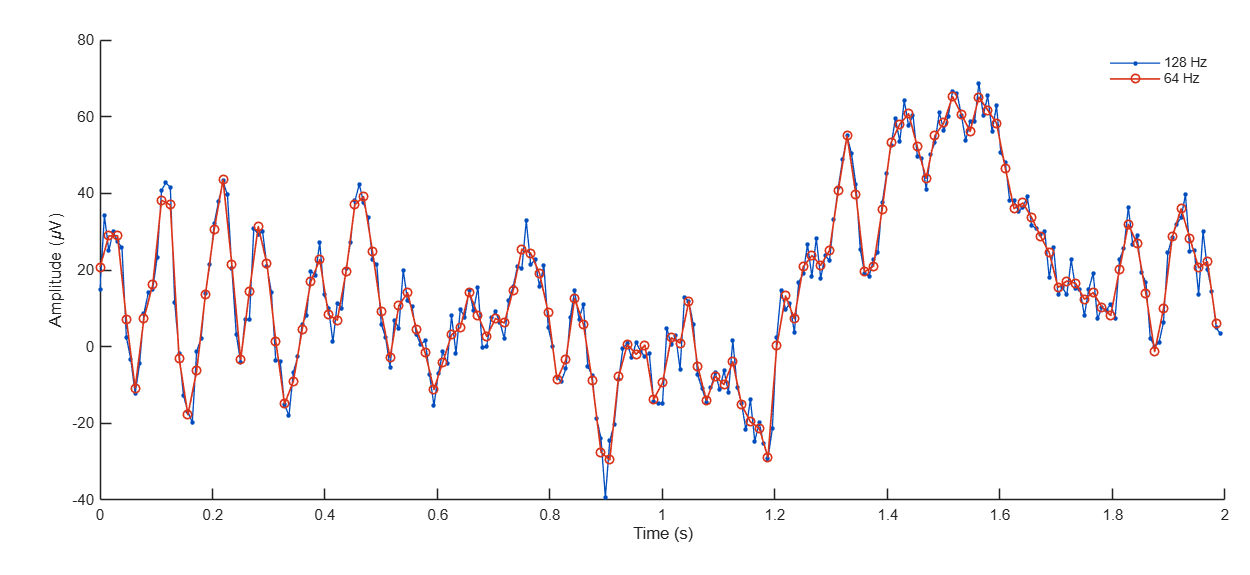
Your next questions, each answered in its own section:
Why do I need this step?
The reasons in detail, and the terms you need
A high rate makes files large and slows every later step, especially ICAA method that separates the recording into independent sources, some brain and some artifact.. Most ERPThe brain's average response to a given event across many trials. analyses do not need frequencies above about 40 Hz.
So you lower the rate once, at the start of processing, and every later step becomes faster.
But there is a limit. The highest frequencyThe number of cycles per second, measured in hertz (Hz). the data can represent is half the sampling rate, called the Nyquist frequencyHalf the sampling rate; the highest frequency that can be represented without distortion.. Any frequency above it does not disappear. It shows up, wrongly, as a lower frequency. This is called aliasingA high frequency appearing as a lower one because the sampling rate is too low..
That is why EEGLAB applies an anti-aliasing low-passA filter that passes low frequencies and weakens fast ones such as muscle activity. filterA tool that weakens some frequencies in a signal and keeps others. before lowering the rate, automatically.
Why do I need this step?
A high rate makes files large and slows every later step, especially ICA. Most ERP analyses do not need frequencies above about 40 Hz.
So you lower the rate once, at the start of processing, and every later step becomes faster.
But there is a limit. The highest frequency the data can represent is half the sampling rate, called the Nyquist frequency. Any frequency above it does not disappear. It shows up, wrongly, as a lower frequency. This is called aliasing.
That is why EEGLAB applies an anti-aliasing low-pass filter before lowering the rate, automatically.
How do I do it in EEGLAB?
6 steps in the menus
Start with D1 loaded, as in the Starting point. In the main EEGLAB window, note the current values: Sampling rate (Hz) is 128, Frames per epoch is 30504, and Events is 154.
- Open Tools then Change sampling rate.
- A window titled Resample current dataset — pop_resample() appears. In New sampling rate, type
64, then press OK. - The command window prints the channel numbers one by one while it works, then
resampling finished. - The window for naming the new datasetOne EEG data file loaded in EEGLAB together with its information. appears, suggesting
Continuous EEG Data resampled. Replace it withD1 64Hzand leave Overwrite it in memory (set=yes; unset=create a new dataset) unchecked. You now have a second dataset, and the first one is unchanged. - Compare the two datasets in the scrolling view: open Plot then Channel data (scroll) on each one. The overall shape is similar, and the new copy is a little smoother.
- Go back to the first dataset from the Datasets . Do not save
D1 64Hz; the path does not use it.
How do I do it in EEGLAB?
Start with D1 loaded, as in the Starting point. In the main EEGLAB window, note the current values: Sampling rate (Hz) is 128, Frames per epoch is 30504, and Events is 154.
- Open Tools then Change sampling rate.
- A window titled Resample current dataset — pop_resample() appears. In New sampling rate, type
64, then press OK. - The command window prints the channel numbers one by one while it works, then
resampling finished. - The window for naming the new dataset appears, suggesting
Continuous EEG Data resampled. Replace it withD1 64Hzand leave Overwrite it in memory (set=yes; unset=create a new dataset) unchecked. You now have a second dataset, and the first one is unchanged. - Compare the two datasets in the scrolling view: open Plot then Channel data (scroll) on each one. The overall shape is similar, and the new copy is a little smoother.
- Go back to the first dataset from the Datasets menu. Do not save
D1 64Hz; the path does not use it.
How do I write it as code?
The same steps in 16 lines of MATLAB
% Exercise only: a temporary copy at half the sampling rate
EEG_64 = pop_resample(EEG, 64);
EEG_64.setname = 'D1 64Hz';

% Compare rate, length and events
fprintf('Original : %g Hz, %d samples, %d events\n', EEG.srate, EEG.pnts, length(EEG.event));
fprintf('Resampled: %g Hz, %d samples, %d events\n', EEG_64.srate, EEG_64.pnts, length(EEG_64.event));

% The same 2 seconds of channel Cz at both rates
cz = find(strcmp({EEG.chanlocs.labels}, 'Cz'));
t1 = (0:2*EEG.srate-1) / EEG.srate;
t2 = (0:2*EEG_64.srate-1) / EEG_64.srate;
figure; hold on;
plot(t1, EEG.data(cz, 1:numel(t1)), '.-');
plot(t2, EEG_64.data(cz, 1:numel(t2)), 'o-');
legend('128 Hz', '64 Hz');
xlabel('Time (s)'); ylabel('Amplitude (uV)');

% The main path continues on EEG at 128 Hz; EEG_64 is not saved
With your own raw data at 1000 Hz, for example, the only line you need in your pipeline is EEG = pop_resample(EEG, 250);.
How do I write it as code?
% Exercise only: a temporary copy at half the sampling rate
EEG_64 = pop_resample(EEG, 64);
EEG_64.setname = 'D1 64Hz';

% Compare rate, length and events
fprintf('Original : %g Hz, %d samples, %d events\n', EEG.srate, EEG.pnts, length(EEG.event));
fprintf('Resampled: %g Hz, %d samples, %d events\n', EEG_64.srate, EEG_64.pnts, length(EEG_64.event));

% The same 2 seconds of channel Cz at both rates
cz = find(strcmp({EEG.chanlocs.labels}, 'Cz'));
t1 = (0:2*EEG.srate-1) / EEG.srate;
t2 = (0:2*EEG_64.srate-1) / EEG_64.srate;
figure; hold on;
plot(t1, EEG.data(cz, 1:numel(t1)), '.-');
plot(t2, EEG_64.data(cz, 1:numel(t2)), 'o-');
legend('128 Hz', '64 Hz');
xlabel('Time (s)'); ylabel('Amplitude (uV)');

% The main path continues on EEG at 128 Hz; EEG_64 is not saved
With your own raw data at 1000 Hz, for example, the only line you need in your pipeline is EEG = pop_resample(EEG, 250);.
Which value should I choose?
Suitable values for your analysis goal
| Setting | Value | Why |
|---|---|---|
| D1 | Do not change the rate (128 Hz) | Official tutorial: the tutorial data rate is already acceptable. |
| Raw data at 500 or 1000 Hz for ERP analysis | 250 Hz, or 256 | Keeps frequencies up to about 100 Hz, far above what ERPs need. |
| General rule | New rate ≥ 2.5 × the highest frequency of interest | Theory requires more than twice. And the EEGLAB anti-aliasing filter keeps frequencies fully only up to 80% of the new Nyquist, so you need a margin. |
| Where in the pipeline | On continuous data, before filtering and epoching | It speeds up everything after it. EEGLAB itself warns against resampling epoched data. |
Which value should I choose?
| Setting | Value | Why |
|---|---|---|
| D1 | Do not change the rate (128 Hz) | Official tutorial: the tutorial data rate is already acceptable. |
| Raw data at 500 or 1000 Hz for ERP analysis | 250 Hz, or 256 | Keeps frequencies up to about 100 Hz, far above what ERPs need. |
| General rule | New rate ≥ 2.5 × the highest frequency of interest | Theory requires more than twice. And the EEGLAB anti-aliasing filter keeps frequencies fully only up to 80% of the new Nyquist, so you need a margin. |
| Where in the pipeline | On continuous data, before filtering and epoching | It speeds up everything after it. EEGLAB itself warns against resampling epoched data. |
How do I check it worked?
4 quick checks
- In the main EEGLAB window, with
D1 64Hzcurrent: Sampling rate (Hz) is 64, and Frames per epoch is 15252, half the original number. - The number of events did not change: Events is still 154.
- The recording length did not change: Epoch end (sec) is 238.297 in the new copy and 238.305 in the original. The difference is less than one sample.
- The original dataset is intact: go back to the first dataset and check that its rate is still 128.
The sentence below is for your raw data resampled to 250 Hz. In D1 you do not write it, because the path does not change the rate.
How do I check it worked?
- In the main EEGLAB window, with
D1 64Hzcurrent: Sampling rate (Hz) is 64, and Frames per epoch is 15252, half the original number. - The number of events did not change: Events is still 154.
- The recording length did not change: Epoch end (sec) is 238.297 in the new copy and 238.305 in the original. The difference is less than one sample.
- The original dataset is intact: go back to the first dataset and check that its rate is still 128.
The sentence below is for your raw data resampled to 250 Hz. In D1 you do not write it, because the path does not change the rate.
What mistakes do people make?
4 mistakes and how to avoid them
- Going below what your analysis needs. If you will study gamma frequencies around 40 to 80 Hz, a 128 Hz rate is not enough. Work out the highest frequency you care about first, then choose the rate.
- Resampling after epoching. Do it on continuous data. With epoched data EEGLAB prints a warning, because the anti-aliasing filter runs over the edges of each epoch separately.
- Editing event latencies by hand. EEGLAB recomputes every event latency for the new rate automatically. Do not divide the numbers yourself.
- Resampling for no reason. If the rate is already acceptable, as in D1, lowering it gains nothing. Every unnecessary step changes the data a little.
What mistakes do people make?
- Going below what your analysis needs. If you will study gamma frequencies around 40 to 80 Hz, a 128 Hz rate is not enough. Work out the highest frequency you care about first, then choose the rate.
- Resampling after epoching. Do it on continuous data. With epoched data EEGLAB prints a warning, because the anti-aliasing filter runs over the edges of each epoch separately.
- Editing event latencies by hand. EEGLAB recomputes every event latency for the new rate automatically. Do not divide the numbers yourself.
- Resampling for no reason. If the rate is already acceptable, as in D1, lowering it gains nothing. Every unnecessary step changes the data a little.
Your browser doesn't allow saving progress. All lessons are open, but completion marks won't be saved.
Done. Your progress is saved in this browser.UndoHow do I write it in my paper?
A Methods template: edit the data, settings and versions to match what you ran
A template: edit the data, settings and versions to match what you ran.
Data were downsampled to 250 Hz using pop_resample (EEGLAB 2026.1), which applies an anti-aliasing low-pass FIR filter (Kaiser window) before resampling.How do I write it in my paper?
A template: edit the data, settings and versions to match what you ran.
Data were downsampled to 250 Hz using pop_resample (EEGLAB 2026.1), which applies an anti-aliasing low-pass FIR filter (Kaiser window) before resampling.Where can I read more?
3 sources, official docs first
- EEGLAB TutorialDocumentation5. Preprocess data > c. Resampling
- Makoto's preprocessing pipeline§3 Downsample if necessary
- EEGLAB preprocessing #3: Rereferencing and resamplingVideoFull video · 11:48
Written for EEGLAB 2026.1 · 2026-10-29
Going further
- EEGLAB Tutorial: https://eeglab.org/tutorials/05_Preprocess/resampling.html (5. Preprocess data > c. Resampling)
- Makoto's preprocessing pipeline: https://eeglab.ucsd.edu/wiki/Makoto%27s_preprocessing_pipeline (§3 Downsample if necessary)
- EEGLAB preprocessing #3: Rereferencing and resampling: https://www.youtube.com/watch?v=hByLyGYecjI (Full video)
Need help?
Ask, share feedback, or report an error
- Report a scientific error · Needs a GitHub account. Don't have one? Use "Share your thoughts".