Station 9 · Lesson 4
Automated pipelines: when to use them
eeglab_data.set (D1) · Nothing yet: the data as downloaded.Download the data (opens in a new tab)Script to reach this state
[ALLEEG, EEG, CURRENTSET, ALLCOM] = eeglab;
eeglabRoot = fileparts(which('eeglab'));
EEG = pop_loadset('eeglab_data.set', fullfile(eeglabRoot, 'sample_data'));

% Show the dataset in the main EEGLAB window
[ALLEEG, EEG, CURRENTSET] = pop_newset(ALLEEG, EEG, 0, 'setname', 'D1 raw', 'gui', 'off');
eeglab redraw;
Your browser's back button takes you to the exact place you were, so open anything you like.
The idea in brief
In stations 3 to 5 you built a preprocessingCleaning and preparing the data before analysis. pipelineThe fixed sequence of processing steps from raw data to results. by hand: filteringApplying a filter to the data., line noiseInterference from the mains supply at 60 Hz in Saudi Arabia or 50 Hz elsewhere., bad channels, referenceThe point against which each channel's voltage is measured., ICAA method that separates the recording into independent sources, some brain and some artifact., then epochA short time segment cut out around an event.. Every lab repeats these steps, so several groups have packaged them into ready-made pipelines that run on all participants without your intervention.
Before and after
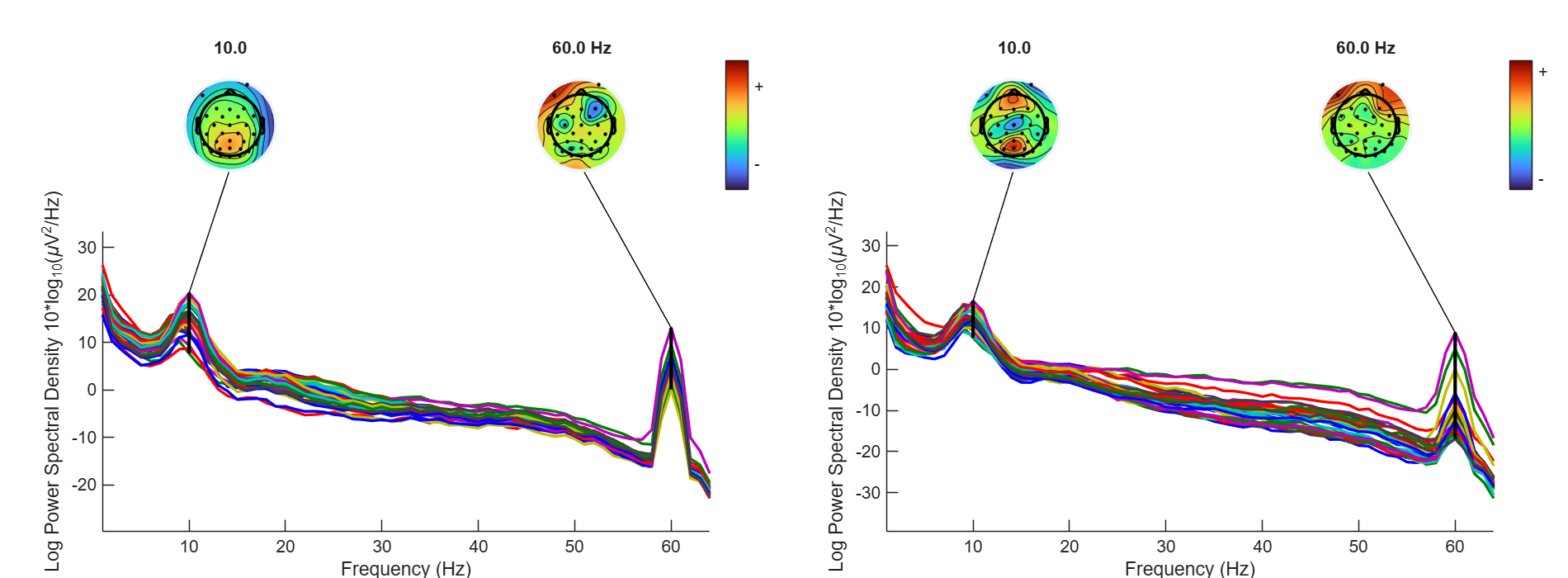
Your next questions, each answered in its own section:
Why do I need this step?
The reasons in detail, and the terms you need
These pipelines save a lot of time, especially with large datasets. But each one makes dozens of decisions for you: which channelThe signal recorded from one electrode, as shown in EEGLAB. is bad, which component is an eye, which segment to delete. If you do not know these decisions, you cannot defend them in your paper or notice when they go wrong.
A ready-made pipeline saves time, but it does not excuse you from understanding every step in it.
That is why this lesson comes after you built the pipeline yourself. In it you compare the six common pipelines, then run one of them (PREP) on D1 and check its output the same way you would check any pipeline.
Six pipelines in one table
All of them are separate tools, not bundled with EEGLAB. Versions are as they were when this lesson was written.
| Pipeline | Designed for | What it does in brief | How you run it |
|---|---|---|---|
| PREP (PrepPipeline 0.57.0) | Any EEGA recording of the brain's electrical activity from electrodes on the scalp., especially large datasets | The early stage only: line noiseAny part of the recording that does not carry the information we want. reduction, a robust average referenceA reference equal to the mean of all scalp channels., bad channelA channel that is flat or noisy for most of the recording. detection and interpolation. It does not run ICA. | EEGLAB plugin: Tools then Run PREP pipeline |
| HAPPE (v4) | Infant and child data, and recordings with few channels | A full pipeline up to clean epochs, with a quality table for each file | MATLAB scripts that use EEGLAB, run from the HAPPE folder |
| MADE (v1.0) | Infant and child data | A full pipeline with automatic detection of bad channels and artifact components | One MATLAB script that you edit and run |
| RELAX (2.0.1) | Adult data, for ERPs and oscillations | Cleans eye and muscle artifacts with several methods together (MWF, wICA and ICLabel) | EEGLAB plugin, needs other plugins its guide lists |
| BeMoBIL (2.0.0) | EEG during movement (mobile EEG) with motion data | Import, cleaning, AMICA and analysis with all parameters in one config file | EEGLAB plugin and scripts |
| Automagic | Large datasets for users who do not want to program | Runs several steps (including PREP), then rates the quality of each file | Its own GUI from the Automagic menu in EEGLAB |
Whatever pipeline you choose, check three things in its output before you continue:
- The channels: how many channels were removed or interpolated, and which ones? Compare them with what you see in Plot then Channel data (scroll).
- The spectrum: compare the spectrum before and after. The line peak should become clearly smaller, and the rest of the spectrum should not collapse.
- The report: read the pipeline’s report for each participant. A participant with too many removed channels or components needs a look, or exclusion.
Why do I need this step?
These pipelines save a lot of time, especially with large datasets. But each one makes dozens of decisions for you: which channel is bad, which component is an eye, which segment to delete. If you do not know these decisions, you cannot defend them in your paper or notice when they go wrong.
A ready-made pipeline saves time, but it does not excuse you from understanding every step in it.
That is why this lesson comes after you built the pipeline yourself. In it you compare the six common pipelines, then run one of them (PREP) on D1 and check its output the same way you would check any pipeline.
Six pipelines in one table
All of them are separate tools, not bundled with EEGLAB. Versions are as they were when this lesson was written.
| Pipeline | Designed for | What it does in brief | How you run it |
|---|---|---|---|
| PREP (PrepPipeline 0.57.0) | Any EEG, especially large datasets | The early stage only: line noise reduction, a robust average reference, bad channel detection and interpolation. It does not run ICA. | EEGLAB plugin: Tools then Run PREP pipeline |
| HAPPE (v4) | Infant and child data, and recordings with few channels | A full pipeline up to clean epochs, with a quality table for each file | MATLAB scripts that use EEGLAB, run from the HAPPE folder |
| MADE (v1.0) | Infant and child data | A full pipeline with automatic detection of bad channels and artifact components | One MATLAB script that you edit and run |
| RELAX (2.0.1) | Adult data, for ERPs and oscillations | Cleans eye and muscle artifacts with several methods together (MWF, wICA and ICLabel) | EEGLAB plugin, needs other plugins its guide lists |
| BeMoBIL (2.0.0) | EEG during movement (mobile EEG) with motion data | Import, cleaning, AMICA and analysis with all parameters in one config file | EEGLAB plugin and scripts |
| Automagic | Large datasets for users who do not want to program | Runs several steps (including PREP), then rates the quality of each file | Its own GUI from the Automagic menu in EEGLAB |
Whatever pipeline you choose, check three things in its output before you continue:
- The channels: how many channels were removed or interpolated, and which ones? Compare them with what you see in Plot then Channel data (scroll).
- The spectrum: compare the spectrum before and after. The line peak should become clearly smaller, and the rest of the spectrum should not collapse.
- The report: read the pipeline’s report for each participant. A participant with too many removed channels or components needs a look, or exclusion.
How do I do it in EEGLAB?
10 steps in the menus
First: install PREP
- Open File then Manage EEGLAB extensions, search for PrepPipeline and install it (the latest release when this lesson was written is 0.57.0). Restart
eeglab, and the item Run PREP pipeline appears in the Tools menu.
Second: look at the data before
- Start from
D1 raw, as in “Starting point”. These are the data as downloaded, without filtering. - Open Plot then Channel spectra and maps and keep the defaults. Note the sharp peak at 60 Hz, as in the line noise lesson.
Third: run PREP
- Open Tools then Run PREP pipeline. The PREP pipeline control panel window opens with six buttons, one for each stage.
- Click Reference. In Reference channels, Evaluation channels and Re-referenced channels, type
[1 3:5 7:32], that is, all channels exceptEOG1(channel 2) andEOG2(channel 6). Click Ok. - Click Line noise and check that Line frequencies removed shows
60. PREP computes it from the sampling rate: multiples of 60 below Nyquist, which is 64 Hz in D1. Click Ok. - Click Ok in the control panel. PREP prints each stage in the command window and takes about a minute on D1. When it finishes, it writes a summary file (
.html) and a detailed report (.pdf) in your working folder, and asks you to name the new dataset. Name itD1 prep.
Fourth: check the output
- Open the
.htmlsummary file in a browser. Look for the list of interpolated channels and the list of channels still noisy after the reference. - Open Plot then Channel spectra and maps again on
D1 prep. The 60 Hz peak is smaller but still there, clearly so in a few channels. PREP’s line noise step reduces the peak; it does not remove it completely. If the remaining peak matters for your analysis, add the band-stop filter from the line noise lesson after PREP. - Compare with your result in the bad channels lesson: there clean_rawdata did not remove any channel from D1. If PREP interpolated a channel, open Plot then Channel data (scroll) and look at it yourself before you accept the decision.
How do I do it in EEGLAB?
First: install PREP
- Open File then Manage EEGLAB extensions, search for PrepPipeline and install it (the latest release when this lesson was written is 0.57.0). Restart
eeglab, and the item Run PREP pipeline appears in the Tools menu.
Second: look at the data before
- Start from
D1 raw, as in “Starting point”. These are the data as downloaded, without filtering. - Open Plot then Channel spectra and maps and keep the defaults. Note the sharp peak at 60 Hz, as in the line noise lesson.
Third: run PREP
- Open Tools then Run PREP pipeline. The PREP pipeline control panel window opens with six buttons, one for each stage.
- Click Reference. In Reference channels, Evaluation channels and Re-referenced channels, type
[1 3:5 7:32], that is, all channels exceptEOG1(channel 2) andEOG2(channel 6). Click Ok. - Click Line noise and check that Line frequencies removed shows
60. PREP computes it from the sampling rate: multiples of 60 below Nyquist, which is 64 Hz in D1. Click Ok. - Click Ok in the control panel. PREP prints each stage in the command window and takes about a minute on D1. When it finishes, it writes a summary file (
.html) and a detailed report (.pdf) in your working folder, and asks you to name the new dataset. Name itD1 prep.
Fourth: check the output
- Open the
.htmlsummary file in a browser. Look for the list of interpolated channels and the list of channels still noisy after the reference. - Open Plot then Channel spectra and maps again on
D1 prep. The 60 Hz peak is smaller but still there, clearly so in a few channels. PREP’s line noise step reduces the peak; it does not remove it completely. If the remaining peak matters for your analysis, add the band-stop filter from the line noise lesson after PREP. - Compare with your result in the bad channels lesson: there clean_rawdata did not remove any channel from D1. If PREP interpolated a channel, open Plot then Channel data (scroll) and look at it yourself before you accept the decision.
How do I write it as code?
The same steps in 35 lines of MATLAB
Continues from “Starting point”. PREP’s own function prepPipeline is the clearest way to call it from a script, as in the example that ships with the plugin. The script does not write the report; it prints the results directly.
% PREP is not bundled with EEGLAB: install it from the extension manager
plugin_askinstall('PrepPipeline', 'prepPipeline', true);

% Keep a copy of the raw data to compare spectra
EEG_raw = EEG;

% Scalp channels only; EOG is cleaned of line noise but not referenced
eegChans = find(~ismember({EEG.chanlocs.labels}, {'EOG1', 'EOG2'}));

params = struct();
params.name = 'D1';
params.lineFrequencies = 60;
params.detrendChannels = 1:EEG.nbchan;
params.lineNoiseChannels = 1:EEG.nbchan;
params.referenceChannels = eegChans;
params.evaluationChannels = eegChans;
params.rereferencedChannels = eegChans;

% Line noise reduction, robust reference, bad channel interpolation
[EEG, params] = prepPipeline(EEG, params);
EEG.setname = 'D1 prep';

% What did PREP decide?
nd = EEG.etc.noiseDetection;
if ~strcmp(nd.errors.status, 'good')
    error('PREP stopped with status: %s', nd.errors.status);
end
fprintf('PREP version: %s\n', nd.version);
fprintf('Interpolated channels: %s\n', ...
    strjoin({EEG.chanlocs(nd.interpolatedChannelNumbers).labels}, ', '));
fprintf('Still noisy after reference: %s\n', ...
    strjoin({EEG.chanlocs(nd.stillNoisyChannelNumbers).labels}, ', '));

% Spectrum before and after
figure; pop_spectopo(EEG_raw, 1, [], 'EEG', 'freqrange', [1 64], 'freq', [10 60]);
figure; pop_spectopo(EEG, 1, [], 'EEG', 'freqrange', [1 64], 'freq', [10 60]);

% PREP leaves the data unfiltered: high-pass before ICA or epochs
EEG = pop_eegfiltnew(EEG, 'locutoff', 0.1);

EEG.filename = ''; EEG.filepath = ''; EEG.datfile = ''; EEG.saved = 'no';
[ALLEEG, EEG, CURRENTSET] = pop_newset(ALLEEG, EEG, 0, 'setname', 'D1 prep', 'gui', 'off');
eeglab redraw;
How do I write it as code?
Continues from “Starting point”. PREP’s own function prepPipeline is the clearest way to call it from a script, as in the example that ships with the plugin. The script does not write the report; it prints the results directly.
% PREP is not bundled with EEGLAB: install it from the extension manager
plugin_askinstall('PrepPipeline', 'prepPipeline', true);

% Keep a copy of the raw data to compare spectra
EEG_raw = EEG;

% Scalp channels only; EOG is cleaned of line noise but not referenced
eegChans = find(~ismember({EEG.chanlocs.labels}, {'EOG1', 'EOG2'}));

params = struct();
params.name = 'D1';
params.lineFrequencies = 60;
params.detrendChannels = 1:EEG.nbchan;
params.lineNoiseChannels = 1:EEG.nbchan;
params.referenceChannels = eegChans;
params.evaluationChannels = eegChans;
params.rereferencedChannels = eegChans;

% Line noise reduction, robust reference, bad channel interpolation
[EEG, params] = prepPipeline(EEG, params);
EEG.setname = 'D1 prep';

% What did PREP decide?
nd = EEG.etc.noiseDetection;
if ~strcmp(nd.errors.status, 'good')
    error('PREP stopped with status: %s', nd.errors.status);
end
fprintf('PREP version: %s\n', nd.version);
fprintf('Interpolated channels: %s\n', ...
    strjoin({EEG.chanlocs(nd.interpolatedChannelNumbers).labels}, ', '));
fprintf('Still noisy after reference: %s\n', ...
    strjoin({EEG.chanlocs(nd.stillNoisyChannelNumbers).labels}, ', '));

% Spectrum before and after
figure; pop_spectopo(EEG_raw, 1, [], 'EEG', 'freqrange', [1 64], 'freq', [10 60]);
figure; pop_spectopo(EEG, 1, [], 'EEG', 'freqrange', [1 64], 'freq', [10 60]);

% PREP leaves the data unfiltered: high-pass before ICA or epochs
EEG = pop_eegfiltnew(EEG, 'locutoff', 0.1);

EEG.filename = ''; EEG.filepath = ''; EEG.datfile = ''; EEG.saved = 'no';
[ALLEEG, EEG, CURRENTSET] = pop_newset(ALLEEG, EEG, 0, 'setname', 'D1 prep', 'gui', 'off');
eeglab redraw;
Which value should I choose?
Suitable values for your analysis goal
| Setting | Value in this lesson | Why |
|---|---|---|
| Reference and evaluation channels | Scalp channels only | EOG channels carry large blinks. If they enter the reference or the bad channel tests, they distort both. |
| Line frequencies | 60 | D1 was recorded with 60 Hz mains. For data recorded with 50 Hz mains, PREP’s default is wrong: set [50 100 150 200] up to below Nyquist. |
| Reference type | robust (the default) | PREP finds bad channels, computes the average reference without them, and repeats until the result stabilises. |
| Interpolation | post-reference (the default) | Bad channels are interpolated after the reference is computed and stay in the data, so the channel count does not change. |
| Keep filtered | No (the default) | PREP high-passes a copy at 1 Hz for its tests only. The output stays unfiltered, so the filtering choice remains yours. |
Which value should I choose?
| Setting | Value in this lesson | Why |
|---|---|---|
| Reference and evaluation channels | Scalp channels only | EOG channels carry large blinks. If they enter the reference or the bad channel tests, they distort both. |
| Line frequencies | 60 | D1 was recorded with 60 Hz mains. For data recorded with 50 Hz mains, PREP’s default is wrong: set [50 100 150 200] up to below Nyquist. |
| Reference type | robust (the default) | PREP finds bad channels, computes the average reference without them, and repeats until the result stabilises. |
| Interpolation | post-reference (the default) | Bad channels are interpolated after the reference is computed and stay in the data, so the channel count does not change. |
| Keep filtered | No (the default) | PREP high-passes a copy at 1 Hz for its tests only. The output stays unfiltered, so the filtering choice remains yours. |
How do I check it worked?
4 quick checks
- The command window prints
PREP version: PrepPipeline0.57.0. - The list of interpolated channels is printed, even if empty. Compare it with what you found in the bad channels lesson.
- The 60 Hz peak in
D1 prepis clearly smaller than in the raw spectrum (about 11 dB above its neighbours instead of about 23 dB), and the alpha peak at 10 Hz keeps its shape. - The channel count of
D1 prepis still 32.
How do I check it worked?
- The command window prints
PREP version: PrepPipeline0.57.0. - The list of interpolated channels is printed, even if empty. Compare it with what you found in the bad channels lesson.
- The 60 Hz peak in
D1 prepis clearly smaller than in the raw spectrum (about 11 dB above its neighbours instead of about 23 dB), and the alpha peak at 10 Hz keeps its shape. - The channel count of
D1 prepis still 32.
What mistakes do people make?
6 mistakes and how to avoid them
- Trusting the pipeline without opening its report. Every pipeline makes mistakes on some participants. Read the report for each participant, and look at the data of any participant with many removed channels.
- Leaving the line frequency at its default for 50 Hz data. PREP computes multiples of 60 by default. In data recorded with 50 Hz mains, it works on the wrong frequency and leaves the real peak.
- Expecting PREP to remove the line peak completely. In D1 the 60 Hz peak drops by about half in dB and stays visible. Look at the spectrum after PREP, and add a band-stop filter if you need the peak gone.
- Assuming PREP filtered the data. The output of PREP is not high-passed. If you go straight to ICA or epochs, the slow drift is still there.
- Changing pipelines between participants. Every participant in one study goes through the same pipeline with the same settings. If you change a setting, rerun everyone.
- Applying a pipeline outside its population. HAPPE and MADE were designed for children, and BeMoBIL for movement. Their settings may not suit adult data recorded at rest, and the reverse.
What mistakes do people make?
- Trusting the pipeline without opening its report. Every pipeline makes mistakes on some participants. Read the report for each participant, and look at the data of any participant with many removed channels.
- Leaving the line frequency at its default for 50 Hz data. PREP computes multiples of 60 by default. In data recorded with 50 Hz mains, it works on the wrong frequency and leaves the real peak.
- Expecting PREP to remove the line peak completely. In D1 the 60 Hz peak drops by about half in dB and stays visible. Look at the spectrum after PREP, and add a band-stop filter if you need the peak gone.
- Assuming PREP filtered the data. The output of PREP is not high-passed. If you go straight to ICA or epochs, the slow drift is still there.
- Changing pipelines between participants. Every participant in one study goes through the same pipeline with the same settings. If you change a setting, rerun everyone.
- Applying a pipeline outside its population. HAPPE and MADE were designed for children, and BeMoBIL for movement. Their settings may not suit adult data recorded at rest, and the reverse.
Your browser doesn't allow saving progress. All lessons are open, but completion marks won't be saved.
Done. Your progress is saved in this browser.UndoHow do I write it in my paper?
A Methods template: edit the data, settings and versions to match what you ran
A template: edit the data, settings and versions to match what you ran.
Line noise at 60 Hz was attenuated, and robust average referencing with bad channel detection and interpolation was performed, with the PREP pipeline (prepPipeline, PrepPipeline plugin [0.57.0], EEGLAB 2026.1), using the scalp channels as reference and evaluation channels; [n] channels were interpolated.How do I write it in my paper?
A template: edit the data, settings and versions to match what you ran.
Line noise at 60 Hz was attenuated, and robust average referencing with bad channel detection and interpolation was performed, with the PREP pipeline (prepPipeline, PrepPipeline plugin [0.57.0], EEGLAB 2026.1), using the scalp channels as reference and evaluation channels; [n] channels were interpolated.Where can I read more?
4 sources, official docs first
- EEGLAB TutorialDocumentation11. Scripting > e. Automated pipeline
- PREP pipeline (EEG-Clean-Tools)README, Releases (0.57.0)
- RELAXREADME
- What is the optimal automated EEG pipeline?VideoFull video · 21:04
Written for EEGLAB 2026.1 · 2026-10-28
Going further
- EEGLAB Tutorial: https://eeglab.org/tutorials/11_Scripting/automated_pipeline.html (11. Scripting > e. Automated pipeline)
- PREP pipeline (EEG-Clean-Tools): https://github.com/VisLab/EEG-Clean-Tools (README, Releases (0.57.0))
- RELAX: https://github.com/NeilwBailey/RELAX (README)
- What is the optimal automated EEG pipeline?: https://www.youtube.com/watch?v=mW7u2YEK3ZY (Full video)
Need help?
Ask, share feedback, or report an error
- Report a scientific error · Needs a GitHub account. Don't have one? Use "Share your thoughts".